






Filco
SKU: FKBC87M*/EB2

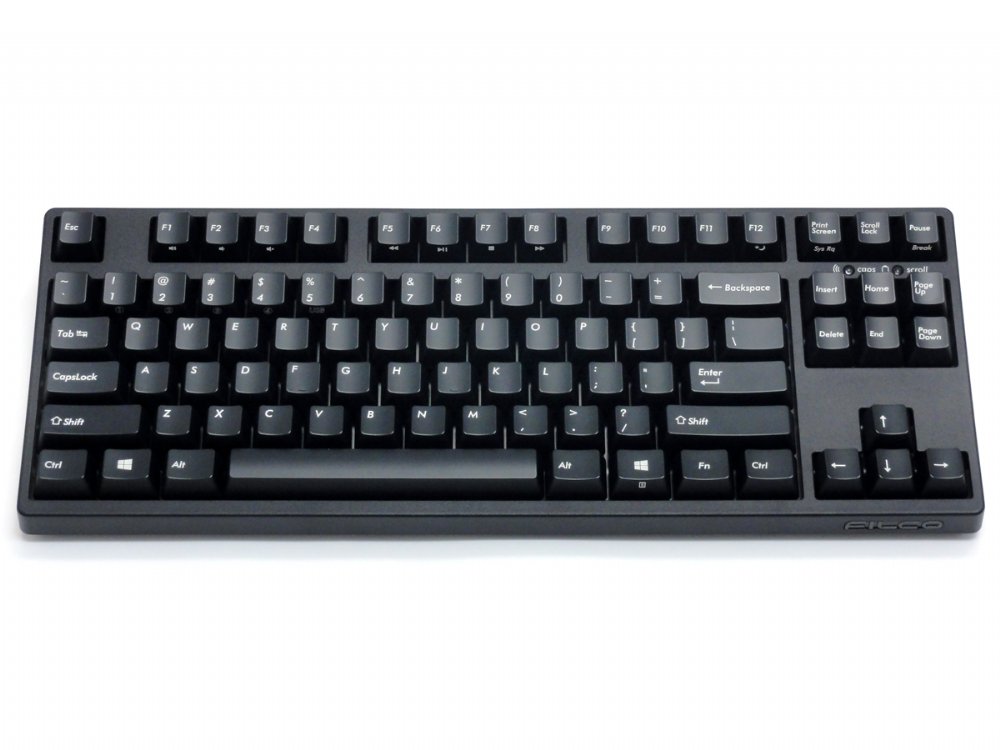
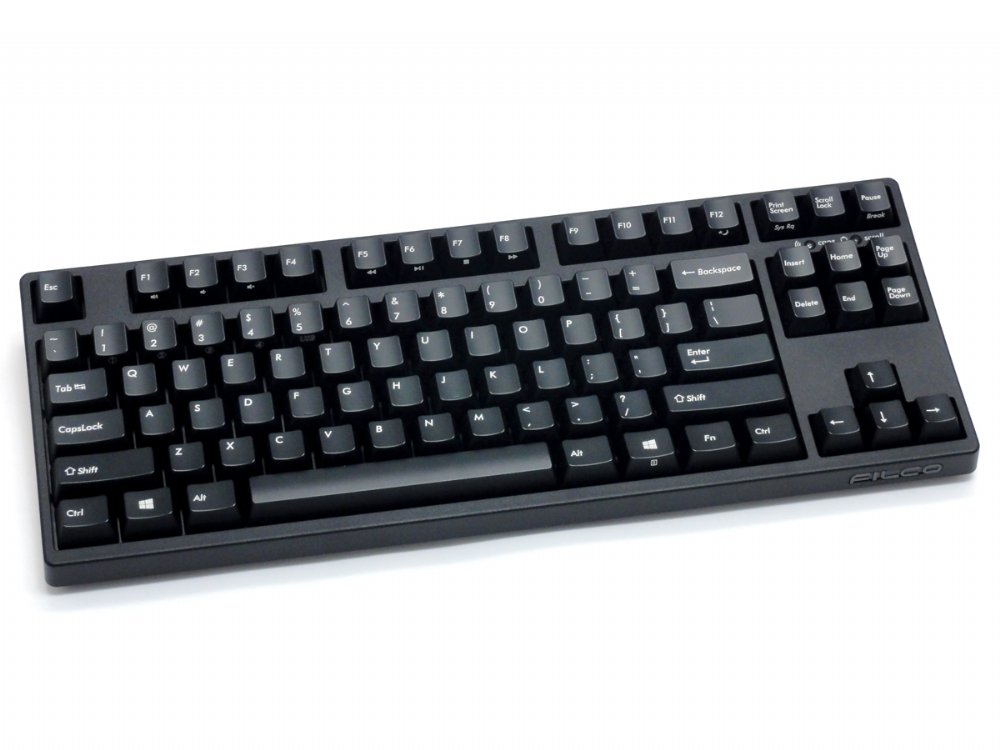
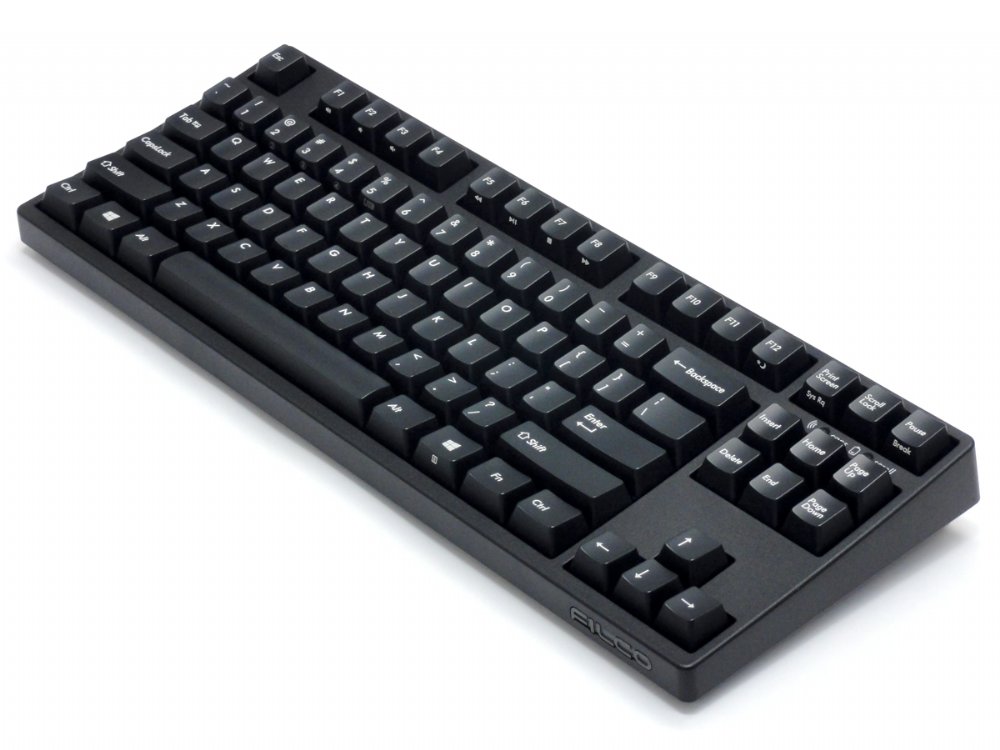
Filco Convertible 2 Tenkeyless Bluetooth Keyboards

£140.00 inc. VAT

Filco Convertible 2 Tenkeyless Bluetooth Keyboards

Platform PC
Brand Filco

95 reviews for Filco Convertible 2 Tenkeyless Bluetooth Keyboards

  1. Chris –

    Switch Type: CHERRY MX Brown   Layout: United Kingdom

    GB

    I am very happy with the Filco Convertible 2 Tenkeyless keyboard. Spending most of my working day on the keyboard or mouse, I wanted to make sure I was using devices that were ergonomically well designed, and also (if possible) a joy to use.
    Conventional keyboards with keypads are very wide. If you are right-handed, this means that the keyboard is off centre from your screen and chair, and also your mousing hand is unnaturally far to the right. Whilst I had gotten used to position for many years, I have realised for some time that it is far from ideal. Therefore, I decided to purchase a tenkeyless keyboard – and I thought, while at it, why not get a mechanical keyboard as well, to improve the experience of typing?
    The size of this tenkeyless keyboard is a great improvement over the conventional, and allows me to have the mouse in a comfortable position. Also, I am very happy with the mechanical switches. This is my first mechanical keyboard, and the Cherry Brown switches feel great – the activity of typing is now very tactile and satisfying.

  2. David Wootton –

    Switch Type: CHERRY MX Brown   Layout: United Kingdom

    GB

    Abolutely delighted my second Filco keyboard, and I would recommend to anyone. And the Keyboard Co are a pleasure to deal with.

  3. tom –

    Switch Type: CHERRY MX Blue   Layout: United Kingdom

    GB

    This is an excellent keyboard!

    – Build quality: The build quality is excellent, everything is well designed and well made. The keyboard legs are sturdy and the keys don’t wobble. In short, it is build to last.

    – Connectivity: The bluetooth works flawlessly. Nice to have a USB connection as well.

    – Typing experience: Initially I wasn’t sure what to make of the typing experience on these MX blue switches. The consequence of using a rubber dome keyboard for the last 15 years is that I invariably bottom out on my keystrokes. Bottoming out on MX blues means that your fingers absorb a lot of shock and I experienced some pain after prolonged periods. If you experience this, I would strongly recommend buying o-rings as it completely alleviates this problem.

  4. JP –

    Switch Type: CHERRY MX Brown   Layout: United Kingdom

    GB

    Excellent keyboard and extremely fast delivery.

    The feature I like best about this keyboard, and had not considered, is its weight. It’s heavy which may sound like a negative, but the stability it gives the keyboard on the desk it fantastic. I’ve now added good weight to the list of must have requirements for future keyboards.

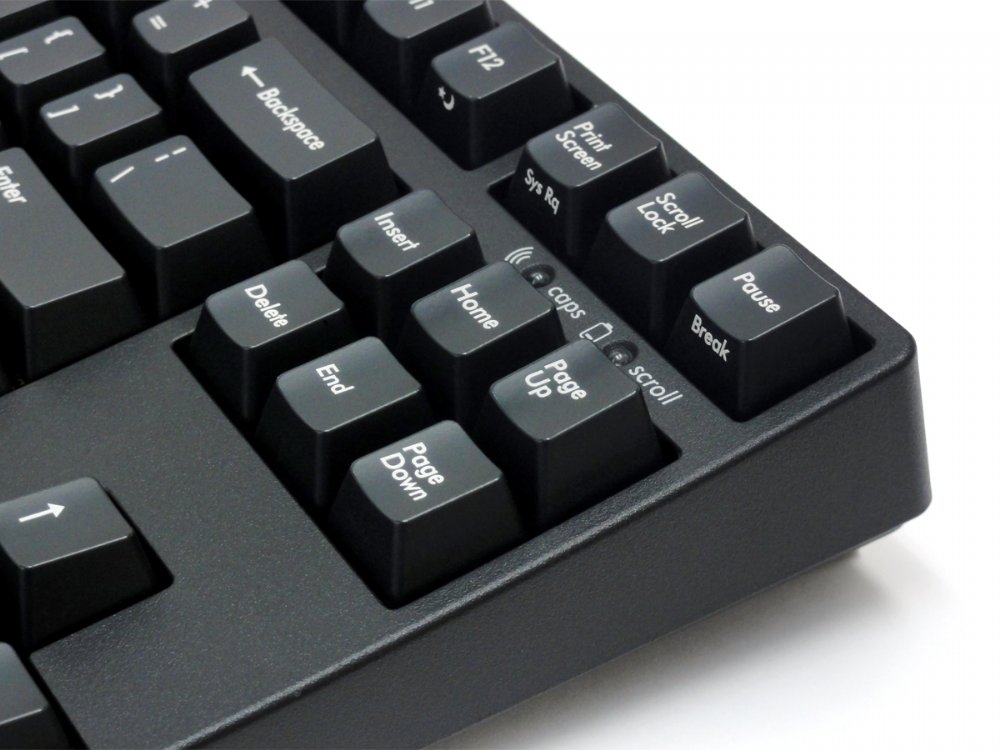
    The LED indicators are super bright … no accidental caps lock on.

    Weight of keys is perfect. The brown keys are quite loud, but I like the positive action.

    Selecting between four devices or wired USB is very easy.

    No hesitation recommending this product or keyboardco.com

  5. Shaun –

    Switch Type: CHERRY MX Silent Red   Layout: United Kingdom

    GB

    This thing is the best keyboard I have ever used, bar none. The option for Brown switches, instead of the more common Red is a welcome feature. I rarely use the wireless connectivity, but when I do it works excellently. Not much to say really, an extremely heavy for it’s size keyboard with absolutely no flex or rattle, unlike the half dozen competitors I tried. Would and have recommended to friends.

  6. KB –

    Switch Type: CHERRY MX Brown   Layout: United Kingdom

    GB

    I am using this keyboard for software development work from home and sharing work space with others in the house, so did not want something too loud.

    Based on just over a week’s usage, about 89 hours a day, I am very pleased with the purchase.

    The positives are –

    1. Soild build quality, heavy keyboard, no flex in the body.
    2. Stable keys, no rattle whatsoever while typing. Even the larger keys like spacebarbackspaceenter are reasonably stable and don’t rattle (much better than my experience with similarly priced Corsair)
    3. Rubber pads to keep keyboard stable on work surface
    4. Ten keyless size is compact and practical for my setup with limited space.
    5. Bluetooth connectivity works really well with no visible impact on performance in a busy work area with several other bluetooth devices. If the keyboard is left idle for a while it switches off bluetooth to save battery. On the first keystroke after going idle, it wakes up and pairs again without any problem.
    6. Good instructions in manual. I followed the the instructions for bluetooth pairing with Windows 10 without any hassle. It can pair with four different devices but I haven’t tried with with Mac or phone yet.
    7. Very pleasant typing experience. This is my first experience with a keyboard using Cherry brown tactile keys. I had previously been using an ancient Steelseries keyboard with Cherry black keys (linear, stiffer) so it took a while to get used to the feel of the tactile keys. But once there, it’s a superb experience.

    Negatives :
    1. A tad noisier than I would like and matters at the moment now as I am sharing workspace with others. I will try fitting O-rings to see if that makes a difference

    A note on Keyboard company performance —
    they have been absolutely brillant in handling my order in the midst of disruptions caused by Corona virus lockdown in UK.
    Staring from general information in the site, wide range of choices, to after sales follow up, everything had been flawless. I have recommended them to all my colleagues and will surely buy from here again.

  7. Skorp –

    Switch Type: CHERRY MX Blue   Layout: United Kingdom

    (i) What I love about the keyboard:
    1. The build is great. Rigid, heavy, firm, and stable. I have two full size Das Keyboards as well, but they never stay on the desk as firmly as this Filco TKL does.
    2. The form factor is prefect. It is simple, classic, has no extra edges (as e.g. some Cherry keyboards do) and fits perfectly on my desk between my other lots of stuff.
    3. The Bluetooth works great, and I can just occasionally plug the usb cable in or out, just to have some variety. I had a problem with freezing of the keyboard on a letter once in a while, but I realised that it is a problem with the intel Bluetooth driver in interaction with power settings. Now the problem is solved.
    4. The cherry MX Blue switches sound. No rivals. I type a lot and write a lot, and this is the heaven of a writer.

    (ii) What I like about the keyboard:
    1. The materiality of the frame. It is kind of a rugged plastic, and feels comfortable. Its not shiny or smooth therefore it doesnt show you the dust or finger prints.
    2. The rubber pads under the keyboard. There are nice rubber pads under the keyboard, both in the flat position and under the legsstands. Although I dont use the legs, but still a must have feature.
    3. The customising pins under the keyboard, which I havent used yet.
    4. The multi-device option. I have already connected it to my laptop, ipad and iphone. Switching and pairing the Bluetooth was an enigma at the beginning, but finding the tiny English part of the manual on page 20 by help of the KeyboardCo customer service helped a lot.

    (iii) What I dont like about the keyboard:
    1. Perhaps the only thing is the material of the keycaps. I think they are ABS (not sure). But the surface is too smooth and I dont like the touch. I am therefore replacing the key caps with Das Keyboard Caps which are more sandy. I am also using orings under the keys to reduce the base vibration effect. But that is just a matter of taste I guess.

  8. John –

    Switch Type: CHERRY MX Blue   Layout: United Kingdom

    GB

    Keyboard Heaven.

  9. David MV –

    Switch Type: CHERRY MX Silent Red   Layout: United Kingdom

    ES

    In summary: a very good piece of equipment.
    I won’t discuss the switches, as these come to personal preference, but I’ll just mention they are not (too) noisy which is great.
    My main requirement was Mac AND Bluetooth. Prior to this one, I tried a Logitech G915 which I returned as it clearly was not compatible, and a Drevo Calibur V2, but the lack of a dedicated f-row was not an option. So TKL is really my sweet spot.
    This Filco covers both points. The keyboard is reasonably compatible with a Mac, provided you use Karabiner-Elements to get the layout you need. The only hiccup is the fn key that is proprietary to the keyboard (afaik). The bluetooth connection is rock solid, not only with the Mac but also with an iPhone and an iPad Pro. It changes from one to the other very quickly.
    It is really heavy, and clearly very well built. The keys are precise (though I don’t like the colors, but that is en route to be fixed 😉

    The instructions are not very clear though, and you might need to try couple times. I don’t give it 4 stars for 2 main reasons:
    1. It needs AA batteries. For the price, I would have expected a rechargeable battery.
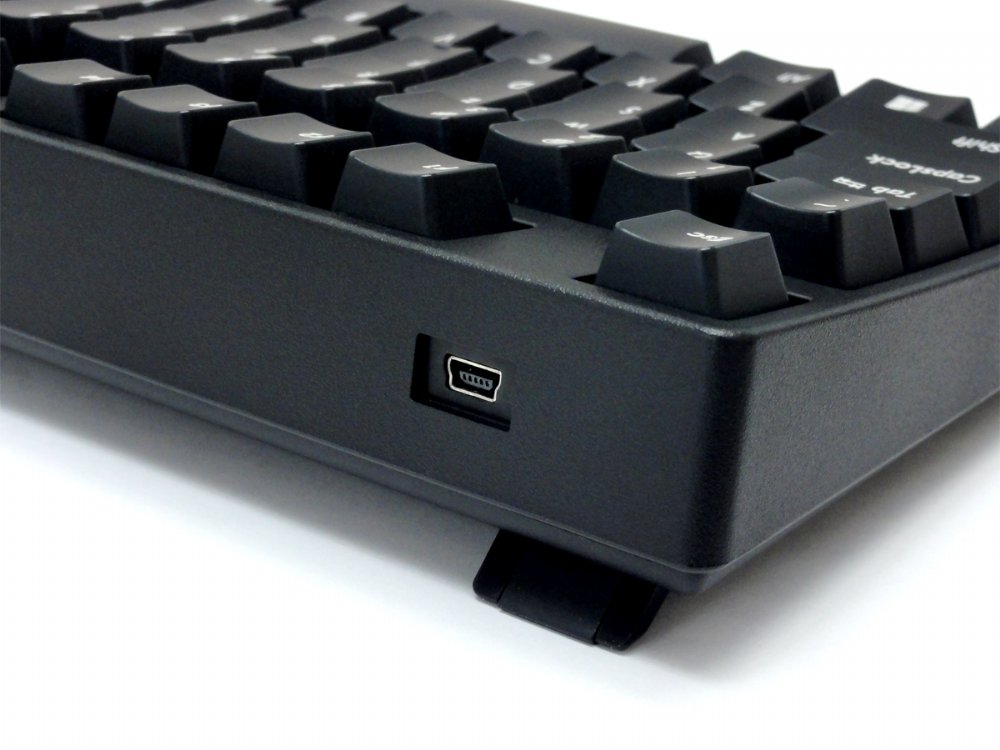
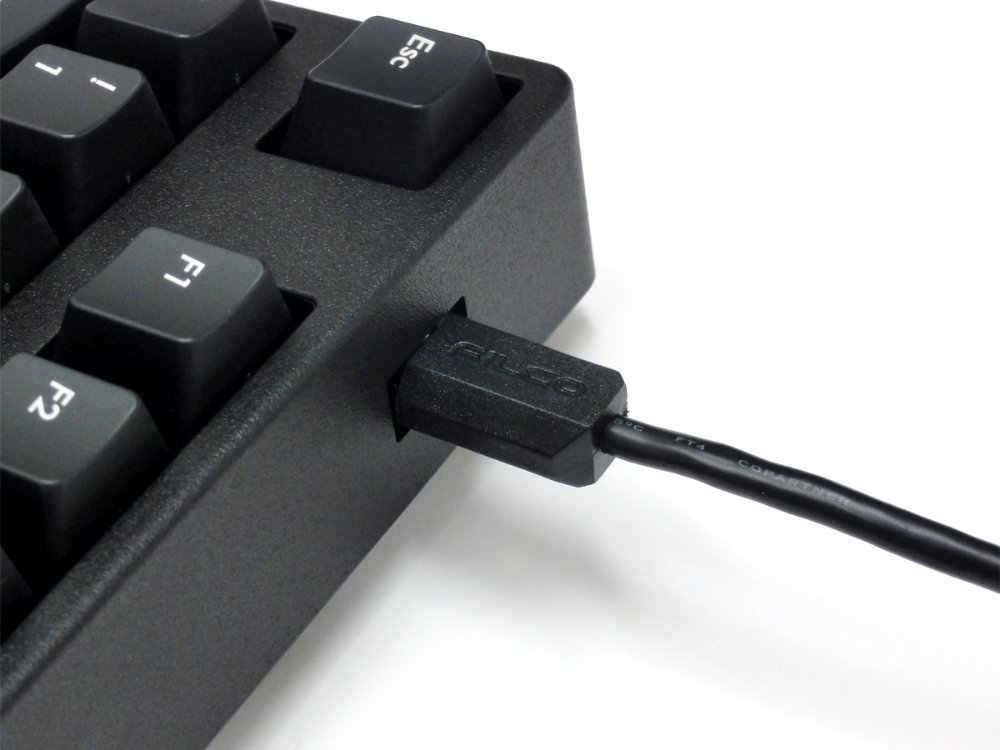
    2. It uses a mini-usb connection. Again, a usb-c would have been the correct choice.
    It IS expensive, but well worth the price in terms of build quality.

    As a side note, the Keyboard company has been perfect in terms of customer support and sales experience. Would definitely recommend and buy from them again.

  10. Matt A –

    Switch Type: CHERRY MX Blue   Layout: United Kingdom

    GB

    Lovely keyboard, exactly what I was after.

    Seems to be a bit slow reconnecting to Bluetooth in the morning (5-10s), but that’s possibly due to my adaptor.

  11. Anonymous –

    Switch Type: CHERRY MX Blue   Layout: USA

    GB

    The keyboard is great, wireless connectivity works really well (with Macbook). It seems really well constructed and weighty which stops it moving around the desk.

    The blue keys feel great, although my girlfriend does hate how loud they are. 5/5 would buy again.

  12. Matt C –

    Switch Type: CHERRY MX Blue   Layout: United Kingdom

    NL

    I bought this keyboard to have a more portable version of my full size Filco Majestouch 2 while I was working from home.

    The Convertible 2 has all of the hallmarks you expect from Filco – excellent build quality, great Cherry MX switches, and no frills. Both bluetooth and cable connectivity worked great out of the box, and the keyboard is very quick to wake from sleep or switch between devices with a key combo, when you are using bluetooth.

    Very, very happy with my purchase.

  13. Ehsan –

    Switch Type: CHERRY MX Brown   Layout: USA

    IT

    This is by far the best mechanical keyboard Ive ever owned. I needed a second keyboard for work and I decided to go for Filco. I have used a Cooler Master quick fire XT with cherry brown switches for the past 5 years but I should admit that Filco is much superior in terms of build quality. Its worth every penny!

    Id like to express my gratitude to the KeyboardCo which delivered the keyboard in under 24 hours from the UK to Italy. Great keyboard and a great purchase experience!

  14. Simon –

    Switch Type: CHERRY MX Silent Red   Layout: United Kingdom

    GB

    Thought long and hard about spending this sort of money on a keyboard, and I think that it is a good investment. The keyboard action is smooth and quiet and the base is solid. Pairing was easy, once you worked out the meaning of the convoluted instructions, and I had no problem pairing with, or switching between, 2 computers and my phone. Good service from Keyboard Company, too.

  15. Robi_g –

    Switch Type: CHERRY MX Brown   Layout: USA

    GB

    I was sceptical over the ‘super stiff, last keyboard you’ll ever need’ that I was reading in reviews across the web, having been a victim of believing hype around keyboards before. But it’s 5 years since I last bought a mech’ board, and there aren’t the companies making them for £80 any more (so this is actually one of the cheaper boards from an established manufactuerer out there).
    The cheap chinese boards don’t come in MX Browns (or even Brown knock-offs) and they’re all covered in tacky RGB anyway, which is just wrong for a keyboard I’m using at work as well as home.
    So I thought I’d go for this as ‘what’s a few more quid over the non-bluetooth version when I’m spending this much anyway?’, and people have been raving about Filco for years on forums, so I thought it was at least unlikely to be awful.
    It arrived today, and I’m very pleasantly suprised. Despite using the same switches as my old Coolermaster, this board gives them a noticably more solid feel, with the texture on the casing living up to the feel of a board of this price. The board just doesn’t flex, and puts my 5yo Ducky board to shame in terms of build quality and refinement, even though they cost the same!
    Bluetooth pairing is reasonably quick, and switching between machines is easy and slick.
    I would knock half a star off for the USB mini-B connector, but in fairness I’m rarely going to use the board with a cable (and you can only rate in full stars). Micro-B, type-C, or even full-size USB B would have been better though.
    Also quirky are the ordering of the media volume keys, but I’ve got my mouse reprogrammed for that so it’s a non-issue for me.
    With the non-alphanum keycaps swapped for some blank, green PBT ones I had lying around, it looks mint too. Although out of the box it looks perfectly inoffensive.
    I finally realise why Filco has the reputation they do. I’ll see how the stock keycaps last, but you can get double-shot replacements at a reasonable price if they do turn out to fade.
    Very happy, with quick shipping from Keyboard Co as well.

  16. Danijel –

    Switch Type: CHERRY MX Brown   Layout: German

    DE

    Perfect. Danke.

  17. Dirk –

    Switch Type: CHERRY MX Brown   Layout: USA

    NL

    I ordered the keyboard with Cherry MX Brown switches. Delivery to the Netherlands took around a week (during the Christmas period). The packaging was damaged quite badly, but luckily the keyboard was fine.

    Now about the keyboard.

    What I like:
    – Solid build quality, no flex whatsoever and key-travel feels great.
    – Bluetooth connection works well (I had read some negative reviews on this topic). I have used this keyboard on an android phone, a Windows pc and a Linux (Ubuntu 19) pc. Connecting to all devices was easy and switching between them as well. I haven’t tried using the keyboard far away from a device it was connected to.
    – It works on two AA batteries when used wireless. I prefer regular batteries over built-in options since you can replace regular batteries (and find them everywhere).
    – The keyboard does not make a lot of noise. I have used other keyboards with the same switches that were way louder.
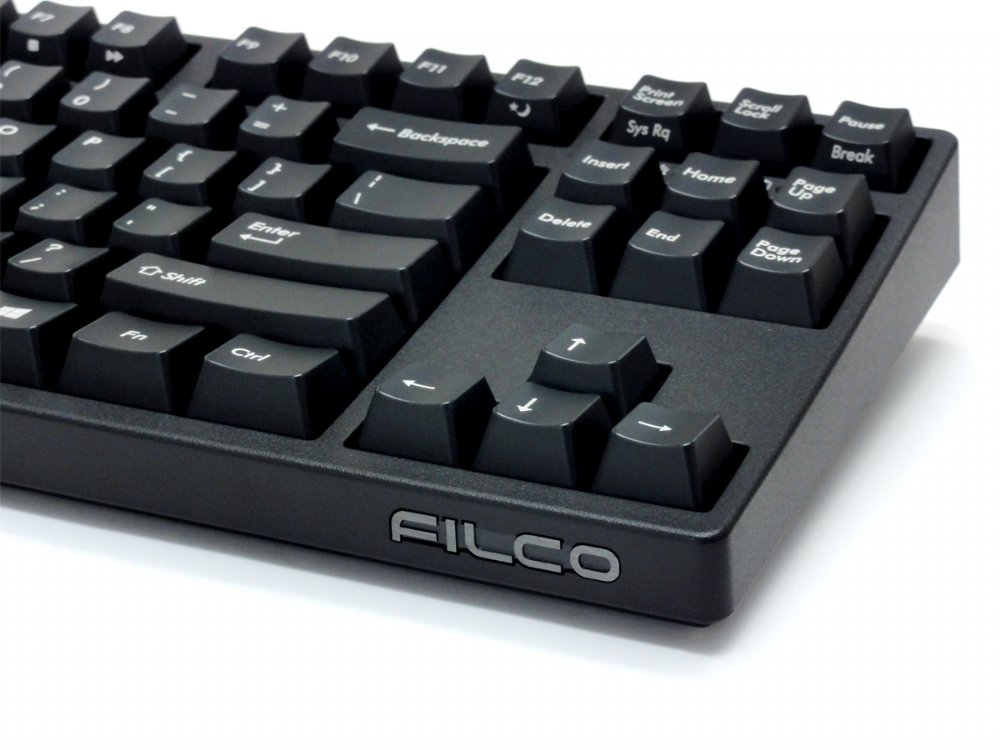
    – Clean, sober design without any lighting or strange shapes or massive logos (the TKL version only has the Filco logo on the front-facing side (under the arrow keys) and its not too notable.

    What I dont like:
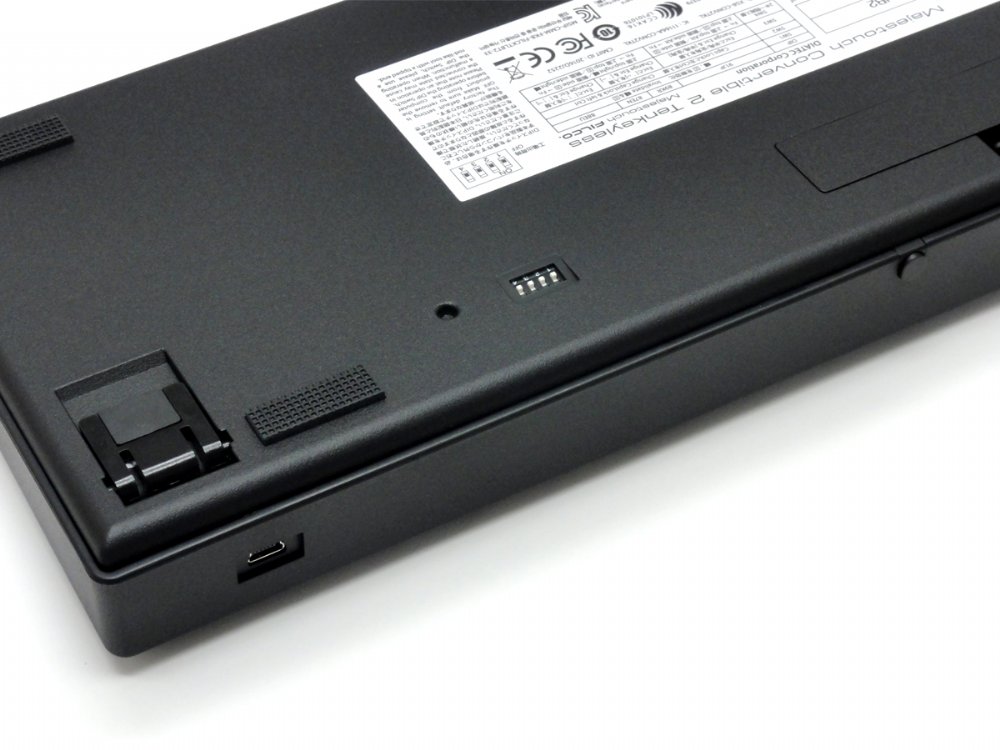
    – The keyboard is not programmable with the built-in controller chip. You do have some settings on the bottom for changing the Ctrl and CapsLock key, Esc and `, and an option to disable the Windows-key, which can be useful for people who game. I would have liked to be able to reprogram all keys.
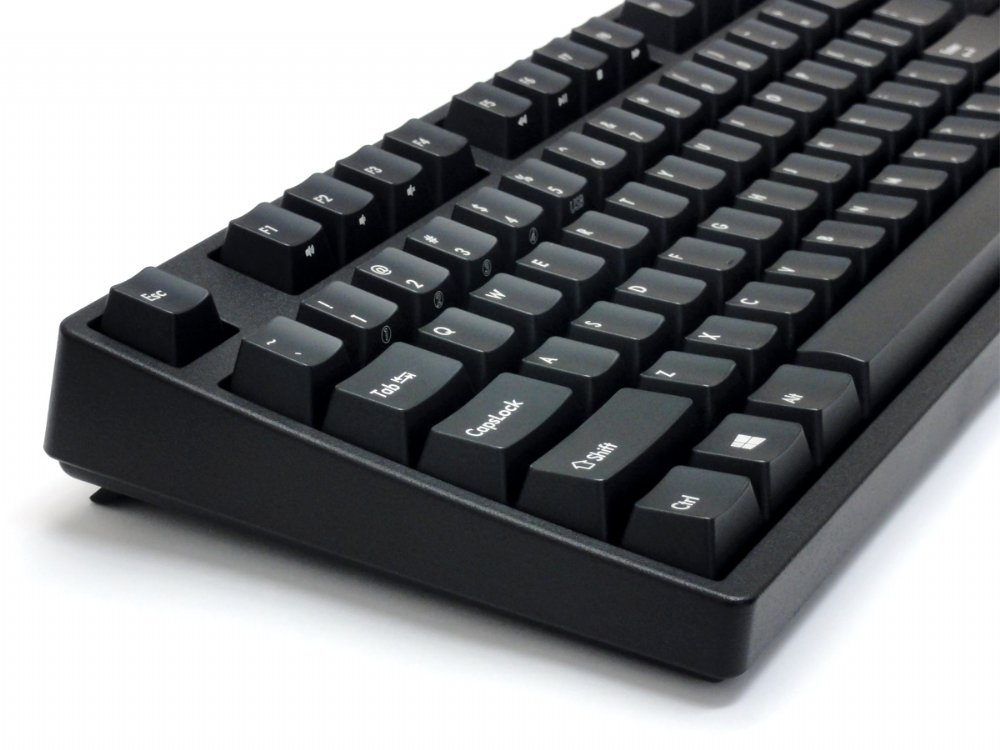
    – The quality of the keycaps is really poor: really thin ABS (not double shot). For this price I expect thick double shot PBT caps. Luckily you can replace them (of course, this will cost you).
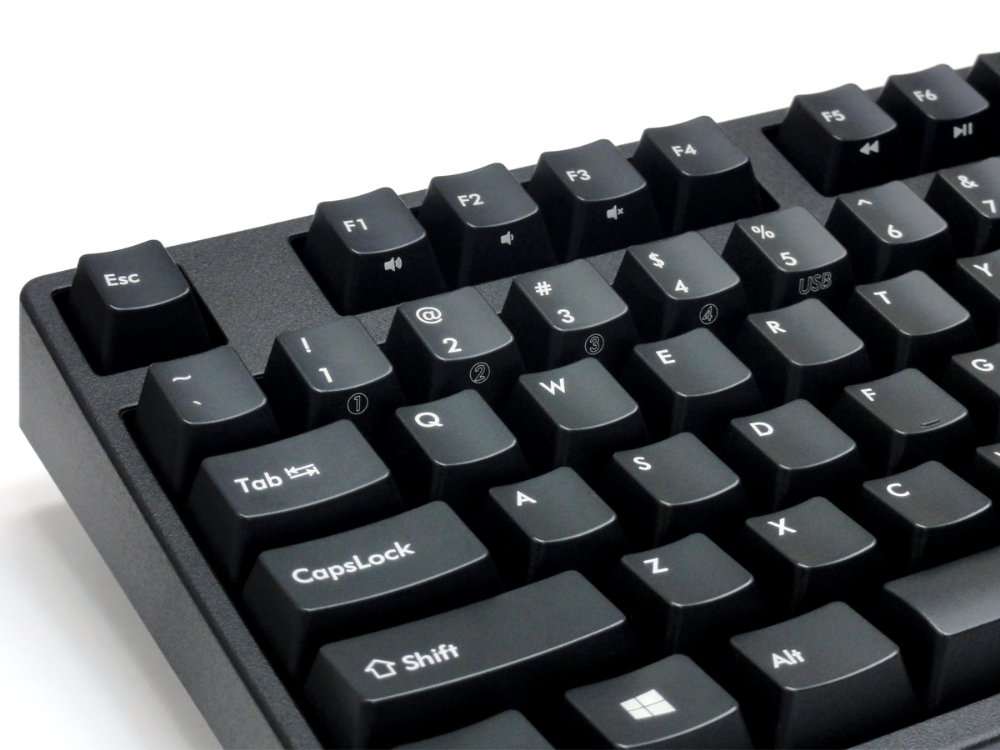
    – Media keys have a strange placement. F1 is also volume up, F2 volume down and F3 is mute. In my view this is the wrong way around. Now if reprogramming was possible I would have just changed this, but now I will just have to live with in. Another option is to use keymapping software, but I would then have to run this on all devices I use the keyboard with.

    In conclusion, the keyboard is good, but there is room for improvement. I will get new keycaps and look for a controller chip replacement. Overall though, I am quite satisfied with the keyboard as is.

  18. Ruggero –

    Switch Type: CHERRY MX Blue   Layout: USA

    GB

    I chose this keyboard after a long research. It is my first mechanical keyboard, so I cannot really have a clear idea of how it compares to others. These are my feelings:

    1. The keyboard gives the feeling of being incredibly solid, sturdy, heavy. It sits on top of my tabletop and doesn’t move a millimiter during typing. The build quality seems excellent. I read that some people do not like the keycaps, but again, I can’t really tell, I have no reference point.
    2. The switches are really nice to press, I love the way it feels under my fingers.
    3. The bluetooth interface works well, without lags. It is somewhat cumbersome to set up, but once you get used to it, it’s quite easy.
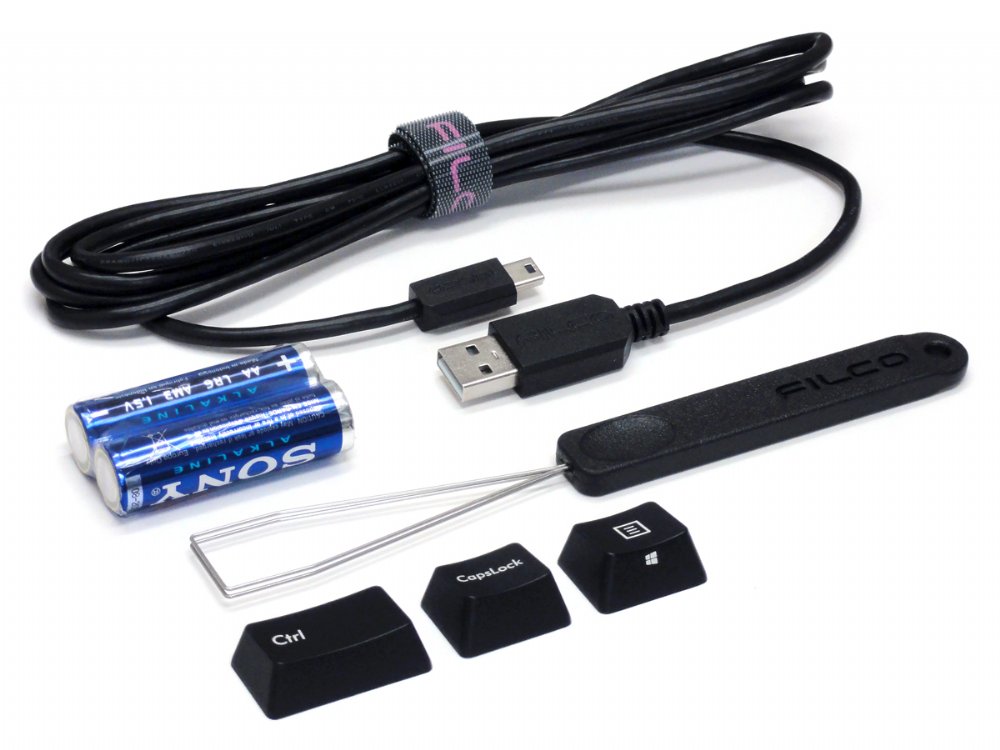
    4. I love the fact that they give you the possibility to switch Caps Lock and Ctrl, and even provide inverted keycaps for the purpose.

    All in all, it is a fantastic keyboard and I’m 100% satisfied with the purchase.

  19. Anonymous –

    Switch Type: CHERRY MX Brown   Layout: Swedish/Finnish

    EE

    Yess!
    It took me a lot of time to find my first mechanical keyboard. I was particularly searching for SWE layout and one in Europe.
    First of all I must say that I was surprised about the delivery time – it was super fast! When unpacking I discovered how elegantly beautiful this keyboard is. But it is not only about the looks. The build is heavy and sturdy there is a massive feel to it what I really love. The keys work neatly and I am itching to go back to office typing.
    I haven’t had the time to use it with all connections – but I am sure it one day will come handy.

  20. Anonymous –

    Switch Type: CHERRY MX Blue   Layout: United Kingdom

    GB

    I have has the wired version for a number of months and found it excellent for ergonomics and sound. Unfortunately that meant carrying it to and from work. This bluetooth (cable is optional and included) version makes taking it places easier, and clears desk clutter.

Only logged in customers who have purchased this product may leave a review.

95 reviews for Filco Convertible 2 Tenkeyless Bluetooth Keyboards

  1. Chris –

    Switch Type: CHERRY MX Brown   Layout: United Kingdom

    GB

    I am very happy with the Filco Convertible 2 Tenkeyless keyboard. Spending most of my working day on the keyboard or mouse, I wanted to make sure I was using devices that were ergonomically well designed, and also (if possible) a joy to use.
    Conventional keyboards with keypads are very wide. If you are right-handed, this means that the keyboard is off centre from your screen and chair, and also your mousing hand is unnaturally far to the right. Whilst I had gotten used to position for many years, I have realised for some time that it is far from ideal. Therefore, I decided to purchase a tenkeyless keyboard – and I thought, while at it, why not get a mechanical keyboard as well, to improve the experience of typing?
    The size of this tenkeyless keyboard is a great improvement over the conventional, and allows me to have the mouse in a comfortable position. Also, I am very happy with the mechanical switches. This is my first mechanical keyboard, and the Cherry Brown switches feel great – the activity of typing is now very tactile and satisfying.

  2. David Wootton –

    Switch Type: CHERRY MX Brown   Layout: United Kingdom

    GB

    Abolutely delighted my second Filco keyboard, and I would recommend to anyone. And the Keyboard Co are a pleasure to deal with.

  3. tom –

    Switch Type: CHERRY MX Blue   Layout: United Kingdom

    GB

    This is an excellent keyboard!

    – Build quality: The build quality is excellent, everything is well designed and well made. The keyboard legs are sturdy and the keys don’t wobble. In short, it is build to last.

    – Connectivity: The bluetooth works flawlessly. Nice to have a USB connection as well.

    – Typing experience: Initially I wasn’t sure what to make of the typing experience on these MX blue switches. The consequence of using a rubber dome keyboard for the last 15 years is that I invariably bottom out on my keystrokes. Bottoming out on MX blues means that your fingers absorb a lot of shock and I experienced some pain after prolonged periods. If you experience this, I would strongly recommend buying o-rings as it completely alleviates this problem.

  4. JP –

    Switch Type: CHERRY MX Brown   Layout: United Kingdom

    GB

    Excellent keyboard and extremely fast delivery.

    The feature I like best about this keyboard, and had not considered, is its weight. It’s heavy which may sound like a negative, but the stability it gives the keyboard on the desk it fantastic. I’ve now added good weight to the list of must have requirements for future keyboards.

    The LED indicators are super bright … no accidental caps lock on.

    Weight of keys is perfect. The brown keys are quite loud, but I like the positive action.

    Selecting between four devices or wired USB is very easy.

    No hesitation recommending this product or keyboardco.com

  5. Shaun –

    Switch Type: CHERRY MX Silent Red   Layout: United Kingdom

    GB

    This thing is the best keyboard I have ever used, bar none. The option for Brown switches, instead of the more common Red is a welcome feature. I rarely use the wireless connectivity, but when I do it works excellently. Not much to say really, an extremely heavy for it’s size keyboard with absolutely no flex or rattle, unlike the half dozen competitors I tried. Would and have recommended to friends.

  6. KB –

    Switch Type: CHERRY MX Brown   Layout: United Kingdom

    GB

    I am using this keyboard for software development work from home and sharing work space with others in the house, so did not want something too loud.

    Based on just over a week’s usage, about 89 hours a day, I am very pleased with the purchase.

    The positives are –

    1. Soild build quality, heavy keyboard, no flex in the body.
    2. Stable keys, no rattle whatsoever while typing. Even the larger keys like spacebarbackspaceenter are reasonably stable and don’t rattle (much better than my experience with similarly priced Corsair)
    3. Rubber pads to keep keyboard stable on work surface
    4. Ten keyless size is compact and practical for my setup with limited space.
    5. Bluetooth connectivity works really well with no visible impact on performance in a busy work area with several other bluetooth devices. If the keyboard is left idle for a while it switches off bluetooth to save battery. On the first keystroke after going idle, it wakes up and pairs again without any problem.
    6. Good instructions in manual. I followed the the instructions for bluetooth pairing with Windows 10 without any hassle. It can pair with four different devices but I haven’t tried with with Mac or phone yet.
    7. Very pleasant typing experience. This is my first experience with a keyboard using Cherry brown tactile keys. I had previously been using an ancient Steelseries keyboard with Cherry black keys (linear, stiffer) so it took a while to get used to the feel of the tactile keys. But once there, it’s a superb experience.

    Negatives :
    1. A tad noisier than I would like and matters at the moment now as I am sharing workspace with others. I will try fitting O-rings to see if that makes a difference

    A note on Keyboard company performance —
    they have been absolutely brillant in handling my order in the midst of disruptions caused by Corona virus lockdown in UK.
    Staring from general information in the site, wide range of choices, to after sales follow up, everything had been flawless. I have recommended them to all my colleagues and will surely buy from here again.

  7. Skorp –

    Switch Type: CHERRY MX Blue   Layout: United Kingdom

    (i) What I love about the keyboard:
    1. The build is great. Rigid, heavy, firm, and stable. I have two full size Das Keyboards as well, but they never stay on the desk as firmly as this Filco TKL does.
    2. The form factor is prefect. It is simple, classic, has no extra edges (as e.g. some Cherry keyboards do) and fits perfectly on my desk between my other lots of stuff.
    3. The Bluetooth works great, and I can just occasionally plug the usb cable in or out, just to have some variety. I had a problem with freezing of the keyboard on a letter once in a while, but I realised that it is a problem with the intel Bluetooth driver in interaction with power settings. Now the problem is solved.
    4. The cherry MX Blue switches sound. No rivals. I type a lot and write a lot, and this is the heaven of a writer.

    (ii) What I like about the keyboard:
    1. The materiality of the frame. It is kind of a rugged plastic, and feels comfortable. Its not shiny or smooth therefore it doesnt show you the dust or finger prints.
    2. The rubber pads under the keyboard. There are nice rubber pads under the keyboard, both in the flat position and under the legsstands. Although I dont use the legs, but still a must have feature.
    3. The customising pins under the keyboard, which I havent used yet.
    4. The multi-device option. I have already connected it to my laptop, ipad and iphone. Switching and pairing the Bluetooth was an enigma at the beginning, but finding the tiny English part of the manual on page 20 by help of the KeyboardCo customer service helped a lot.

    (iii) What I dont like about the keyboard:
    1. Perhaps the only thing is the material of the keycaps. I think they are ABS (not sure). But the surface is too smooth and I dont like the touch. I am therefore replacing the key caps with Das Keyboard Caps which are more sandy. I am also using orings under the keys to reduce the base vibration effect. But that is just a matter of taste I guess.

  8. John –

    Switch Type: CHERRY MX Blue   Layout: United Kingdom

    GB

    Keyboard Heaven.

  9. David MV –

    Switch Type: CHERRY MX Silent Red   Layout: United Kingdom

    ES

    In summary: a very good piece of equipment.
    I won’t discuss the switches, as these come to personal preference, but I’ll just mention they are not (too) noisy which is great.
    My main requirement was Mac AND Bluetooth. Prior to this one, I tried a Logitech G915 which I returned as it clearly was not compatible, and a Drevo Calibur V2, but the lack of a dedicated f-row was not an option. So TKL is really my sweet spot.
    This Filco covers both points. The keyboard is reasonably compatible with a Mac, provided you use Karabiner-Elements to get the layout you need. The only hiccup is the fn key that is proprietary to the keyboard (afaik). The bluetooth connection is rock solid, not only with the Mac but also with an iPhone and an iPad Pro. It changes from one to the other very quickly.
    It is really heavy, and clearly very well built. The keys are precise (though I don’t like the colors, but that is en route to be fixed 😉

    The instructions are not very clear though, and you might need to try couple times. I don’t give it 4 stars for 2 main reasons:
    1. It needs AA batteries. For the price, I would have expected a rechargeable battery.
    2. It uses a mini-usb connection. Again, a usb-c would have been the correct choice.
    It IS expensive, but well worth the price in terms of build quality.

    As a side note, the Keyboard company has been perfect in terms of customer support and sales experience. Would definitely recommend and buy from them again.

  10. Matt A –

    Switch Type: CHERRY MX Blue   Layout: United Kingdom

    GB

    Lovely keyboard, exactly what I was after.

    Seems to be a bit slow reconnecting to Bluetooth in the morning (5-10s), but that’s possibly due to my adaptor.

  11. Anonymous –

    Switch Type: CHERRY MX Blue   Layout: USA

    GB

    The keyboard is great, wireless connectivity works really well (with Macbook). It seems really well constructed and weighty which stops it moving around the desk.

    The blue keys feel great, although my girlfriend does hate how loud they are. 5/5 would buy again.

  12. Matt C –

    Switch Type: CHERRY MX Blue   Layout: United Kingdom

    NL

    I bought this keyboard to have a more portable version of my full size Filco Majestouch 2 while I was working from home.

    The Convertible 2 has all of the hallmarks you expect from Filco – excellent build quality, great Cherry MX switches, and no frills. Both bluetooth and cable connectivity worked great out of the box, and the keyboard is very quick to wake from sleep or switch between devices with a key combo, when you are using bluetooth.

    Very, very happy with my purchase.

  13. Ehsan –

    Switch Type: CHERRY MX Brown   Layout: USA

    IT

    This is by far the best mechanical keyboard Ive ever owned. I needed a second keyboard for work and I decided to go for Filco. I have used a Cooler Master quick fire XT with cherry brown switches for the past 5 years but I should admit that Filco is much superior in terms of build quality. Its worth every penny!

    Id like to express my gratitude to the KeyboardCo which delivered the keyboard in under 24 hours from the UK to Italy. Great keyboard and a great purchase experience!

  14. Simon –

    Switch Type: CHERRY MX Silent Red   Layout: United Kingdom

    GB

    Thought long and hard about spending this sort of money on a keyboard, and I think that it is a good investment. The keyboard action is smooth and quiet and the base is solid. Pairing was easy, once you worked out the meaning of the convoluted instructions, and I had no problem pairing with, or switching between, 2 computers and my phone. Good service from Keyboard Company, too.

  15. Robi_g –

    Switch Type: CHERRY MX Brown   Layout: USA

    GB

    I was sceptical over the ‘super stiff, last keyboard you’ll ever need’ that I was reading in reviews across the web, having been a victim of believing hype around keyboards before. But it’s 5 years since I last bought a mech’ board, and there aren’t the companies making them for £80 any more (so this is actually one of the cheaper boards from an established manufactuerer out there).
    The cheap chinese boards don’t come in MX Browns (or even Brown knock-offs) and they’re all covered in tacky RGB anyway, which is just wrong for a keyboard I’m using at work as well as home.
    So I thought I’d go for this as ‘what’s a few more quid over the non-bluetooth version when I’m spending this much anyway?’, and people have been raving about Filco for years on forums, so I thought it was at least unlikely to be awful.
    It arrived today, and I’m very pleasantly suprised. Despite using the same switches as my old Coolermaster, this board gives them a noticably more solid feel, with the texture on the casing living up to the feel of a board of this price. The board just doesn’t flex, and puts my 5yo Ducky board to shame in terms of build quality and refinement, even though they cost the same!
    Bluetooth pairing is reasonably quick, and switching between machines is easy and slick.
    I would knock half a star off for the USB mini-B connector, but in fairness I’m rarely going to use the board with a cable (and you can only rate in full stars). Micro-B, type-C, or even full-size USB B would have been better though.
    Also quirky are the ordering of the media volume keys, but I’ve got my mouse reprogrammed for that so it’s a non-issue for me.
    With the non-alphanum keycaps swapped for some blank, green PBT ones I had lying around, it looks mint too. Although out of the box it looks perfectly inoffensive.
    I finally realise why Filco has the reputation they do. I’ll see how the stock keycaps last, but you can get double-shot replacements at a reasonable price if they do turn out to fade.
    Very happy, with quick shipping from Keyboard Co as well.

  16. Danijel –

    Switch Type: CHERRY MX Brown   Layout: German

    DE

    Perfect. Danke.

  17. Dirk –

    Switch Type: CHERRY MX Brown   Layout: USA

    NL

    I ordered the keyboard with Cherry MX Brown switches. Delivery to the Netherlands took around a week (during the Christmas period). The packaging was damaged quite badly, but luckily the keyboard was fine.

    Now about the keyboard.

    What I like:
    – Solid build quality, no flex whatsoever and key-travel feels great.
    – Bluetooth connection works well (I had read some negative reviews on this topic). I have used this keyboard on an android phone, a Windows pc and a Linux (Ubuntu 19) pc. Connecting to all devices was easy and switching between them as well. I haven’t tried using the keyboard far away from a device it was connected to.
    – It works on two AA batteries when used wireless. I prefer regular batteries over built-in options since you can replace regular batteries (and find them everywhere).
    – The keyboard does not make a lot of noise. I have used other keyboards with the same switches that were way louder.
    – Clean, sober design without any lighting or strange shapes or massive logos (the TKL version only has the Filco logo on the front-facing side (under the arrow keys) and its not too notable.

    What I dont like:
    – The keyboard is not programmable with the built-in controller chip. You do have some settings on the bottom for changing the Ctrl and CapsLock key, Esc and `, and an option to disable the Windows-key, which can be useful for people who game. I would have liked to be able to reprogram all keys.
    – The quality of the keycaps is really poor: really thin ABS (not double shot). For this price I expect thick double shot PBT caps. Luckily you can replace them (of course, this will cost you).
    – Media keys have a strange placement. F1 is also volume up, F2 volume down and F3 is mute. In my view this is the wrong way around. Now if reprogramming was possible I would have just changed this, but now I will just have to live with in. Another option is to use keymapping software, but I would then have to run this on all devices I use the keyboard with.

    In conclusion, the keyboard is good, but there is room for improvement. I will get new keycaps and look for a controller chip replacement. Overall though, I am quite satisfied with the keyboard as is.

  18. Ruggero –

    Switch Type: CHERRY MX Blue   Layout: USA

    GB

    I chose this keyboard after a long research. It is my first mechanical keyboard, so I cannot really have a clear idea of how it compares to others. These are my feelings:

    1. The keyboard gives the feeling of being incredibly solid, sturdy, heavy. It sits on top of my tabletop and doesn’t move a millimiter during typing. The build quality seems excellent. I read that some people do not like the keycaps, but again, I can’t really tell, I have no reference point.
    2. The switches are really nice to press, I love the way it feels under my fingers.
    3. The bluetooth interface works well, without lags. It is somewhat cumbersome to set up, but once you get used to it, it’s quite easy.
    4. I love the fact that they give you the possibility to switch Caps Lock and Ctrl, and even provide inverted keycaps for the purpose.

    All in all, it is a fantastic keyboard and I’m 100% satisfied with the purchase.

  19. Anonymous –

    Switch Type: CHERRY MX Brown   Layout: Swedish/Finnish

    EE

    Yess!
    It took me a lot of time to find my first mechanical keyboard. I was particularly searching for SWE layout and one in Europe.
    First of all I must say that I was surprised about the delivery time – it was super fast! When unpacking I discovered how elegantly beautiful this keyboard is. But it is not only about the looks. The build is heavy and sturdy there is a massive feel to it what I really love. The keys work neatly and I am itching to go back to office typing.
    I haven’t had the time to use it with all connections – but I am sure it one day will come handy.

  20. Anonymous –

    Switch Type: CHERRY MX Blue   Layout: United Kingdom

    GB

    I have has the wired version for a number of months and found it excellent for ergonomics and sound. Unfortunately that meant carrying it to and from work. This bluetooth (cable is optional and included) version makes taking it places easier, and clears desk clutter.

Only logged in customers who have purchased this product may leave a review.

Overview

The Convertible 2 Tenkeyless keyboard from master keyboard makers – Filco. This keyboard is ‘convertible’ from a USB wired keyboard to a Bluetooth wireless keyboard, and you don’t even need to unplug it from your PC. It combines the high quality typing feel of Cherry MX switches, steel mounted in a rock solid body all put together in a very slick package. These keyboards just make you want to type, now on all of your devices.

  • Switch between 5 different devices, 4 Bluetooth and 1 USB
  • Tactile feel, ergonomic click action (Brown switch)
  • Rear mounted DIP switch located at the base of the keyboard
    1. Lock Windows and Application keys
    2. Swap CapsLock and left Ctrl keys
    3. Swap Esc and [` ~] keys
    4. Swaps Fn with Windows/App key
  • Gold contacts
  • 4.0mm travel
  • 2.0mm actuation point
  • 55g ~ 2oz actuating force keyswitch
  • Switches tested to 50 million actuations

Average battery life is about 6 months based on 5 hours use a day, the keyboard can be used without batteries, powered by a USB charger or PC.

Includes: Keyboard, detachable cable, velcro cable tie, extra keys, keypuller, 2 x AA batteries, dust cover and manual

Bluetooth adaptor NOT included.

Customers also viewed these

Select your currency