
Keychron
Keychron K3v2 Bluetooth RGB Ultra-slim Aluminium Mac/PC 75% Keyboards
From £89.00 inc. VAT
Keychron K3v2 Bluetooth RGB Ultra-slim Aluminium Mac/PC 75% Keyboards
30 reviews for Keychron K3v2 Bluetooth RGB Ultra-slim Aluminium Mac/PC 75% Keyboards
Only logged in customers who have purchased this product may leave a review.




Overview
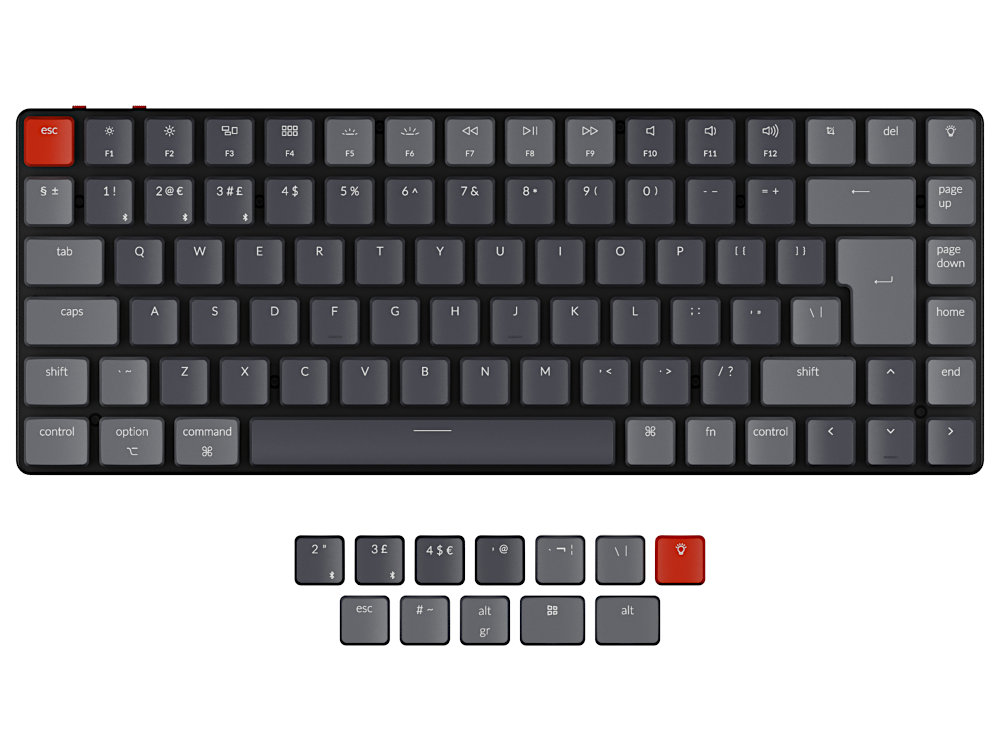
Keychron K3 Ultra-slim Wireless Bluetooth Mechanical Keyboard version 2 has included keycaps for both Windows and macOS, and users can hot-swap every switch with the Optical version.
WHAT’S NEW ON K3 VERSION 2
- Two level adjustable rubber feet
- Reinforced body structure
AN ULTRA-SLIM WIRELESS MECHANICAL KEYBOARD
Incorporating the world’s first hot-swappable low profile Optical switches to customize per-key typing experience with ease, together with all signature Keychron features.
FEATURES
WIRELESS AND WIRED
Connects via Bluetooth and switch among 3 Bluetooth devices easily and 1 wired device. Featuring Bluetooth 5.1 chipset, the K3 offers flawless connectivity whether you’re working at home or the office while connecting with your smartphone, laptop and iPad.
- Connects with up to 3 Bluetooth devices
- Broadcom Bluetooth 5.1
- USB Type-C connection
ULTRA-SLIM
The redesigned low profile switch is 40% slimmer than conventional switches. Together with the streamlined aluminum body makes the K3 one of the thinnest and most lightweight wireless mechanical keyboards in the world.
Compatible for both macOS and Windows. Keychron is one of only a few in the market that comes with a Mac multimedia keys layout for Mac enthusiasts. For Linux users, we also have a dedicated user group to help with the experience.
Two level adjustable rubber feet makes the new K3 more comfortable to type on.
HOT-SWAPPABLE
We all have our unique typing preferences, that’s why we went the extra mile to make the K3 the world’s first hot-swappable low profile Optical switch keyboard. We’ve implemented an MX-styled stem and stabilizers, and conducted numerous design iterations of the keyboard structure.
You can easily hot-swap every Optical switch to customize your typing experience on the K3 without soldering. *Hot-swappable feature is available for low profile Keychron Optical switch version only.
OPTICAL SWITCH
With the MX-styled stem housing and ultra-low latency, the low profile Keychron Optical switches are crafted for typists or gamers who want to type at lightning speed with a lifespan much greater than industry standards.
*Low profile Keychron Optical switch keyboard is not compatible with any conventional mx style mechanical switch.
- Light actuated
- 0.2ms Ultra-low latency
- 70 million keystroke lifespan
ALTERNATIVE KEYCAPS
We’ve spent over a year developing and implementing a MX-styled stem on both the low profile switches for the K3 as well as stabilizers on the big keys like the space bar, left Shift, backspace and Enter key.
It will improve reliability, deliver better typing experiences, and may potentially pave the way for other keycap manufacturers to launch alternative keycaps.
75% LAYOUT
Crafted for productivity, the K3’s 75% layout is a compact version of tenkeyless layout. It allows users access to all the essential multimedia and function keys, but with a smaller footprint.
18 TYPES OF RGB
Comes with various RGB backlight settings, you can adjust the keyboard brightness to sync with your mood.
Contents: Keyboard, USB-A to USB Type-C Cable, Keycap Puller, Switch Puller, User Manual
Customers also viewed these
Matias Quiet Pro Mac Keyboards
£138.00 inc. VAT
in stock
Details
Select options
This product has multiple variants. The options may be chosen on the product page
Standard Foreign Language Keyboards, Black, PS/2
£34.80 inc. VAT
in stock
Details
Select options
This product has multiple variants. The options may be chosen on the product page
Keychron K1 Max QMK 2.4G BT RGB Hot-Swap Ultra-slim Mac/PC Tenkeyless Keybo…
£109.99 inc. VAT
in stock
Details
Select options
This product has multiple variants. The options may be chosen on the product page
SEAL Pup Glow 2 All-In-One Waterproof Backlit Mini Touchpad Keyboard
£118.80 inc. VAT
Available on back-order
Ben –
Switch Type: Keychron Low Profile Optical Brown Layout: United Kingdom
Quite a change from the much-loved but very noisy Filco Majestouch boards I bought it to replace, but better suited to my post-PhD, typing-fast-but-not-touch-typing knackered hands, for two main reasons. First, with the brown Keychron switches and the slim profile there is less key travel and less reaching, but still a really nice precise feel. Second, though I miss the number pad, there is less desk space taken up to the right, and I have to reach less for my mouse.
I couldn’t care less about the RGB lights and haven’t done much testing with the Bluetooth connection, though it paired happily with two Linux laptops, so the early signs are good. I’ve used it mainly with a Windows laptop and a Linux desktop, using the USB cable. It’s precise and a good typing experience though the layout, particularly the location of the Pg Up, Pg Dn, Home, and End keys has taken me a short while to get used to.
The four-star rating is solely because of the bluetooth latency problem which another reviewer has referred to, whereby in the midst of some very fast typing the cursor freezes and then appears to get stuck, churning out hundreds and hundreds of whatever letter last registered with the USB receiver. This has only happened once – compared to the dozens of times it used to happen with the Filco Majestouch 2 – but it’s still bloody annoying when it does happen.
I haven’t had any difficulty with slow reconnections after the keyboard sleeps, as referred to by other reviewers, but this may yet be early days.
Overall, very happy with the board but it loses a star from the full 5 for the latency issue.
Joe –
Switch Type: Keychron Low Profile Optical Red Layout: United Kingdom
My keyboard arrived promptly and was well packaged. The price was cheaper than Amazon which is not often the case when shopping around for the best deal. Great communication throughout the purchase.
My Keychron K3 v2 is great. I use Ubuntu for my main OS so I had to do some googling to get it working as I wanted. Thats no reflection on The Keyboard Company.
I would 100% purchase from The Keyboard Company again.
Anonymous –
Switch Type: Keychron Low Profile Optical Red Layout: United Kingdom
Beautiful keyboard that has exceeded my expectations. It is the perfect keyboard. Right size, well crafted and the red switches are perfect for me. Feels lovely to type and very tactile. The provision for MacWindows with the extra keys and tool is very convenient too. The RGB lighting is an added bonus. It’s made to last a long time.
Customer Services (Helen) were extremely helpful throughout the process, even when there was a little hiccup with the incorrect item being sent out initially. This was a rare occurrence and everything was handled well and sorted out very swiftly. Exemplary customer service and a top company that I will definitely be purchasing from again.
Martin –
Switch Type: Keychron Low Profile Optical Brown Layout: United Kingdom
I’ve held off on this review for over a month so I can test those features that receive some criticism online. 5 stars for The Keyboard Company for prompt service and great packaging. The keyboard itself is wonderfully tactile and a joy to use. I don’t miss the numeric keypad. The Bluetooth is the reason I’m knocking one star off. It’s a little annoying at times. Can take a few seconds to connect after going to sleep. Sometimes a couple of seconds and sometimes a little longer. The time to go to sleep mode can be altered and (I believe) switched off. It’s a minor gripe. A more significant drawback is that after waking up from sleep mode the keyboard can generate the same letter multiple times on the screen due to some latencyconnection issues. This happens most days. Overall I’d recommend this keyboard as almost all of the time it performs well. I don’t use the cable (which would cure the Bluetooth performance issues). Charge lasts approximately 2 weeks when I use the keyboard around 6 hours per day. Good purchase overall. 🙂
Cynthia –
Switch Type: Keychron Low Profile Optical Red Layout: United Kingdom
I switched to the keychron k3 w red switches as I wanted a smaller, low profile keyboard, and one similar to the apple ones. Before the keychron I was using a Corsair k70 lux with brown switches, so it takes some getting used to as expected. I often misjudge where the arrow keys are.
I use it for my job as a software engineer on my windows laptop, and on a Mac after work. Its easy to change the keyboard settings with the switch on top. The rgb effects are cute as well. Overall really nice keyboard and fits my lifestyle.
PH –
Switch Type: Keychron Low Profile Optical Brown Layout: United Kingdom
I love the keyboard, it feels great to type on, and frees up a lot of space on the desk compared to the full size wired one I had before. There are loads of reviews which explain it far better than I ever could! However I’d like to say special thanks to KeyboardCo – I placed my order on Friday afternoon (sorry guys) and had it in my hands by Monday morning. If you look on the manufacturer’s website there are several complaints from people who have been waiting weeks. That’s too stressful! Without hesitation I would buy from Keyboard Co again.
Gary –
Switch Type: Keychron Low Profile Optical Red Layout: United Kingdom
Great keyboard has its own feel which is a mid way point between an apple key board and a standard mechanical keyboard. Quality packaging and product delivery and would recommend. Service great too, even with RM delivery issues.
Marc –
Switch Type: Keychron Low Profile Optical Red Layout: United Kingdom
Beautiful keyboard, lovely typing experience, very responsive. My first time using compact layout, but will get used to it time. Great communication from the Keyboard Co, with good order tracking info. Very happy! Recommend.
Alex –
Switch Type: Keychron Low Profile Optical Red Layout: United Kingdom
Excellent compact keyboard, it works exceedingly well for switching between use with my iPad, desktop pc and laptop. It takes a little getting used to the layout and size coming from full size keyboards but that’s to be expected. Overall I would highly recommend it.
Chris –
Switch Type: Keychron Low Profile Optical Brown Layout: United Kingdom
Really like this keyboard, feels great to type on and the Bluetooth connectivity and the spare keys provided allow for it to be set up for mac or windowsLinux.