
Keychron
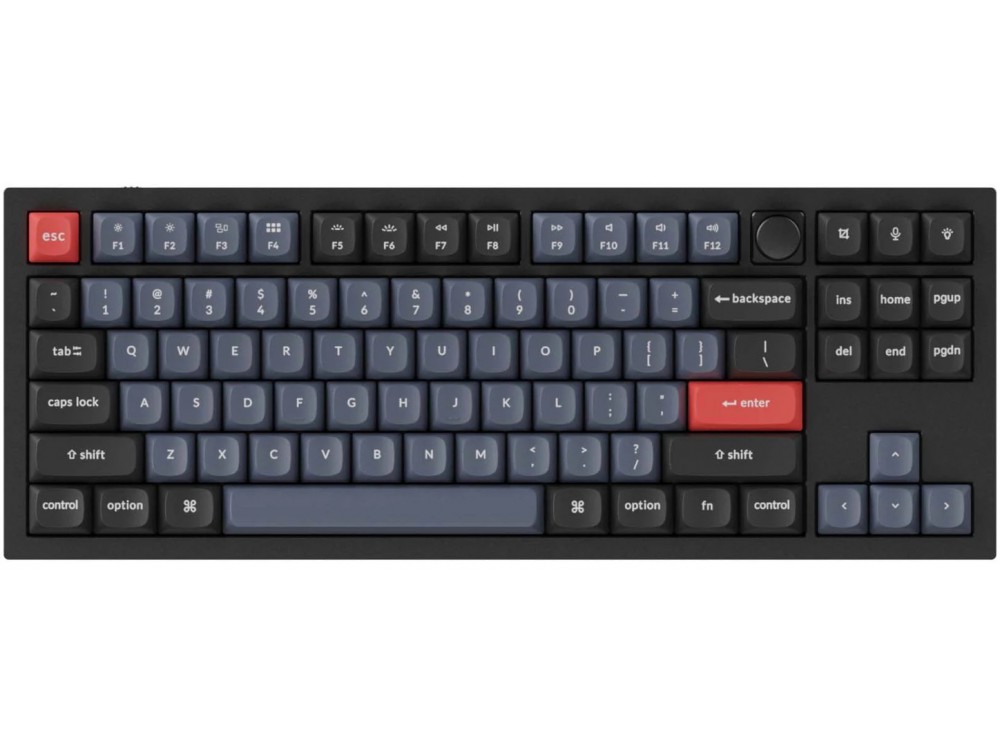
Keychron Q3 QMK RGB Aluminium Mac/PC Carbon Black Custom Keyboards with Knob
From £159.19 inc. VAT
Keychron Q3 QMK RGB Aluminium Mac/PC Carbon Black Custom Keyboards with Knob
8 reviews for Keychron Q3 QMK RGB Aluminium Mac/PC Carbon Black Custom Keyboards with Knob
Only logged in customers who have purchased this product may leave a review.




Overview
The Q3 is a fully customizable mechanical keyboard to push your typing experience to the top. With the classic tenkeyless layout, full aluminum CNC machined body, double-gasket design, and QMK/VIA support, the Q3 is designed for premium typing comfort and endless possibility.
Refined Metal Art
The entire metal body is crafted with 6063 aluminum that is CNC machined, polished, anodized, sandblasted, and undergoes 24 more manufacturing stages to make a solid piece of metal art on the desk that is the Q3.
All-Around Customizable Keyboard
To build a fully customizable keyboard, we designed every component easily assembled. Therefore, you can customize and adjust each component you want.
Double-Gasket Design
The Double Gasket Design is a new innovative structure in the industry. In addition to the gaskets on the plates, we added silicone pads between the top and bottom cases to significantly reduce the sound resonance between the metals and reduce the noise of the impacted metals. This design allows the keyboard to maintain the flexibility of the gasket structure and improves the overall typing sound.
Programmable Knob
Designed to enhance your creative workflow, the premium rotary encoder allows you to easily customize your favorite keys and macros on the knob through the VIA software.
You can easily customize the Q3’s knob to your desired key or macro commands such as: zooming in/out, adjusting screen brightness, brush size, volume, selecting video clips or photos, or backlight hue.
OSA Profile Double-shot PBT Keycaps
For the new double-shot PBT keycaps, we built a new profile. It has a similar height to the OEM profile and has an SA-like shape. We named it the OSA (OEM spherical angled) keycap. The PBT keycaps will provide excellent oil resistance, enhance the type feel, and prevent the legends from fading out.
Switch layouts between macOS & Windows
Built with the Mac users experience in mind while still retaining compatibility for Windows devices, the Keychron Q3 comes with a system toggle and an additional set of customized keycaps for both Windows and macOS systems. You can now save two different layouts on the keyboard, one for each system.
Program Q3 with QMK & VIA
With full QMK and VIA support, you can easily program and remap each key on the keyboard. The open-source firmware means endless possibilities for keyboard layouts, shortcuts, backlight effects, even the knob, and more. A brand new ultra-low-power Arm structure MCU which is powerful, and armed with 128K Flash will provide more flexibility for developers.
Get the Q3 keymap working on VIA
To get started, please follow these steps: download the appropriate keymap JSON file below, open VIA, turn on ‘Show Design tab’ on ‘Settings’ tab, drag the JSON file into the ‘Design’ tab on VIA to get the Q3 keymap working on VIA
Since the VIA code for the Q3 is still awaiting approval from Github, it is not yet automatically recognized, so you will need to manually download and enter the Q3 keymap.
Note: Only the right JSON file can be input, please find the right version keymap JSON file which matches your keyboard to download.
Hot-swappable
The hot-swappable sockets are mounted on the PCB, so you can install or change the switches without soldering. The PCB supports both 3 pin and 5 pin MX mechanical switches.
South-facing RGB LED Lights
The south-facing RGB LED is designed to better illuminate the keyboard backlight from the typist’s angle with the premium non-shine-through PBT keycaps installed. The south-facing RGB is also free from interference when the users install OEM or Cherry-profile alternative keycaps on the keyboard.
Note: The Q3’s top case has sharper corners to make it much more compatible with third-party keycaps.
All New Screw-In PCB Stabilizers
The screw-in design increases stability and makes it easier for changes and upgrades. Precise craftsmanship makes the stabilizers more stable and less shaky. The big keys (space bar, shift, enter, delete) typing experience is now more stable and smooth. The Keychron Q3 also supports third-party stabilizers, including Cherry or Durock.
ANSI & ISO Layouts
ISO layout is widely used in Europe while the ANSI layout is widely used by the rest of the world.
Note: If you live in Europe, we recommend you to purchase the ‘Barebone ISO’ version with the corresponding ISO keycaps. The ‘Barebone ISO’ is suitable for all ISO keyboard countries like the UK, Germany, France, Italy, Spain, Denmark, Norway, Sweden, Finland, Iceland, etc.
Includes
Keyboard Kit
(Without Keycaps or Switches)
- 1 x Aluminium Case
- 1 x PCB
- 1 x Steel Plate
- 1 x Sound Absorbing Foam
- 1 x Case Foam (Installed)
- 16 x Gaskets (10 Installed)
- 5 x Sets of Stabilizers
- 1 x Sets of Keycaps (Double-Shot PBT)
- 1 x Sets of Switches (Gateron G Pro)
Cable
- 1 x USB-C to USB-C Cable
- 1 x USB-A to USB-C Adaptor
Tools
- 1 x Switch Puller
- 1 x Keycap Puller
- 1 x Screwdriver
- 1 x Allen key
HDC –
Switch Type: Hot-swap Gateron Red Layout: United Kingdom
I bought the UK Keychron Q3 QMK mechanical keyboard with Red switches to replace a noisy old board. The Q3 is a really nice product. It’s much heavier than I was expecting to be honest (I think it weighs more than my laptop) but I don’t intend to take it travelling.
This was the first 10-keyless design I’ve tried, and I’ve quickly come to like it. Having the mouse closer to the main keyboard is great. The Red switches are very easy to type on and it makes a pleasant sound that is not going to annoy the neighbours. The UK model that I bought comes with a set of extra keys so I was able to customise it easily to fit my needs.
froggleston –
Switch Type: Hot-swap Gateron Brown Layout: United Kingdom
I previously got the Keychron K2 V2 as I wanted a more compact keyboard, and I was hoping I could get used to the layout of the Ins, Del and arrow keys tight up against the rest of the keys. After a year, I simply couldn’t get my muscle memory to work with it, so decided to go back to a more traditional layout, so went for the Q3. So far, it’s fantastic and the best of both worlds. The build quality is brilliant, and the weight is something else – needless to say it doesn’t move around my desk at all. The Gateron Browns were a nice change from the Reds, but there isn’t much in it as far as my general typing goes. The Q3 is lovely and quiet, and I’m very glad I made the swap over.
Keyboard Co were great as per my previous order, and it arrived on a Saturday delivery even though I ordered it fairly late with 2 day delivery on the Thursday. Awesome all round!
BJC –
Switch Type: Hot-swap Gateron Brown Layout: United Kingdom
I’ve had my Keychron Q3, with knob, and hot-swap Gateron brown keys for about 9 months. I’d been debating the purchase of a mechanical keyboard for a very long time – probably years. I’m a software engineer but not a touch typist. It was difficult to justify spending that much on a keyboard when the main issue was my typing ability, rather than the equipment. However, given how much time I spend with a keyboard, it made sense that it should be a good one.
The first choice was TKL or full size. I opted for TKL and it was the right option for me. While I occasionally miss the numeric keypad, its absence allows the mouse to be in a closer, more comfortable position.
The next choice was the keys. I work in a shared office and I didn’t want a noisy keyboard. I asked for advice from The Keyboard Company about potential noise issues and the difference with o-rings. Their response was encouraging about their engagement with customers. They thought noise wouldn’t be an issue, and suggested that there was no need for o-rings. I opted for the brown keys and for a pack of black (1.5mm) o-rings, to give me the choice. TKC were correct that the noise didn’t seem to bother my office companions, but my heavy typing caused a little too much noise for my taste. I’ve tried both without the o-rings but mostly with them; I prefer them fitted. A lighter typist, who doesn’t bottom out the keys, probably doesn’t need them.
I opted for the version with the knob, as I thought it was important to me. However, I don’t use the knob often. The location of the knob seems a little odd, in the middle of other keys. I think a more natural location would be the top-right of the keyboard.
The keyboard arrived in a lovely box and was very nicely packed. It was a pleasant experience to open for the first time. I also use the box if I’m moving the keyboard between locations. The keyboard is very substantial, with real weight to it – it feels like an item of value. It certainly doesn’t move on the desk! The weight does mean that I wouldn’t want to often be moving it to different locations.
I also opted for the keyboard rest. It was rather expensive but it does look lovely. I haven’t used the keyboard without the rest, but the keyboard is quite tall so something is probably needed, if your typing style tends to rest your wrists on the desk.
Having been using it for many months, I have to be honest that I had been questioning whether it had been worthwhile. I then had cause to be using the standard keyboard that ships from a popular PC manufacturer (with a 4 letter name). Using such a keyboard was previously the norm for me, and that had been fine. However, after using the Keychron, it was awful to switch to this keyboard and a reminder of just what a pleasure the Keychron had become.
Did I need the keyboard? No. Is my typing improved? No, I don’t think so. Would I buy one again? Yes. The keyboard is such a pleasure to use, I don’t know why I waited so long.
Sean Parry –
Switch Type: Hot-swap Gateron Red Layout: United Kingdom
I bought Q3 keyboard as a nice looking 80% board to easily move it out of the way on my desk. However, little did I realise that this keyboard weighs around 3 or 4KG. It’s a beast. But that means it’s stable, it doesn’t flinch, and that equates to an excellent key press.
The build quality and materials are so robust it will easily out last you. You will pass this keyboard onto grandchildren for sure.
The keycaps are lovely and smooth, the control knob is weighty and responsive (and clickable), and the RGB lighting is customisable enough to not be too distracting. And it comes with all the Mac and Windows keycaps that you’ll need – plus the tools as well. And whilst I’m here, the packaging is excellent as well.
Overall, an excellent keyboard.
Plus, great service from The Keyboard Company. There was a delivery mishap for me, but great comms and support from Helen and the keyboard arrived a few days later. Nothing to do with The Keyboard Company, but I was glad to see them so motivated to assist.
M D –
Switch Type: Hot-swap Gateron Brown Layout: United Kingdom
The only thing I’m considering changing on this board is the keycaps and that is for purely aesthetic reasons.
I’ve been very impressed with the quality of the board, it’s well machined, the switches are a delight and the sound it makes is lovely. Very pleased.
Mr. E –
Switch Type: Hot-swap Gateron Brown Layout: United Kingdom
A Rolls-Royce. Cherry Browns pale in comparison with these lubed Gateron pros and gee whizz what a sound! It’s marbles I’m sure. I’m quite enchanted by this acoustic, which I find suitable for a shared office. Try moving it – it’s cold to touch and it’s hefty! I’ve replaced the stock keycaps with some cherrys as I wasn’t enamoured with them but other than that I really feel like if I changed anything else on it I’d be degrading it – it’s just a marvel! Reliable, speedy delivery as ever from the Keyboard Company.
KW –
Switch Type: Hot-swap Gateron Red Layout: United Kingdom
Great service from the Keyboard Co,
The Q3 is competitively priced here with free, next-day delivery.
Lxxxs –
Switch Type: Hot-swap Gateron Red Layout: United Kingdom
Fast delivery, competitive pricing and it arrived in perfect condition.
The Q3 is probably the best sub £200 mechanical keyboard out of the box. I would definitely recommend this for anyone just getting into mechanical keyboards.