
Keychron
Keychron K2v2 Bluetooth RGB Backlit Aluminium Mac/PC Keyboards
From £84.00 inc. VAT
Keychron K2v2 Bluetooth RGB Backlit Aluminium Mac/PC Keyboards
136 reviews for Keychron K2v2 Bluetooth RGB Backlit Aluminium Mac/PC Keyboards
Only logged in customers who have purchased this product may leave a review.






Overview
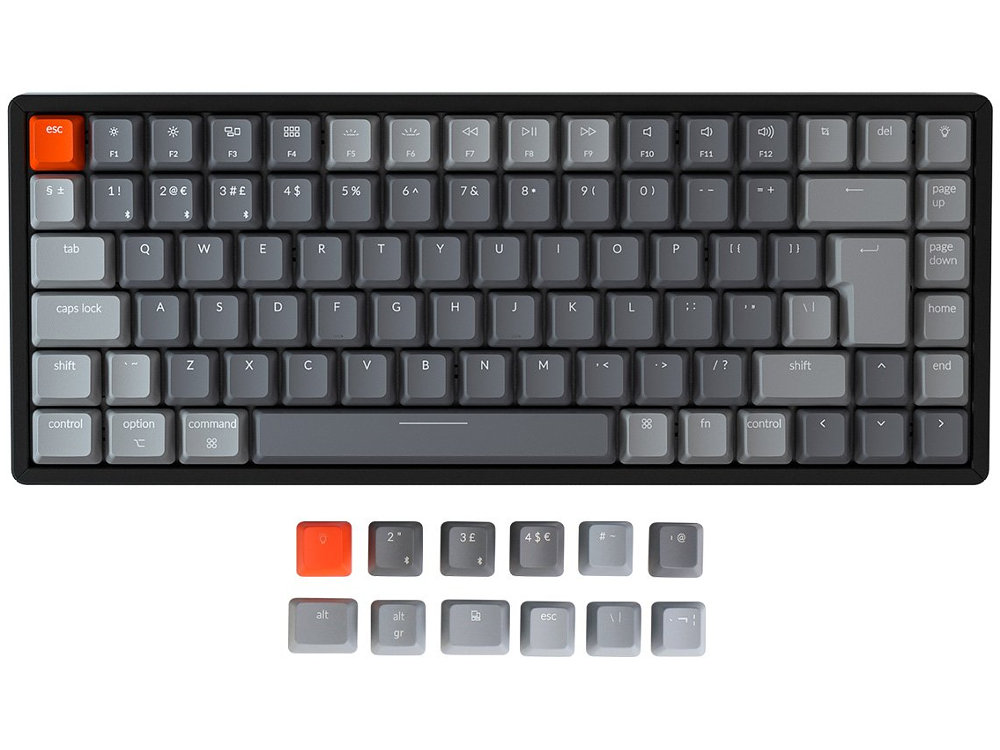
The Keychron K2 is a super Bluetooth or wired keyboard giving you all the keys and functions you need while keeping it compact and with one of the largest batteries seen in a mechanical keyboard.
Connect with your phone, laptop or iPad. Connect the keyboard wirelessly via Bluetooth with up to 3 devices, and switch between them with fn + 1, 2 or 3. You can also use the USB to type-C cable to connect the keyboard to your devices and/or charge the keyboard.
Tactile feel Gateron Brown switches with a lifespan of 50 million keystrokes and more.
Compatible with all operating systems from Mac to Android to Windows. K2 is one of the few mechanical keyboards featuring Mac layout media keys. It allows you to use all the same media keys as conventional macOS. Every K2 keyboard comes with specific keycaps for Mac and Windows, respectively.
K2’s 85 key design retains all the essential function keys like Page Up/Down, Home, End, and Screen capture (cmd+shift+4) which are important for your productivity. With N-key rollover (NKRO on wired mode only) you can register as many keys as you can press at once without missing out characters.
Designed to be a wireless mechanical keyboard that everyone would love to use in everyday work. The CNC processed streamline aluminum frame with curved profile keycaps creates an unbeatable feel and the 6 degree typing angle gives unrivaled comfort.
With 4000 mAh battery K2 has 25% more battery capacity than the Apple Magic keyboard, 2.7x more than the Logitech Craft Keyboard, 4x more than Hexgear’s X1 and two times more than the Keychron K1 Keyboard. This ensures that K2 lasts as long as it can with a single charge.
Engineered with more than 15 types of RGB light and comes with different styles (flashing, breathing, or static etc) which will match up to your mood. Simply press the light bulb key or fn + right arrow to achieve it.
- Switches: Gateron Brown tactile switches
- Backlit Types: 18
- Backlit: Adjustable 4-level RGB backlit
- System: Mac/iOS/Windows/Android
- Battery: 4000mAh Rechargeable li-polymer battery
- BT Working Time(RGB): Up to 10 hours (Lab test result may vary by actual use)
- Connection: Bluetooth and Type-C cable
- Bluetooth version: 3.0
- Top Case Material: Aircraft-grade aluminium
- Single-tone keycaps
- Single-tone keycaps
Customers also viewed these
Das Keyboard Prime 13 Backlit
£109.00 inc. VAT
in stock
Details
Select options
This product has multiple variants. The options may be chosen on the product page
Lucas S –
Switch Type: Hot-swap Gateron Brown Layout: United Kingdom
This is my first TKL mechanical keyboard, switching from a Logi G513. I chose hot-swappable brown switches in case I didn’t like the switches however, they are perfect for now. The switches aren’t too loud but also not too quiet.
I also chose the RGB backlight and find it rather dim compared to other keyboards. It can be difficult to tell whether caps lock is engaged or bluetooth is connected in sunlight. The backlighting is only really effective in a very dark environment. The caps lock light turning red isn’t enough so I have had to turn on a indicator within my OS.
The keyboard company has been very helpful with my purchase and provided a couple replacement keycaps for chipped keycaps that arrived with the keyboard.
Sourcing keycaps will be an issue if you are on UK ISO and K2 as it is such a unique size. I am happy with sticking to the Keychron keycaps but since it seems they are just painted I may look elsewhere for more keycaps.
The keyboard is very nice to type on and is a good size for portability and I’d recommend it to anyone wanting a good macOS mech keyboard.
Guido V. –
Switch Type: Hot-swap Gateron Red Layout: United Kingdom
The product is a pleasure to use. I bought the K2 keyboard (ISO) after the K6 (ANSI) because I realized that I’ve not the patience and the time to learn a new layout and I appreciate also the presence of the Delete key respect the K6.
Great service from Keyboard Co too!
Tony H –
Switch Type: Hot-swap Gateron Brown Layout: United Kingdom
This is my first mechanical keyboard and I’m very statisfied with the experience of ordering and with the quality of thekeyboard. It takes a little getting used to but it’s nothing a little time and practice won’t cure. As mentioned in previous reviews, the UK layout and 75% size makes sourcing replacement keycaps tricky but it’s not anything anyone should worry about out the box. The ABS caps on this keyboard are perfecrtly fine so you’ve got plenty of time to do LOTS of research online 🙂
L Juillet –
Switch Type: Gateron Red Layout: United Kingdom
Amazing product and quality. I have a wonderful keyboard with me for the next 4 years at least!
Anonymous –
Switch Type: Gateron Brown Layout: United Kingdom
Initial reactions from trying out my new Keychron K2-V2 computer keyboard from The Keyboard Company (modelRGB Backlit Tactile Aluminium):
Itll take a bit of getting used to, and its Gateron Brown switches are a little noisier than expected. Id envisaged the sound to be a tad more metallic than the distinctly plastic click-clack. However, thats OK.
Deskchair height is going to be fairly important when working for longer periods, because the keytops are up to 4cm taller than the keyboard on a MacBook.
Also the shortcuts seem to be different. My normal `command-` and `option-` key functions seem to have been swapped. But going into System Preferences, I can reverse that. No need to download Karabiner or anything. (I suppose I might, if I needed to do anything more exotic.) `control-` behaves itself, so thats fine. (UPDATE: I found that although the keyboard came with the Mac keyset installed, the switch on the left side of the keyboard was set to `WindowsAndroid`. So I have corrected that, and restored the `System Preferences Keyboard Modifier Keys` to their normal settings for the Keychron.)
The other lovely thing is that using `caps lock` to change the keyboard language layout (called Input Sources in System Preferences), which I think I remappped already for the standard keyboardit just works! I can toggle between UK English and whichever of my other language layouts I last used.
When I do want to type in upper case, the `caps lock` key backlights in red, nice and conspicuous.
I need to get used to having a `del` key again, rather than the clunky `fn-backspace` that Apple has forced me to use all these years, especially since the `fn` key is down below my right pinky rather than my left. And I now have `page up`, `page down`, `home`, and `end` keys. The first two are probably going to be the most useful.
Already, I find myself in touch typing mode again. I havent done this much for years with the MacBooks squidgy, low-profile buttons. They never provided enough tactile feedback for me to be sure of my finger placement. Nor is there sufficient travel in the Mac keys to avoid the occasional inadvertant multiple keypress. With the Keychron every press is individual.
And as I go further, Im finding the plasticky clack-clack of the keys surprisingly soothing. My partner will hate it, of course, so Ill need to keep the study door shut. Im glad I chose the Gateron Brown keyset rather than the louder Blues.
One other benefit from using the K2, or indeed any separate keyboard, is that my wrists dont brush the trackpad and trigger wild swoops of the cursor while Im typing. The number of times I have found myself inserting text in unexpected places!
This is not the first bluetooth keyboard I have tried. I also own a Logitch K380, which is slim, compact, portable, lightweight, and also connects to up to three devices. Its a nice piece of kit, but its big dawback lies in the somewhat cramped spacing of the keys. Theyre nicely shaped, and they dont leave me in the same doubt about where my fingers are as the MacBooks keyboard does. But I have large hands, so the full-size layout of the Keychron is a big deal. Its why I decided to take the plunge and upgrade.
So here we are, typing on one screen via Bluetooth while charging from a different computer on USB. Does this enter text into my code editor on machine 2?no. Nor does it when I flick the switch from `BT` to `Cable`. Maybe its an issue with settings. Im not going to go into it for now, because I need to get some work done soon.
But before I sign off, a few words about the fancier backlighting options. Im not a fan. What bugs me most is that its not clear what mode Im in until I type. If I inadvertently hit the backlighting key, going back to my preferred (boring) setting is a tedious, stop-start, hit-and-miss affair. In my opinion, the backlight key is in the wrong placesurely it is a less-used function. But its exactly where the more frequently used `del` key should be, right in the top right-hand corner.
The service from Keyboard Co? Very good. Kept me in touch, packaged well, and delivered on time. Id happily do business again.
Luca –
Switch Type: Hot-swap Gateron Brown Layout: United Kingdom
Great keyboard, the aluminum version is very solid.
David C –
Switch Type: Hot-swap Gateron Brown Layout: United Kingdom
A little context first: My previous keyboards have been a couple of Ducky One2Mini’s, a Leopold FC900R PD, a GMMK White Ice and a Filco Convertible.
I currently find this Keychron K2 Hotswappable Aluminium to tick all the boxes I need and otherwise the quality is pretty damn good. Build quality is excellent (especially considering the sub £100 price), the feature set is rich and the footprint is so much more compact than a TKL but with pretty much the same functionality.
I chose Gateron Brown switches and prefer them so much more than Cherry Browns, given the choice. Currently I have just swapped the Escape and the Enter keys to use Khail Box White switches 🙂
The only thing I would mention is that whilst visually pleasing and comfortable to type on, the keycaps are only standard shine through ABS plastic, not even double-shot ABS, however with what you are paying for this product such is to be expected. It’s still one of the most competitively priced boards around. Just be careful in sourcing an aftermarket keycap set as many of the keys are not standard size.
If it helps anyone, I am using a GMMK Compact sized wooden wrist rest that I already owned and this fits better than any of the TKLFull sized ones I had, and when centered is around 0.7cm shorter than each edge of the Keychron K2. It fits very well.
Robbie –
Switch Type: Gateron Red Layout: United Kingdom
Fantastic Keyboard. My first mech keyboard and really impressed with the quality and ease of set up
Anonymous –
Switch Type: Hot-swap Gateron Red Layout: United Kingdom
The product is a pleasure to use and to look at. Great service from Keyboard Co too.
Michael –
Switch Type: Hot-swap Gateron Brown Layout: United Kingdom
Amazing keyboard! Great quality nothing compared to my previous gaming mech keyboards.
Anonymous –
Switch Type: Gateron Blue Layout: USA
In general a very good keyboard.
I would rate the quality of the build a tad bit inferior and personally I find the Gateron Blues a bit more thunk-sounding compared to Cherry MX Blue.
That being said, the keyboard is coming with *tons* of functionality, Also be aware the firmware is not open source.
Z –
Switch Type: Gateron Brown Layout: United Kingdom
Love the swift service Keyboardco provided, and the product is excellent, fulfilling all my requirements and needs for a keyboard.
ibid –
Switch Type: Gateron Brown Layout: United Kingdom
All the reviews are true: the keyboard is solid quality, minimal, perfect; the service is terrific.
Anonymous –
Switch Type: Gateron Brown Layout: United Kingdom
Excellent quality keyboard and great customer service.
The slightly larger format than a 60% keyboard with all the additional function keys, media keys and a full separate set of arrow keys make this extremely easy to use vs other 60% keyboards I’ve used in the past. The aluminium frame makes the keyboard feel very weighty and sturdy.
Gateron Brown switches are great with a relatively mild and smooth actuation bump compared to cherry browns. However, the only problem I have is that space, enter and backspace keys have a fair bit of keycap wobble. The stabilisers on these keys very clearly have too much lubricant within the mechanism which makes them feel quite mushy.
They keycaps are of great quality and the typing experience is excellent. Would highly recommend both the Keychron K2V2 and the KeyboardCo.
Lou –
Switch Type: Gateron Brown Layout: United Kingdom
Really love this keyboard. Nice form factor and also includes additional keys that most standard 60% keyboards remove.
Package included all the keys I needed to convert it from a mac layout to a pc one as well as a good quality key puller. Its also nice to find a good quality UK layout instead of a US one that most mech-keyboard companies make, though it makes it a pain to find proper uk key caps.
Biggest issues I can find with it is the annoying rgb back light controls to set up and that it forgets what I had it set at when I power it down. Though I just turn it off tbh so it isnt really an issue for me.
Anonymous –
Switch Type: Gateron Brown Layout: United Kingdom
Ive been looking for a mechanical keyboard for a while now, but found it hard to understand a lot of the associated jargon. I ended up buying from this site because of how clearly explained it is.
Shipping was very fast, and I have no doubt that any questions would have been answered just as speedily.
The keyboard itself is excellent, could not have been easier to set up and the light effects are so pretty. The aluminium frame means its still light without compromising quality, I have no doubts about being able to carry this in a bag (with a protective case, of course).
Anonymous –
Switch Type: Gateron Brown Layout: United Kingdom
So I have been tempted to join the world of mechanical keyboards for some time, probably mainly down to the amount of content on YouTube. Having watched a few reviews I took the plunge and went for the Keychron K2 as I wanted the Function keys for when I work in AutoCAD, otherwise I probably would have gone for the K6.
I am very happy with the look and build of the keyboard. It’s taking a bit of getting use to but that is because I have mainly been using laptop and low profile keyboards for the last few years. I may consider adding the wrist rest once I finalise my desk setup.
I elected to go for the aluminium frame and Gatron brown switches. I had no experience of mechanical switches but as I am quite a heavy typer I thought the extra actuation force would be the best to go with.
Pairing the keyboard with my laptop, iPad and Pixel was a breeze. I really like the fact I can have it linked to 3 different devices and can easily switch between them.
The service for Keyboard Company was great. Very quick processing, despatch and delivery of my order, you can’t ask for much more.
Anonymous –
Switch Type: Gateron Brown Layout: United Kingdom
Outstanding customer service and speed delivery!
The typing experience on keyboard is amazing. Comparing the low profile red switch keyboard I used by, the typing speed increase by 40 words per minutes. I would describe the feeling is between cherry brown and red with slightly tactile feedback and quieter than the brown. Personally, I am in favor of the PBT keycap, it might take some time to get use to default keycap. The is by far one of the best mechanical keyboard I have used! I will give it a five star if it is PBT keycap.
P –
Switch Type: Gateron Brown Layout: United Kingdom
I held off buying this for so long and shouldn’t have! The quality of this product is only surpassed by the customer service at Keyboard Co.
Everything about the K2 oozes class, from the packaging to the user experience. You do get what you pay for
Anonymous –
Switch Type: Gateron Brown Layout: United Kingdom
This is the second K2 I’ve bought from Keyboard Co, and the features it offers are pretty unique, having an ISO layout, Mac & Windows layout options (extra keycaps and toggle switch on the side), and it’s USB-C and Bluetooth as well!
The only slight downside for me is the choice of switches; the only tactile option is the Gateron Browns, which aren’t very tactile at all IMO. The hot swap option is only available in the US layout, which means changing the switches involves resoldering ~85 switches and voiding your warranty. The Aluminium version is also more of an aluminium frame around the edges of the keyboard, rather than a full alu base. Not surprising given the price, and the frame does add some weight to the thing, but the base is still hollow plastic.
Obviously none of that is Keyboard Co’s fault, and their service has always been impeccable. Fast dispatch, quick delivery, responsive and helpful customer service. Wouldn’t buy a keyboard from anywhere else!