4 reviews for UK Matias Wireless BT Aluminum Tenkeyless Mac Keyboard Space Grey
Rated 3 out of 5
Tushar –
After using this keyboard for a few days moving from an Apple keyboard, I was a little disappointed by the reactiveness of the keys. Granted it works, but quite often I will hit a key and it won’t actually trigger. Upon testing, hitting the bottom left of a key doesn’t trigger and I now quite often get missing letters. It needs a firmer press than an Apple keyboard. Also, there is more noise when typing and less soft padding when pressing keys. It could be my typing style and something I need to get used to. Originally, I struggled greatly moving to this large keyboard as the arrow keys are further away from the main keyboard. Something my muscle memory got used to eventually.
Rated 5 out of 5
J –
This keyboards works great! I switched from an external Apple Magic Keyboard to this one in order to control two Macs and an iPad with the same keyboard. It’s somewhat reminiscent of Apple laptop pre-butterfly mechanisms but is perhaps firmer requiring more actuation force, and typing definitely feels heavier than on Magic or butterfly mechanisms with more key travel. The function key controls for volume, expose, play etc are familiar are a great addition.
Excellent service from keyboardco as usual.
Rated 5 out of 5
Martin T –
If you need a good portable keyboard that’ll connect easily to several computers, you won’t go far wrong with one of these. Time will tell how good the battery life is but it’s easy to pair, and it works with PCs as well as Macs — if you hold down Control when pairing it turns the Command keys into Alt keys, and the Option keys into Windows keys. Unlike many Bluetooth keyboards it has a proper Caps Lock light as well.
Keys are a nice size and feel, and the action is good too. Slightly more tactile and less squishy than a 2013-era Macbook Pro Retina. Not better or worse, just different! Nicer than the newer butterfly keyboards though, in my opinion.
It fits nicely into the medium size suede effect keyboard bag.
I did notice one thing. Unlike some other Bluetooth keyboards I’ve used (Apple, Filco and Logitech) it doesn’t ask you to enter a code when pairing. It does generate a new link key each time it’s paired though, which is better than it using the same key every time.
If you were worried about privacy you might want to do your pairing well away from any other Bluetooth devices, but if you were that worried you probably wouldn’t be using a Bluetooth keyboard anyway.
Apart from that, it’s a very nice keyboard. If a Filco Convertible is great for putting in your suitcase, one of these is great for keeping in your carry-on bag. And that’s where this one will be.
Rated 5 out of 5
Chris R –
Fast efficient service from keyboardco.
The keyboard itself is very similar to the apple wired keyboard, the keys are more clicky both in feel and noise, its a nice keyboard to type on. The bluetooth works as advertised and is both reliable and consistent. The keyboard doesn’t sleep and drop the connection, it maintains a connection with the current device and immediately closes the connection with the previous device. The connection switching time is about 2-3 seconds and the keyboard does not buffer keypresses during the switch. It would be nice if it could maintain more than one connection (atleast for a while) to speed up the switching but it doesn’t take long to get used to the timing.
Only logged in customers who have purchased this product may leave a review.
4 reviews for UK Matias Wireless BT Aluminum Tenkeyless Mac Keyboard Space Grey
Rated 3 out of 5
Tushar –
After using this keyboard for a few days moving from an Apple keyboard, I was a little disappointed by the reactiveness of the keys. Granted it works, but quite often I will hit a key and it won’t actually trigger. Upon testing, hitting the bottom left of a key doesn’t trigger and I now quite often get missing letters. It needs a firmer press than an Apple keyboard. Also, there is more noise when typing and less soft padding when pressing keys. It could be my typing style and something I need to get used to. Originally, I struggled greatly moving to this large keyboard as the arrow keys are further away from the main keyboard. Something my muscle memory got used to eventually.
Rated 5 out of 5
J –
This keyboards works great! I switched from an external Apple Magic Keyboard to this one in order to control two Macs and an iPad with the same keyboard. It’s somewhat reminiscent of Apple laptop pre-butterfly mechanisms but is perhaps firmer requiring more actuation force, and typing definitely feels heavier than on Magic or butterfly mechanisms with more key travel. The function key controls for volume, expose, play etc are familiar are a great addition.
Excellent service from keyboardco as usual.
Rated 5 out of 5
Martin T –
If you need a good portable keyboard that’ll connect easily to several computers, you won’t go far wrong with one of these. Time will tell how good the battery life is but it’s easy to pair, and it works with PCs as well as Macs — if you hold down Control when pairing it turns the Command keys into Alt keys, and the Option keys into Windows keys. Unlike many Bluetooth keyboards it has a proper Caps Lock light as well.
Keys are a nice size and feel, and the action is good too. Slightly more tactile and less squishy than a 2013-era Macbook Pro Retina. Not better or worse, just different! Nicer than the newer butterfly keyboards though, in my opinion.
It fits nicely into the medium size suede effect keyboard bag.
I did notice one thing. Unlike some other Bluetooth keyboards I’ve used (Apple, Filco and Logitech) it doesn’t ask you to enter a code when pairing. It does generate a new link key each time it’s paired though, which is better than it using the same key every time.
If you were worried about privacy you might want to do your pairing well away from any other Bluetooth devices, but if you were that worried you probably wouldn’t be using a Bluetooth keyboard anyway.
Apart from that, it’s a very nice keyboard. If a Filco Convertible is great for putting in your suitcase, one of these is great for keeping in your carry-on bag. And that’s where this one will be.
Rated 5 out of 5
Chris R –
Fast efficient service from keyboardco.
The keyboard itself is very similar to the apple wired keyboard, the keys are more clicky both in feel and noise, its a nice keyboard to type on. The bluetooth works as advertised and is both reliable and consistent. The keyboard doesn’t sleep and drop the connection, it maintains a connection with the current device and immediately closes the connection with the previous device. The connection switching time is about 2-3 seconds and the keyboard does not buffer keypresses during the switch. It would be nice if it could maintain more than one connection (atleast for a while) to speed up the switching but it doesn’t take long to get used to the timing.
Only logged in customers who have purchased this product may leave a review.
Overview
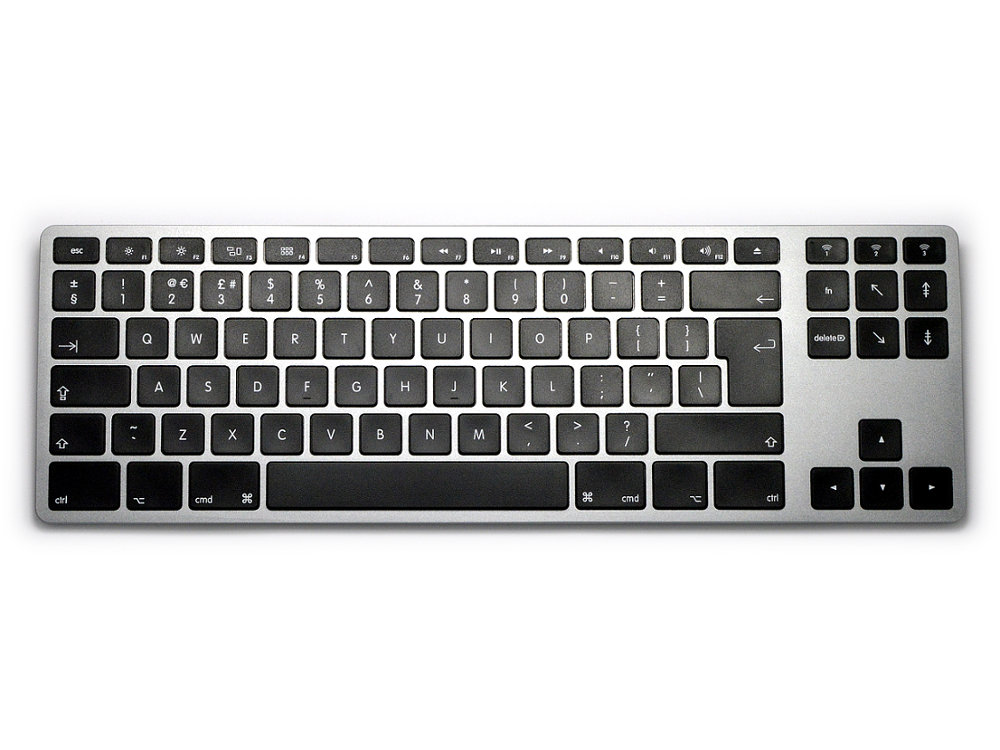
The ‘Matias Wireless Aluminum Tenkeyless Keyboard – Space Gray’ is a slim, aluminum, wireless (BT wireless) keyboard with a similar layout to the familiar Apple Wireless Keyboard. It has two features that enhance your experience compared to the regular Apple Wireless Keyboard:
It has a rechargeable battery with a typical battery life of 1 year before needing charging.
It has the ability to pair to three BT wireless devices at the same time, and easily switch between the three devices with the press of a button. Now you can use the same beautiful, great-feeling keyboard for your Mac, iPad, iPhone, Android, or PC; the keyboard even pairs with the optimal layout for each type of device, so when you switch between devices, the keyboard layout is what you expect.
To provide the best experiences, we use technologies like cookies to store and/or access device information. Consenting to these technologies will allow us to process data such as browsing behaviour or unique IDs on this site. Not consenting or withdrawing consent, may adversely affect certain features and functions.
Functional
Always active
The technical storage or access is strictly necessary for the legitimate purpose of enabling the use of a specific service explicitly requested by the subscriber or user, or for the sole purpose of carrying out the transmission of a communication over an electronic communications network.
Preferences
The technical storage or access is necessary for the legitimate purpose of storing preferences that are not requested by the subscriber or user.
Statistics
The technical storage or access that is used exclusively for statistical purposes.The technical storage or access that is used exclusively for anonymous statistical purposes. Without a subpoena, voluntary compliance on the part of your Internet Service Provider, or additional records from a third party, information stored or retrieved for this purpose alone cannot usually be used to identify you.
Marketing
The technical storage or access is required to create user profiles to send advertising, or to track the user on a website or across several websites for similar marketing purposes.
To provide the best experiences, we use technologies like cookies to store and/or access device information. Consenting to these technologies will allow us to process data such as browsing behaviour or unique IDs on this site. Not consenting or withdrawing consent, may adversely affect certain features and functions.
Functional
Always active
The technical storage or access is strictly necessary for the legitimate purpose of enabling the use of a specific service explicitly requested by the subscriber or user, or for the sole purpose of carrying out the transmission of a communication over an electronic communications network.
Preferences
The technical storage or access is necessary for the legitimate purpose of storing preferences that are not requested by the subscriber or user.
Statistics
The technical storage or access that is used exclusively for statistical purposes.The technical storage or access that is used exclusively for anonymous statistical purposes. Without a subpoena, voluntary compliance on the part of your Internet Service Provider, or additional records from a third party, information stored or retrieved for this purpose alone cannot usually be used to identify you.
Marketing
The technical storage or access is required to create user profiles to send advertising, or to track the user on a website or across several websites for similar marketing purposes.





Tushar –
After using this keyboard for a few days moving from an Apple keyboard, I was a little disappointed by the reactiveness of the keys. Granted it works, but quite often I will hit a key and it won’t actually trigger. Upon testing, hitting the bottom left of a key doesn’t trigger and I now quite often get missing letters. It needs a firmer press than an Apple keyboard. Also, there is more noise when typing and less soft padding when pressing keys. It could be my typing style and something I need to get used to. Originally, I struggled greatly moving to this large keyboard as the arrow keys are further away from the main keyboard. Something my muscle memory got used to eventually.
J –
This keyboards works great! I switched from an external Apple Magic Keyboard to this one in order to control two Macs and an iPad with the same keyboard. It’s somewhat reminiscent of Apple laptop pre-butterfly mechanisms but is perhaps firmer requiring more actuation force, and typing definitely feels heavier than on Magic or butterfly mechanisms with more key travel. The function key controls for volume, expose, play etc are familiar are a great addition.
Excellent service from keyboardco as usual.
Martin T –
If you need a good portable keyboard that’ll connect easily to several computers, you won’t go far wrong with one of these. Time will tell how good the battery life is but it’s easy to pair, and it works with PCs as well as Macs — if you hold down Control when pairing it turns the Command keys into Alt keys, and the Option keys into Windows keys. Unlike many Bluetooth keyboards it has a proper Caps Lock light as well.
Keys are a nice size and feel, and the action is good too. Slightly more tactile and less squishy than a 2013-era Macbook Pro Retina. Not better or worse, just different! Nicer than the newer butterfly keyboards though, in my opinion.
It fits nicely into the medium size suede effect keyboard bag.
I did notice one thing. Unlike some other Bluetooth keyboards I’ve used (Apple, Filco and Logitech) it doesn’t ask you to enter a code when pairing. It does generate a new link key each time it’s paired though, which is better than it using the same key every time.
If you were worried about privacy you might want to do your pairing well away from any other Bluetooth devices, but if you were that worried you probably wouldn’t be using a Bluetooth keyboard anyway.
Apart from that, it’s a very nice keyboard. If a Filco Convertible is great for putting in your suitcase, one of these is great for keeping in your carry-on bag. And that’s where this one will be.
Chris R –
Fast efficient service from keyboardco.
The keyboard itself is very similar to the apple wired keyboard, the keys are more clicky both in feel and noise, its a nice keyboard to type on. The bluetooth works as advertised and is both reliable and consistent. The keyboard doesn’t sleep and drop the connection, it maintains a connection with the current device and immediately closes the connection with the previous device. The connection switching time is about 2-3 seconds and the keyboard does not buffer keypresses during the switch. It would be nice if it could maintain more than one connection (atleast for a while) to speed up the switching but it doesn’t take long to get used to the timing.