







CHERRY MX 35 Switch Sets and Holder
From £20.00 inc. VAT
in stock
Details
Select options
This product has multiple variants. The options may be chosen on the product page
£139.00 inc. VAT
Das Keyboard 4 Professional for Mac
Only logged in customers who have purchased this product may leave a review.
The combination of tactile feel, the psycho-acoustic experience and incredible craftsmanship all deliver an excellent typing experience. With a Das Keyboard 4 for Mac, you’ll type faster and longer. It feels so good, you won’t want to stop.
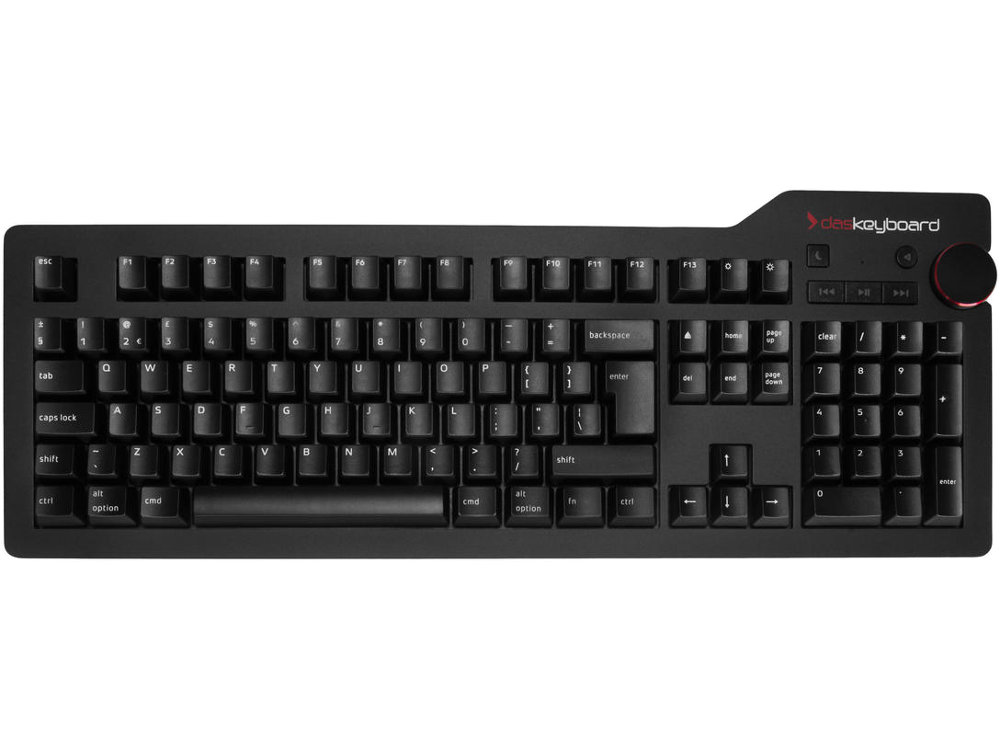
Das Keyboard 4 Professional for Mac mechanical keyboard is specifically designed for Mac compatibility. It’s made of the highest-quality materials and has a robust construction you can feel. All of our keyboards are designed with high-performance, gold-plated mechanical key switches lasting up to 50 million keystrokes. Give your Mac the keyboard it deserves.
The Cherry MX ‘brown’ key switch, gives a tactile feel without the audible click of the ‘blue’ switch, it has a long key stroke of 4mm with the actuation point (key press) at 2mm. Easy, fast and stress-free typing, the famous features of Cherry MX tactile feel.
With its large volume knob, Das Keyboard 4 for Mac allows users to quickly adjust volume while on a Skype call, in a Google hangout, or streaming online music. The Das Keyboard 4 for Mac also provides quick access to dedicated media controls such as mute, play, pause, next and previous track.
Be kind to the earth by putting your computer to sleep with the quick-access instant sleep button. Not only will you save energy, but by putting your computer to sleep, you save time and can be up and running much faster than if you shut down and restart.
Need to transfer videos to your workstation but don’t have time to wait all day for file transfers to complete? Don’t worry. Das Keyboard 4 for Mac has a blazing fast two-port USB 3.0 hub to transfer music, high resolution pictures and large videos at up to 5Gb per second. That’s 10 times faster than USB 2.0. It is backwards compatible with all USB 2.0/1.1 devices and hosts so previous peripheral investments are protected.
Programmers and fast typists will love to hear that Das Keyboard 4 for Mac supports full n-key rollover (NKRO) over USB. No need to use a PS/2 adapter anymore. Just press shift + mute to toggle NKRO. Full n-key rollover works with Windows, Linux, and Mac OS X.
In addition to standard Command and Alt/Option keys, Das Keyboard 4 Professional for Mac offers quick, convenient access to a number of other Mac specific key functions. The Das Keyboard 4 Professional for Mac makes it easy to toggle between screens, view your desktop along with other applications that you have open, and access your brightness controls all at the push of a button.
The Das Keyboard 4 Professional for Mac has UV hard coat-protected key caps to prevent fading. The UV hard coating, silk screened legends and new printing process allows for extra durable inscriptions. Das Keyboard’s key cap font has been designed to provide ease of reading. Das Keyboard’s font looks modern while keeping some of its lines from older, well established fonts. The overall result is sleek and easily readable while not drawing unnecessary attention.
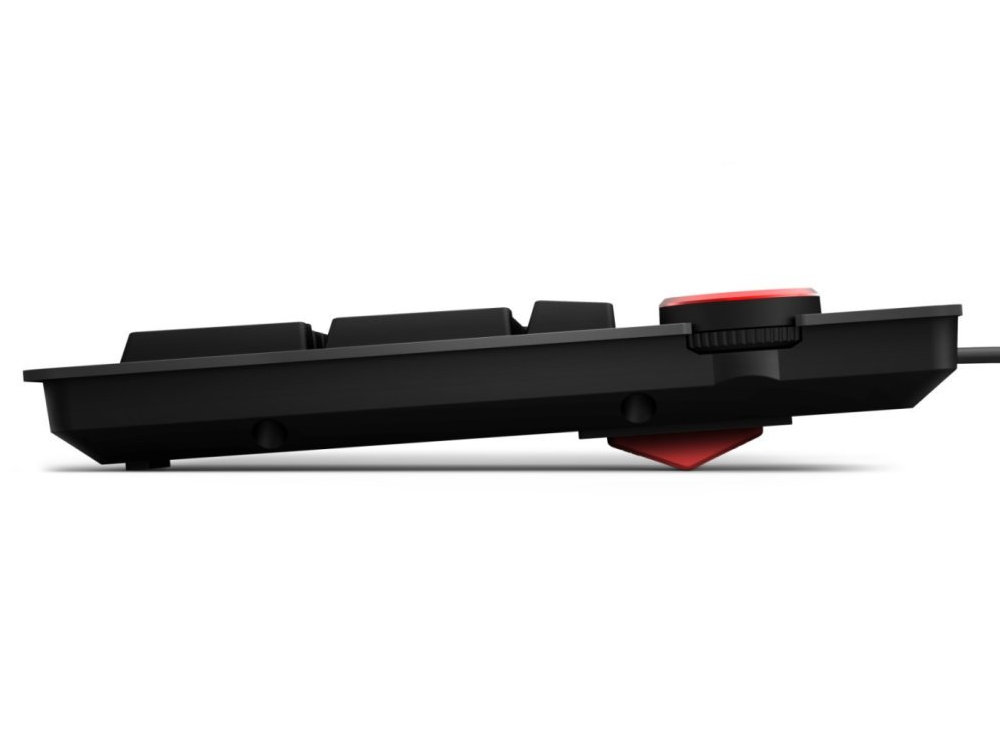
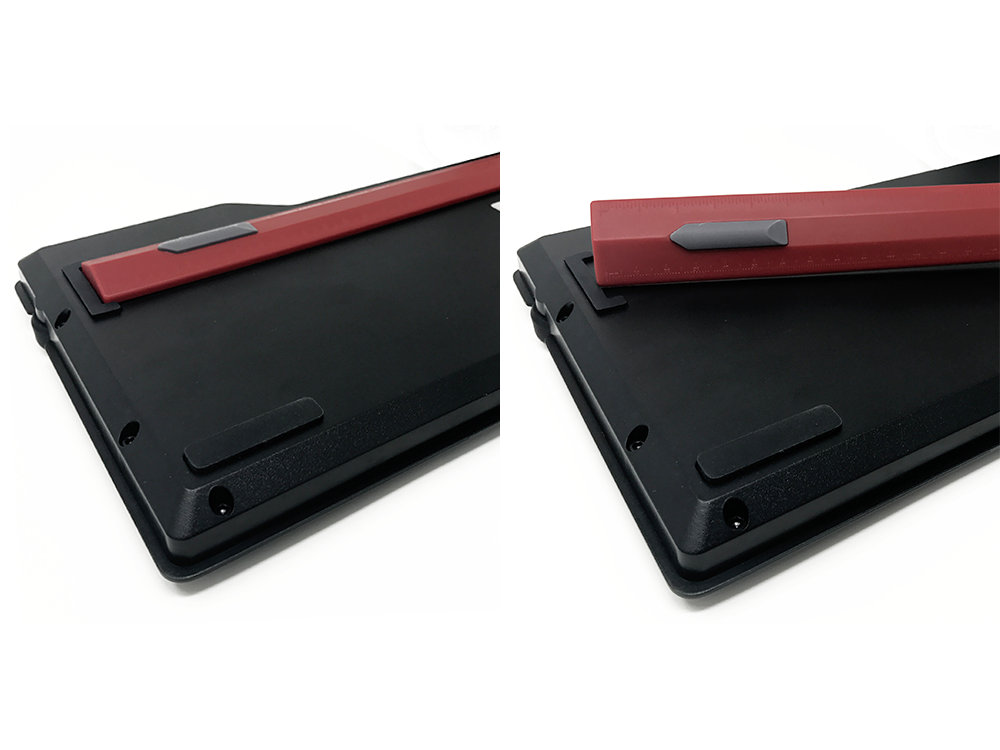
We got tired of those itty bitty plastic keyboard feet. They are fragile and typical. The magnetically attached Das Keyboard footbar raises the keyboard to an optimal 4-degrees. It looks sharp and can be used as a precise ruler when not in use as a footbar. 16-Inch red ruler is scaled on both sides. A ruler? Why not…
Das Keyboard 4 Professional for Mac sports a 2-meter (6.5ft) cable that goes through desk grommets to keep your workspace neat and tidy. Now equipped with only one USB cable to power the keyboard and USB hub at the same time.
Featuring a stunning look, Das Keyboard 4 Professional for Mac has been designed with a slick anodized aluminium top panel, a resonance-free bottom enclosure, a magnetically attached footbar, and a laser-engraved aluminium bottom labelナ all which make the design feel more bad ass and the typing feel more responsive.
There is no detail too tiny for us.
From £20.00 inc. VAT
£125.00 inc. VAT
£109.99 inc. VAT
£454.80 inc. VAT
From £130.90 inc. VAT
Knight –
Switch Type: CHERRY MX Brown Layout: United Kingdom
Really like this keyboard.
Feels great to type on. It’s worth the money for sure!
Sally –
Switch Type: CHERRY MX Brown Layout: United Kingdom
I cannot fault the service I received, nor can I heap enough praise on this keyboard. My only regret is that I suffered for so long with my iMac issue one before buying this. Yes, it is expensive, but then I have never found anything in life that is worth having that hasn’t been! To paraphrase, buy cheaply, buy twice.
Will Lakeman –
Switch Type: CHERRY MX Brown Layout: United Kingdom
It’s a great product, this is my second one since 2015. The first one has had a few switches jitter, so I bought a second one whilst the first is being repaired. It is worth the extra money. The brown switch version is not too loud, and is very comfortable and solid. I don’t think I would consider another keyboard brand. The volume knob for media is great too.
Fire Angel –
Switch Type: CHERRY MX Blue Layout: United Kingdom
A very good keyboard but it should be better at this price.
The feel of this keyboard is perfect for me, the Cherry MX Blue switches give just the right amount of audible and tactile feedback. I am old enough to remember the computers and keyboards of the early 1980s and having a membrane keyboard cannot satisfy after that experience, so the DAS Keyboard 4 Professional passes the most important test.
The extra media control keys work well with a variety of Macs, from a current model to an ancient (made in 2004) PowerMac G5 still hanging around because it has PhotoShop CS3 on it. Nice. The numeric keypad lacks the proper Mac numeric keypad layout (with the = on it) but this is sadly becoming normal for all third party keyboards for the Mac. I don’t like this trend but I can live with it.
The build is solid and heavy so it doesn’t wander about on the desk and overall I like the looks.
If you don’t like your keyboard flat there is a supplied foot you can attach to the underside with magnets. This is also a ruler, though not a particularly useful one even if you don’t need it to prop up your keyboard. It’s a gimmick, built in feet would do the job better and wouldn’t easily become separated from the keyboard. The keyboard is too flat for me even with the foot fitted, so I prop it up further with a piece of wood. I will make something more elegant with magnets in it at some stage to completely replace the supplied foot. The lack of slope even with the foot fitted is a definite minus point. If I weren’t good at making things out of wood and plastic I would be sending the keyboard back as using it so near to flat would be a pain.
It has printed key-caps. I know they are varnished and better than most printed keys, I don’t care; at this price they should be two-shot moulded. Since the keyboard has Cherry MX blue switches when legends start to wear off I can easily replace the key-caps, so it’s an irritation rather than a deal breaker. Still, I’ve seen keyboards costing a third of this price with two-shot moulded keys, so DAS really should be looking at this.
Overall I like this keyboard a lot, in spite of the irritating flaws. The feel and looks are great positives, the build quality seems superb and it works with every Mac I could find with USB ports on it. With my last two keyboards I kept feeling that they were slowing me down and there is no hint of that with this one.
Positives: Tactile feedback, audible feedback, looks, build quality, Cherry MX blue switches, works with almost any Mac with USB ports on, volume control, extra media keys.
Negatives: Lack of slope even with the supplied foot attached, printed key-caps, numeric keypad doesn’t have proper Mac layout.
Max –
Switch Type: CHERRY MX Brown Layout: United Kingdom
Great board, this is my second one since 2017 because I gave the last one a tough life and one or two keys are triggering twice. Ill make sure to clean this one once in a while and Im sure itll last a lot longer!
Chris S –
Switch Type: CHERRY MX Brown Layout: United Kingdom
Great service from the keyboard co, again.
Really really well-built keyboard. The switches are pleasingly clicky: Well see how much they annoy my colleagues when and if we ever return to shared offices.
I dont love its design, and the decision to give 2 of the f-keys over to brightness controls is hard to explain, but it feels good and works well which are the most important things.
Sam –
Switch Type: CHERRY MX Brown Layout: United Kingdom
This is a lovely keyboard. It’s taken me a few days to get used to it, but I am typing really cleanly on it now and it feels very satisfying to type on. I think I could probably use a wrist rest as well as the typing position is higher than I’m used to.
Anonymous –
Switch Type: CHERRY MX Brown Layout: United Kingdom
Excellent service. The keyboard is excellent. It’s a huge improvement on my previous keyboard and excellent value for money given the build quality .
Anonymous –
Switch Type: CHERRY MX Brown Layout: United Kingdom
Very quick service and excellent quality of product
Martin Sketchley –
Switch Type: CHERRY MX Blue Layout: United Kingdom
I’ve just taken delivery of a new Das Keyboard Professional for Mac with blue switches. It replaces the exact same model, but with brown switches. I decided to replace the brown-switch keyboard as I wanted more feedback when typing. The main difference between these two switch types discussed on the internet is the sound: blue = clicky, brown = soft tactile. Some reviews even say the blue switches will be noisy in the workplace and could disturb co-workers; jeepers, how sensitive to noise must these people be?! The blue switches do sound pleasingly different to the browns, and the click is very satisfying. This isn’t the end of the story, however: to me there’s also a distinct difference in the springiness of the keys: the blue switches just seem more responsive and positive than the browns. Any Das Keyboard will be great, but if you do a lot of typing, I’d certainly recommend the blues. As ever, service from The Keyboard Company, and responses by Bruce to email enquires, were fantastic.
David Jones –
Switch Type: CHERRY MX Blue Layout: United Kingdom
If you actually want to type content rather than admire your smart, minimalist desk accessories, then this is perfect. This is a return to the quality of the early IBM keyboards that we took for granted at the time.
Wired too, just like the good old days. Bluetooth has its place, but as a reliable data entry tool for desk use, I don’t think a keyboard like this can be beaten. Highly recommended.
As for the Keyboard Company, everything just worked. I would much rather deal with a specialist company that knows their product.
Jon –
Switch Type: CHERRY MX Brown Layout: United Kingdom
A quality mechanical keyboard. So much more satisfying to work on than the standard Apple keyboard. Loving it.
Seb L –
Switch Type: CHERRY MX Brown Layout: United Kingdom
Very happy with the keyboard so far,
Great tactile feel, i got used to it in no time.
I received the parcel about 4 working days after ordering it which is great considering the state of lockdown we’re in at the moment.
I’ll order again on this website for sure!
Ben Chapman –
Switch Type: CHERRY MX Blue Layout: United Kingdom
A fantastic keyboard. Brilliant feeling keys, as I’d expect from the Cherry MX Blue keyswitches. The build is fantastically solid and the media controls make it perfect for when you’re working away and don’t want to go changing windows to pause the podcast you’re listening to.
The service was also fantastic, would thoroughly recommend buying from The Keyboard Company.
Al –
Switch Type: CHERRY MX Brown Layout: United Kingdom
Great bit of kit and excellent service from The Keyboard Company.
All the media and sleep keys work.
The keyboard is solid and typing is a really nice experience. The brown switches mean it’s fairly quiet as well.
Ian Stewart –
Switch Type: CHERRY MX Blue Layout: United Kingdom
This is just about the perfect keyboard and as far as I know Das Keyboard make the only Mac specific mechanical keyboards. Here are my comments after using it for a few days:
Mechanical keyboards are more pleasant to type with.
It is exceptionally well built, easy to use, and has a consistent feel across all keys.
The weight means it stays firmly on the desk.
It has a separate number pad which makes typing numbers much easier.
It is wired which I think is better than Bluetooth (as one computer expert I read said ‘bluetooth keyboards and mice are a solution to a problem that doesn’t exist).
The two USB inputs are really useful, especially as the newer Mac computers no longer have several USB ports.
There is only one thing I would change, the media controls appear to work with iTunes only. These are not programmable (as far as I can tell) to work with other software. I always use other audio software and never iTunes. The play and fast forward buttons work with Youtube but for some reason I couldn’t get the backwards button to work. They are also very low and close to the number keypad, therefore not that comfortable to use. However as the playback controls are far from important its not really a problem.
The service from the Keyboard Company was excellent, my questions were answered knowledgeably, and the delivery was in two days as promised.
zemogle –
Switch Type: CHERRY MX Brown Layout: United Kingdom
I’ve never had a mechanical keyboard before, but this was recommended by a co-worker. I had complained that the keyboard which came iMac was giving me RSI. I’ve fallen in love with this keyboard and look forward to writing lots of code on.
The USB hub is well placed and the volume control is delightfully tactile.
Jo –
Switch Type: CHERRY MX Brown Layout: United Kingdom
I am delighted with the Das Keyboard for Mac, bought for a new computer (my second Das purchase, I already have a Das blue switch keyboard in the house). I was a little worried that the media keys wouldn’t work, as someone else had that trouble, but mine do work and I love them. Also, this is my first purchase of a soft tactile model and wasn’t sure I would like the feel of it, but I should not have been concerned. It has the same great feeling of reliability and quality build as my other Das. A special mention for the excellent service provided by The Keyboard Co. I was impressed!
Dave –
Switch Type: CHERRY MX Brown Layout: United Kingdom
I’m kicking myself that I didn’t get one of these many years ago.
Had a Matias Quiet Pro before this which was good, but this is better.
I was worried that the click noise would annoy, but it’s actually very satisfying. It might annoy in a shared office though.
The metal case is the winner too – so nice to have something so robust after decades of plastic.
Martin Sketchley –
Switch Type: CHERRY MX Brown Layout: United Kingdom
I’ve had several mechanical keyboards including Matias Tactile and Quiet Pros, and a Das with blue switches. I’ve sold them on for various reasons, whether build quality or having to fudge keys because they weren’t Mac-specific keyboards. I won’t be selling this one, which is solid and satisfying to use. However, although this is a Mac keyboard, the media keys dont work on my machine, and to be honest feel a bit weird. Of the mechanical keyboards I’ve had, this one offers the best combination of built quality, compatibility and feel. Excellent service from The Keyboard Co, as ever.