





















Kailh 35 Switch Sets and Holder
£10.00 inc. VAT
in stock
Details
Select options
This product has multiple variants. The options may be chosen on the product page
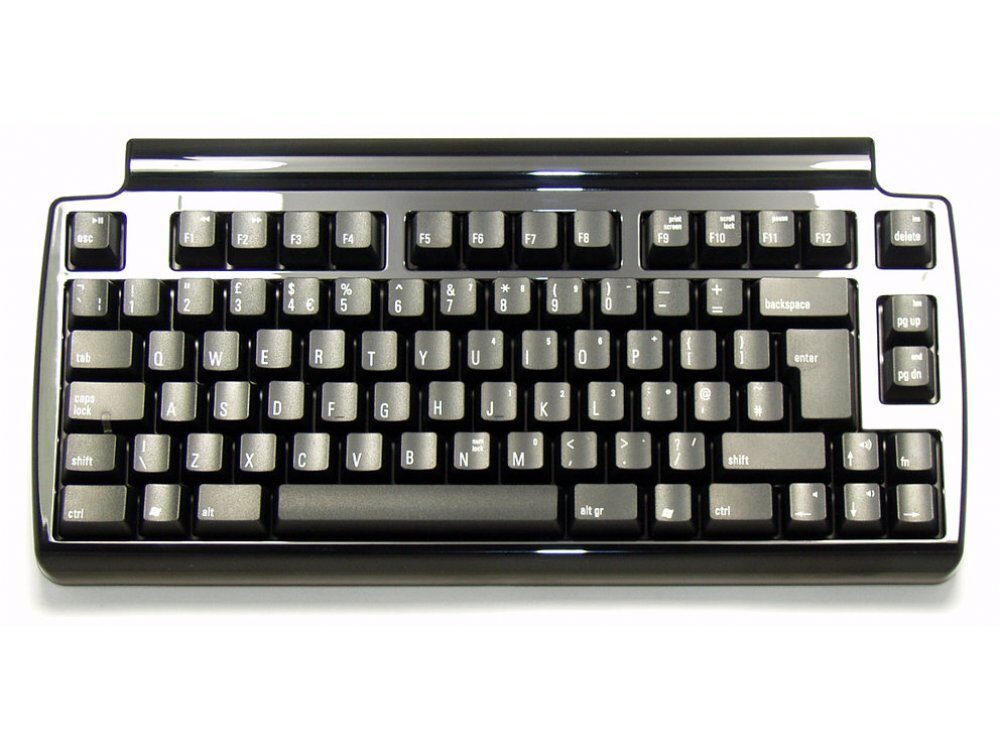
The Mini Quiet Pro uses Matias’ new Quiet Click mechanical keyswitches. They deliver a feel that’s unmatched for comfort – without sacrificing the tactile feedback you need to type really fast.
There are several advantages that come with a compact keyboard…
Mechanical keyboards offer the best performance, but they’re noisy – too noisy to use in most offices, or around other people. This is the first one that’s quiet. Over two years in the making, it’s the only mechanical keyboard that keeps both your fingers and your co-workers happy.
Some keyboards have 2 USB ports – most have none. We’re giving you three! You can plug in flash drives, digital cameras, your mouse, and more.
If you plan to take your Mini Quiet Pro with you, we’ve made that easier to do. Keyboard and cable detach from each other, and we provide an extra cable that you can keep stowed in your laptop bag, for use on the road.
All those symbols are handy, but what happens when they wear off? They won’t. They’re laser etched – burned into the keys with a laser – so they’ll never wear off.
The latest trend in keyboards is to have very flat & wide keys, with little or no space between them. You see this a lot on laptops and netbooks. While they look great, they can also be a little tricky to type on. The flatness makes it very easy to slide out of home row and lose your bearings.
The Mini Quiet Pro bucks this trend. It has traditional sculpted keytops, curved to fit your fingertips, and keep you from sliding out of home position.
Dedicated keys let you control Volume Up / Down / Mute. Plus, by holding down the Fn key you gain access to strategically located Pause / Play, Next Track, and Previous Track keys.
Most keyboards allow only a few keys to be pressed at once, so they can’t keep up with very fast typists. The result is called ghosting – letters missing from what you actually typed, or additional letters that you didn’t type.
The Mini Quiet Pro has special Anti-Ghosting Circuitry (also called n-key rollover) to eliminate these problems. You can type as fast as you’re able; the Mini Quiet Pro will keep up.
£10.00 inc. VAT
Jeff –
Switch Type: Matias Quiet Click Layout: USA
As a follow-up to my review from 2016: The sticky keys were originally fixed by massaging the offending keys a little (too much grease in the wrong place on the inside of the switch). But eventually the problem with the ‘m’ key returned and I had to replace the switch.
By the end of 2019 I started having trouble the usb connection, the micro-USB port on the keyboard was clearly at fault. It failed entirely in early 2020, I’ve had a look at it and despite the extra support bracket, that micro-USB port clear has too much room to move. Combined with the 90 degree angled usb cable which puts more strain (twist) on the port, this is a likely failure point of this keyboard. I’ve found more stories of the port failing on keyboard fora. So it you have this keyboard or want one, make sure to reinforce the micro-usb port. Just open it up, take off the support bracket on the port, build up something on the port so it comes into contact with the bracket when you put it back on (e.g. electrical tape).
Anonymous –
Switch Type: Matias Quiet Click Layout: USA
A great product, very solid and a simple plug-and-play. It feels good to type and the sound is gentle. Delivery from the keyboard company was quick and hassle free.
curlypaws –
Switch Type: Matias Quiet Click Layout: USA
I love this keyboard! Working from home and using a company laptop, I wanted a good keyboard for typing that wouldn’t be too intrusive on calls but still have mechanical switches. I know Matias keyboards from my Mac, but this time I needed a PC keyboard. This fits the bill perfectly. It keeps important keys (such as the cursor keys, page updown and delete) on dedicated keys – avoiding the need to keep using modifiers to do the simplest things. And the key action is very pleasant to type on.
It isn’t as quiet as a membrane keyboard, but is much quieter than a normal mechanical keyboard. And I find the size really handy to avoid taking up too much desk space.
I’m really pleased with this keyboard. I’ve found Matias keyboards to be very reliable in the past and I’m confident that this one will be too.
And as a final note, the dispatch from Keyboardco was super quick even in these days of lockdowns. A superb company that I enjoy buying from.
Anonymous –
Switch Type: Matias Quiet Click Layout: USA
The order was quick and the keyboard is of good quality and has a nice typing feel.
From something that has Quiet in it’s name i expected less noise.
It’s quite a bit noisier than my WhiteFox.
I will have to find a way to silence this further before my homeoffice time ends, or my coworkers will be upset.
Nick –
Switch Type: Matias Quiet Click Layout: United Kingdom
I previously had the Realforce 87UW (55gm), which while very good quality, the keys felt quite heavy and tiring after a while. I replaced it with this Matias one, which has been excellent. Feels buttery smooth compared to the Relaforce but very tactile at the same time. My typing became instantly faster and comfier.
The keyboard is relatively quite and feels much better than the cherry mechanical ones imo.
Reliability wise, I have the keyboard for more than a year now and I only had a problem once, about six months ago, with the left Ctrl key missing some strokes. I removed the key and put it back on again, and the problem seems to have been solved.
I highly recommend the keyboard (I got a second one for home).
I would love if Matias comes up with an even more compact one (e.g., without the F keys and a more compact case).
Chris –
Switch Type: Matias Quiet Click Layout: German
Generally good keyboard. A bit too noisy by todays standards. I got mine at half price ( Black Friday sale ) which made it worth the purchase.
chris –
Switch Type: Matias Quiet Click Layout: United Kingdom
This keyboard is quiet enough to use in an open-plan office and feels good when typing.
I was slightly worried about the layout, especially the function (fn) key placement over on the right side, but having used the keyboard for a while I now believe that this is one of it’s best features. The placement of this key makes using the volume keys (on the cursor keys) and the home and end keys (on page up and page down) a one-handed combo. Someone should have thought of this years ago!
The Alps (reinvisioned) keysswitches have a good professional quality and feel to them, and there are enough ports on the chassis to plug in whatever you need.
The keyboard comes with 2 cables of differing lengths keeping your desk in order. And a nice detail is that the cable USB connecter is designed to work either way up (you *can* plug it in upside down or the right way up).
The keyboard is also small enough and light enough to be carried in a normal sized backpack with a PC.
Has worked flawlessly on Win10 and on Linux, including all the media keys and function keys like ‘insert’ etc.
Overall I am impressed and would deiniately choose a Matias keyboard again.
A professional translator –
Switch Type: Matias Quiet Click Layout: Nordic
I bought this keyboard for mobile work (I use a Unicomp as my daily driver). It is very well built and the key feel is very snappy. Additionally, the board is much quieter than my old cheapo Labtec keyboard and only slightly louder than a laptop chicklet keyboard.
I really like the recessed USB ports, a cool feature copied from older Apple keyboards. Matias was kind enough to bundle the board with two different-length cords with an angled USB micro connector for added durability, very handy. The keycaps are very nice with a crisp, nice-looking font. For the most part, I like the layout: it’s compact but with sufficient space between key groups. Thanks to the recessed USB ports, I can fit this keyboard and a standard-sized mouse in a very small space.
Thus far, I have only two niggles: the glossy finish of the chassis (I would’ve preferred matte) and the usability of the Home and End key. To access these keys, you need to press down the Fn key and either the Pg up or Pg down key, which is somewhat awkward on this board. The Fn key is located above the right arrow key, generally a very well thought-out position, but as the Pg up and Pg down keys are located in their own group right above the Fn key, you need to hold your wrist at an awkward angle to press these buttons simultaneously. This can be a real problem in extended use (I regularly paint text by holding shift and pressing either Home or End).
All in all, I would definitely recommend this, if you can live with the Home and End problem (or find a workaround, which I’m looking into right now).
BS –
Switch Type: Matias Quiet Click Layout: United Kingdom
This is an absolutely fantastic keyboard. My iMac came with the Apple Magic Keyboard which I don’t particularly like because the arrow keys are ridiculously small.
I don’t like the keys on most mechanical keyboards because of how close they are together, but for whatever reason – it might be down to the curved design of the keys on the Mini Quiet Pro – it’s a dream to type on, despite the keys being so close together. Each keystroke feels intentional and the switches are very tactile but quiet. You can easily feel the actuation point, whereas on an MX Brown, it’s difficult to notice. It’s what the MX Browns should be, both in terms of tactility and feedback.
It’s a good keyboard. It’s probably the only one I could personally recommend, and I’ve tried many – Unicomp Ultra Classic, Varmilo VA88M, Filco Majestouch-2 TKL and the Cherry G80-3000.
AH –
Switch Type: Matias Quiet Click Layout: United Kingdom
Excellent product, good switches, relatively quiet too. Best combination of size / noise / tactility.
Santeri Horttanainen –
Switch Type: Matias Quiet Click Layout: USA
They said that my Model M was too noisy so I changed to Matias. It feels and sounds amazing.
Justin –
Switch Type: Matias Quiet Click Layout: Nordic
The keys are terribly shaky on arival, and it gets progressively worse the more you use it. It does random double or quadruple registers of buttonclicks and sometimes doesn’t register at all. The spacebar is the worst in this regard.
The only positive side with this keyboard is that it’s really quiet (as it’s on the shelf right now, being part of my most wasted money ever.)
Art –
Switch Type: Matias Quiet Click Layout: USA
Keyboardco is the only company that I trust to review the feeling of a keyboard accurately. I’ve nearly worn through my current Cherry MX Blue based keyboard and wanted another ten-keyless. I was about to just hop on the the website and order another when a co-worker on their third drink mentioned I was the loudest typist they’d ever heard. The CherryMX Browns aren’t bad, and I can tolerated them on my less important computers, but the Blues are what I’m tuned to. The Matias Mini Quiet Pro is as close as a quiet keyboard has come to the feel of the Blues, noticeably closer than the Browns. There is a bit of work to do to retrain my hands which can reach for the the arrow pad and back to home row without looking (or thinking) but switching to the feel of these keys was a snap. The small size that that adjustment buys me will let me put this in an non-huge laptop bag and type at full speed when I’m on the road with my very pretty Macpro. I would definitely recommend this to a friend.
og –
Switch Type: Matias Quiet Click Layout: United Kingdom
Got this for when working in an open plan office. Very quiet and excellent tactile feedback. A real programmer’s keyboard. Service from KeyboardCo was very good indeed (again).
R88 –
Switch Type: Matias Quiet Click Layout: United Kingdom
Very good tactile switches. And quiet.
Inset number keys a bit confusing but probably won’t use them anyway.
Jeff –
Switch Type: Matias Quiet Click Layout: USA
I’m typing this review on my Mini Quiet Pro, and it is quiet indeed! After my first experience with mechanical keyboards (MX Browns) I was looking for something with a more pronounced tactile bump and less noise. The noise reduction on upstroke of Matias Quiet Clicks is very effective given my style of typing.
Some small things I like less: The arrows keys are louder than the rest of the keys (maybe because they’re on the outside?). The ‘m’ key seems to be ghosting a little sometimes, but that might just be me learning to type without bottoming out. Last but not least: I use HomeEnd a lot when I write computer programs, and they’re slightly harder to reach with Fn+PgDnUp.