
Product Specifications
| Part Number | — |
|---|---|
| Connection | — |
| Cable Length | — |
| Number of Keys / Buttons | — |
| Compatible | — |
| SKU | — |
| Country of Origin | — |
| Offer Type | — |
| Weight | — |
| Dimensions | — |
Platform PC
Brand daskeyboard
£119.00 inc. VAT
Das 4C Tenkeyless MX Keyboards
Only logged in customers who have purchased this product may leave a review.
Minimal footprint – Maximum potential
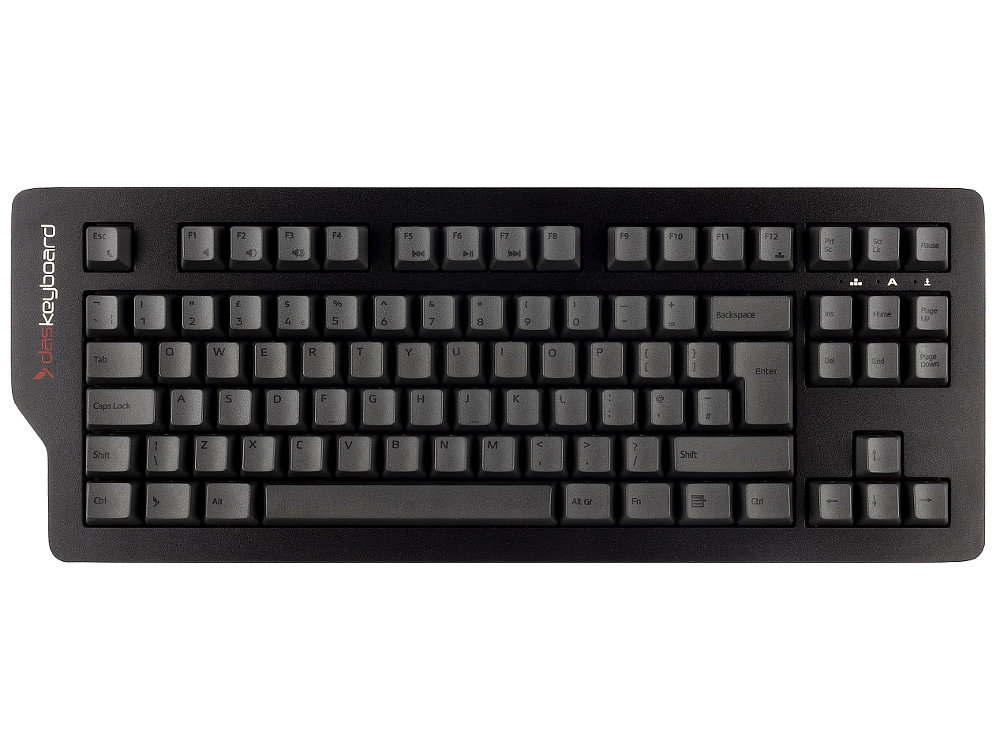
Revived and better than before! Now with PBT keycaps and Cherry MX Brown switches, our newly improved Das Keyboard 4C TKL is the compact keyboard with ultra-modern design you’ve been looking for. Featuring a sleek black anodized aluminum top panel, accented by charcoal grey PBT keycaps, with black sublimation legends, this TKL mechanical keyboard will have everyone envious.
Charcoal PBT keycaps for maximum durability are paired with Cherry MX Brown switches, giving your new mechanical keyboard life up to 50 million keystrokes. You’ll enjoy the tactile experience you love from a mechanical keyboard, with just enough sound to satisfy you – and not annoy your coworkers!
Built with the same best-in-class materials you’ve come to expect from Das Keyboard, our latest model in TKL keyboard format includes a solid construction meant to streamline your work environment while maximizing your potential for speed.
System requirements: PC Windows, Linux or ChromeOS, One USB 1.1, 2.0 or 3.0 port, No driver required.
£94.80 inc. VAT
£160.00 inc. VAT
£118.80 inc. VAT





Koko –
Switch Type: CHERRY MX Brown Layout: United Kingdom
DAS keyboards are almost always listed in top ten reviews for professional writers and often make number one. It was only a matter of time before I was tempted. I got my DAS 4C TKL from The Keyboard Company, and I’ve barely stopped using it since. I’m an author and tech writer, and use different keyboards for different kinds of work. That might sound a bit much, but it’s no more extravagant than using different brushes for different paintings which I also do.
The DAS 4C TKL is beautifully made. It’s heavy in the right way: solid, reassuring. It has a sort of Mission: Impossible vibe, though that’s probably down to the keycaps: charcoal grey with dark brown legends. They’re subtle, distinctive, and surprisingly pleasant to the touch. Smooth and creamy under the fingers. The legends are usually visible, but can be hard to make out in dim light. If you’re a touch typist, you wont care. If you’re not, you might. (Or just put a lamp on.)
I was a bit surprised to find it has a magnetic removable bar underneath instead of the usual flip-out feet. But its just the right height. I haven’t noticed the difference while typing, and in fact, I prefer it. Some feet feel flimsy, and almost all are fiddly to use. None of that here. The bar is solid, clean, and just works. The whole board feels like Tom Cruise could drop it from a tall building, abseil down after it, and keep on typing at the bottom.
It has Cherry MX Brown switches, which are ideal for writers. I say that as someone who’s spent a few years being Goldilocks about it. Some switches are too loud. Some are too soft. These are just right. There’s enough tactile feel to keep your hands engaged, but nothing that distracts or slows you down. Typing on it is smooth, light, and quietly satisfying.
I’ve been using it for freewriting short stories and articles, where the aim is to get the words out to keep going without second-guessing every sentence. Top tip: to help with that, I shrink the Scrivener or Word window down to a narrow strip just enough to see a few lines at a time. It stops me looking back and fiddling. I don’t want to be tempted to rewrite the first paragraph ten times when I should be writing the next one. Headphones on, ASTRO in my ears (my favourite K-pop), fingers on the 4C, and I just go. It gives the same focused, immersive feel as those boutique writer-typewriters that cost five or six times as much. It’s just as good for daily stuff too – emails, forms, general admin. You still get that smooth, precise feel without its ever being tiring.
Its now the keyboard I reach for by default. Its something like a workhorse crossed with a dressage thoroughbred: strong, graceful, reliable, and very good to look at. There’s a spec sheet for those who care about how it achieves this. I go by feel. And the 4C feels like a reassuring companion in the battle of life. I know. But it does.
If you buy here as you may already know you’ll be treated to exceptional customer service. And unlike other companies, they stock these keyboards. You don’t have an agonising wait. I ordered mine on a Wednesday afternoon, fairly late. It was delivered first thing Friday morning. That’s very good going.
The board, the great price, the buying experience:
HIGHLY RECOMMENDED
**MISSION ACCOMPLISHED**
TC –
Switch Type: CHERRY MX Brown Layout: United Kingdom
Very nice keyboard. Would have given it 5 stars but the black printing on dark grey keys can be very difficult to read.
I bought the UK Black Filco 105 Key Keyset Pack – FKCS105UKB which works a treat. Keys are now legible even in low light.
Margo –
Switch Type: CHERRY MX Brown Layout: United Kingdom
I’m really pleased with my new keyboard. It’s great quality, the keys have a nice clack to them, and the additional USB ports are useful. I think it’s the best keyboard I’ve ever typed on.
And I’m impressed with the Keyboard Company’s service – ordering was easy, and I received the keyboard within a couple of days.
Chris –
Switch Type: CHERRY MX Brown Layout: United Kingdom
The most comfortable keyboard I’ve used so far. Got one of these for work and just had to get a second for home as I was missing it. The combination of the Cherry Brown switches and solid construction mean the keys don’t bounce and it’s not too noisy. The USB ports along the side are great for a wireless mouse receiver and I love the black-on-grey styling.
Graeme –
Switch Type: CHERRY MX Brown Layout: United Kingdom
Needed a narrower keyboard to help with back pain issues and this size really helps . Second DAS keyboard in my setup , they are high quality and long lasting, the USB ports on the side are a big plus too for security key use . Ordering , delivery and communication was also faultless .
David –
Switch Type: CHERRY MX Brown Layout: United Kingdom
Having worked from home throughout the various lockdowns, I really wish I had found this a year ago. I had no idea such keyboards existed. I originally learned to type on a traditional typewriter and this is an absolute joy. I chose this model because it is so compact. I already owned a separate numeric keypad for when I need to enter a lot of figures, so I preferred not to have that included. My work laptop is tiny, with minimal sockets, so the two USB ports on the keyboard have also proved useful.
Edward –
Switch Type: CHERRY MX Brown Layout: United Kingdom
This is a decent keyboard. It feels solid, and the Cherry Brown switch is pleasant to type on. As others have said, the color scheme and lack of backlighting can make the key labels difficult to see in poor lighting conditions, but I’m trying to improve my touch typing so I’m not too bothered by that. My only criticism is that the keyboard has a larger footprint than some other TKL keyboards.
I use this keyboard at a standing desk. My computer is on the floor under the desk. Although the cable is integrated into the keyboard, at 2 metres long it can still easily reach the computer, without pulls or snags when the desk height is adjusted. I plug a wired mouse into the keyboard’s USB hub, which means the mouse cable doesn’t need to be as long.
MG –
Switch Type: CHERRY MX Brown Layout: United Kingdom
Thrown into increased amount of homeworking I spent a lot of time researching how to find a flat noiseless Applelaptop style keyboard. I wasn’t looking for a gaming keyboard – more a keyboard to use in my home office. My research led me to the complete opposite of what I set out to buy – a mechanical keyboard! Having decided that I didn’t need a numeric keypad (right decision, I probably use one about twice a year) I opted for the Das 4C tenkeyless.
It looks really good (even my wife said this, more on that later), it feels weighty, sturdy and just conveys quality.It is incredible to type on although I am comparing to a low benchmark given the mushy keyboards I have used for years. It’s also a lot better than the old school keyboards I used even longer ago.
In terms of features I have already used the USB hub on several occasions as well as the media keys. What is missing? For me, and this is just part of the design which also makes it look very cool and is clearly deliberate, I found it a little difficult to use in low light environments. I can touch type but from time to time do need to look down to find less used characters and as it got darker or the sun moved position I found that I couldn’t pick up the lettering on the keys. Is this a huge problem? Probably not if you have convinced yourself you don’t needlike backlighting or are a better typist than me. For me it was a bit of a niggle although if I invest in some better lighting in the room (I have done but not yet installed) I suspect it would be irrelevant. The feel on the keys when you press down is great by the way.
My wife recently found herself needing a keyboard and it now looks like she will be commandeering the 4C. The room she works in has better natural light and she also enjoys typing on itloves the design. This means I am now looking to buy another keyboard and having rediscovered the fun of typing from the 4C, I’ve now ordered a Varmilo VA88m with MX Blue switches. This is no reflection on the 4C – it’s more that I am gradually identifying what I’m looking for in a keyboard (i.e. a loud satisfying click). The other contender for me was the Filco MAJESTOUCH-2 TKL. Rightly or wrongly I opted for the Varmilo so that I could still use the media keys – the design also appealed to me (i.e. raised keys, PBT keycaps etc). I’ll review that one when it arrives but I will still be borrowing the 4C from the wife now and then when she lets me!
Excellent service from the Keyboard Company by the way – cannot be faulted.
Anonymous –
Switch Type: CHERRY MX Brown Layout: United Kingdom
I just bought this and it is almost perfect, for me, but has one really major flaw (from my perspective).
The good news: lovely to type on. Compared to my old mechanical keyboard (which had silent Cherry Red switches), this one makes a little bit of noise, but the more positive action needed to type seems to actually make my typing a bit more accurate (and I’m a really crappy touch-typist). It’s not magic of course; I’m still a lousy typist, but the error rate seems a bit lower.
However, Das have printed the letters and numbers in black on a charcoal grey keyboard (they are actually much harder to see than the picture above would suggest), and there’s no backlighting. I bought a tenkeyless to bring my mouse in closer, so that my arm is at a less awkward angle when I use it, so that my RSI won’t be aggravated as much. All that works, but not being able to see the numbers unless the light is really good, is making the adjustment quite awkward.
Hopefully, I will get used to it and, of course, if you’re a really good typist who never needs to look at the keys, you will be fine. But at the moment, this is really a pain.