
Unicomp
SKU: UT4*
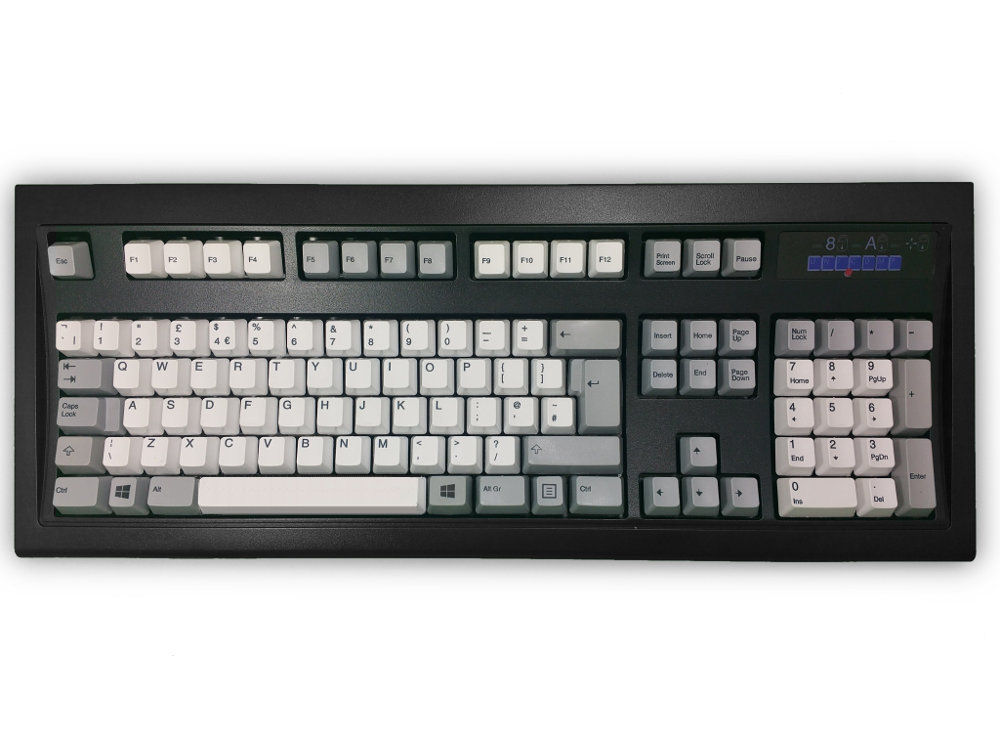
New Model M Keyboards Black with White & Gray Keys USB
£209.00 inc. VAT
New Model M Keyboards Black with White & Gray Keys USB
22 reviews for New Model M Keyboards Black with White & Gray Keys USB
-
Rated 3 out of 5
Simon –
Layout: United Kingdom

I had heard a lot about the buckling spring switch and how amazing it was to type on, how the best of these keyboards was the Model M and how Unicomp still made these in Lexington, Kentucky. I took the plunge.
Positives: The Keyboard Company were excellent. My order was delivered the next working day, well packaged and with no damage.
The keyboard is well built. It has little flex and is fairly heavy due to the steel plate in its base.
The keycaps are PBT and are of a nice profile to type on.
The key feedback is crisp and very tactile and make a loud ‘clack’ when pressed rather than a ‘thock’, This is a matter of personal taste but I do like the sound and the feel of it when up to speed typing and the keys actuate exactly on the click, so you can tell when the key has been depressed enough.
Negatives: It’s very expensive and you are paying a lot of money for … a basic keyboard of good construction and with the famed buckling spring switches… and that’s it. There are no other interesting features of this board. If you don’t like the clicking feedback and the clacky sound of old style electric typewriters, this is definately not for you.
The key feel is noticeably ‘scratchy on quite a few of my keys and they feel quite heavy in their weighting, although I am coming from two previous light linear boards. The cable is long but not sheathed and can not be disconnected from the board so it’s a problem if it gets damaged. There is no RGB – I’m not bothered about RGB but this isn’t for you if that is your thing. It’s not programmable nor switchable for a Mac layout.either.
In conclusion, if you are intersted in a loud, clacky sounding, well built keyboard that looks good but has no other features but a crisp tactile feedback or you have tried these buckling springs before and love them – this is for you, at a premium price.
Otherwise, see if you can try one first or if ‘clacky’ is not for you – stay clear. -
Rated 5 out of 5
CH –
Layout: United Kingdom
The parcel arrived a couple of days ago. Upon opening it I was presented with a smaller, keyboard-sized box. Upon cutting the tape to this O Fortune began to play in my head, and as I opened the smaller box and removed the bubble-wrap, the choir began going for it like Old Spice was back in fashion.
Plugging the keyboard in, it was everything I wanted. Solidly made, responsive, pleasingly noisy, and with an NumLock light you can read from at night, it has been a step up from my mechanical gaming keyboard which I’ve been using for the last year or so.
Genuinely, nostalia aside, this is a great looking and great sounding keyboard, responsive, not at all tiring for all the greater degree of travel than I’m used to, and sure to get a lot of work over the years. Yes, it’s not cheap, but if you spend a lot of time typing, it is a worthwhile investment, at least IMHO. -
Rated 5 out of 5
Jon S. –
Layout: United Kingdom
Not my first Unicomp keyboard, I drowned the first one. Finger location markers are less prominent than they were 5 years ago and definately not as prominent as on an original Type M. Added some colour keys which look great. Windows Key is imperative in my current work environment. I really enjoy typing on this it is nice and noisy:) 100 positive action no doubt about a key press being completed. Delivery was quick and painless.
-
Rated 4 out of 5
Christian –
Layout: United Kingdom

I have been using this keyboard for three weeks now and I quite love it. It is a bit on the pricey side, but I feel like I’ve gotten every Euro back. Typing feels excellent and it makes coding a joy all over again. The springs are very satisfying to press and hear them depress. The build quality is also excellent. The material of the keycaps all feels very solid (and so does the printing on them) and the added weight makes it difficult for it to move from its place. It is a pleasant reassurance that this keyboard will last 20 years
My only real complaint here (and why I’m not giving it 5 stars) is the LED lighting. While it is pleasant to have them, I feel as though they are way too bright on this keyboard. The blue lighting from when you have the Num Lock on is bright and difficult to ignore when you are just staring at your monitor, especially in a dark room. There are solutions to help it (putting a dark translucent layer on top of it, covering it, modifying the keyboard to replace the blue LEDs with ones in green or amber), it is a bit disappointing that this problem becomes apparent out-of-the-box, especially when I have never had this problem with other keyboards of sometimes lesser quality.
All in all, very worthwhile purchase.
-
Rated 5 out of 5
Anonymous –
Layout: Swedish

Excellent keyboard, worth every penny.
-
Rated 4 out of 5
Martin T –
Layout: United Kingdom
Why only 4 stars for what I thought was a lovely keyboard?
I’m a big user of VMware and for decades have used Ctrl Shift Alt as my hot keys. Unfortunately the design of the New Model M’s keyboard matrix meant that it wouldn’t recognise Ctrl, Shift, Alt and Insert at the same time which made it difficult to log in to VMs. I could have changed my hot keys but every other keyboard I’ve used — including my original IBM Model M (without Windows and Menu keys) — handled that combination. Having discussed this issue with Unicomp and Bruce at Keyboard Co, I decided to return the keyboard, which Keyboard Co dealt with very efficiently.
Full marks to Unicomp as well for confirming that a PS2 New Model M would have had the same issues.
This was a massive shame, since it was a lovely keyboard to type on.
Unicomp have unusual and changing ideas about where to put the Alt Gr, right-hand Windows and right-hand Menu keys but I found I liked and got used to the layout on the New Model M very quickly. I think it’s nicer than the layout on the Mini M because although the Mini M swaps Alt Gr and right-hand Windows to where everybody else puts them, Unicomp didn’t swap the key sizes around, so right-hand Windows has (to my mind) too large a physical key and Alt Gr’s is too small.
If Unicomp sorted the keyboard matrix I’d buy it again immediately. If they made an ISO 104 key large spacebar version with only the Menu key on the right hand side (just where it is right now) and no right-hand Windows key, as they do for the US layout, that’d be lovely too.
-
Rated 5 out of 5
James L –
Layout: United Kingdom
I have coveted a Unicomp keyboard for years, but couldn’t face the expense and hassle of ordering it direct from Unicomp themselves. despite having used a selection of hand-built, and commercial keyboards, I think the Model M is my favourite; its heft gives it a feeling of quality and permanence that my other keyboards lack. It works flawlessly on my Mac, Windows and Linux machines
The process of ordering was slick, and painless; I was typing on my keyboard within 48 hours of ordering, the board itself was immaculately packaged.
Overall, a premium experience for a premium product.
-
Rated 5 out of 5
Chen –
Layout: United Kingdom

It’s the classic IBM model M reborn. It feels like typing on a piece of computer history. Nothing beats the buckling spring switches. Perfect for someone typing all the time.
-
Rated 5 out of 5
Matt –
Layout: United Kingdom
This keyboard is amazing. Make no mistake, it’s worth buying.
I had briefly used a buckling spring keyboard as a young teen, and thought it was amazing back then. Ever since I’ve been trying to track down somewhere selling new ones. Especially since I’m now using a PC during the day job.I’ve always preferred the clicky feedback, and have tried the keyboards with cherry (and clones) switches. Whilst they were good, the buckling spring mechanism is a whole new level.
The keyboard itself is a hefty, solid design. That’s a good thing. It won’t slip around whilst you’re typing. The legend on the keys is sharp, and so far, durable. I’ll check in again in 20 years (if I remember).
The number of options available for this keyboard means there will be one to suit everyone. I personally got the three colour design, black base, with beige and grey keys.
Hats off to Unicomp and to The Keyboard Company – You’ve got it right.
-
Rated 5 out of 5
Darryl –
Layout: United Kingdom
Absolutely the best keyboard I’ve ever used. Great build quality and simply a joy to type with. The buckling spring design is certainly worth the hype.
My only criticism would be the blue LEDs for the CapsLock Numlock ScrollLock indicators. They seem a bit out of place. Green LEDs would have been a much better choice IMO.
-
Rated 5 out of 5
Jim –
Layout: United Kingdom
I bought this to replace a generic membrane keyboard because one of the legs had snapped off! That is NOT going to happen with this keyboard. Fantastically solid – this will last forever, and the keys are splendidly loud and tactile. Perfect for work.
-
Rated 5 out of 5
Peter –
Layout: United Kingdom
I have loved the heavier feel of a bucking spring keyboard ever since I moved from Apple II to an IBM PC back in the depths of the past. I always found them more certain for typing on, and the new model M is great just great. It feels really solid and has the old familiar heavier feel. Way better than the standard keyboards that come with laptops these days.
-
Rated 5 out of 5
Chris –
Layout: United Kingdom
An absolute joy to use, and a beautiful piece of kit.
-
Rated 5 out of 5
Charlie –
Layout: United Kingdom
As a long-time user of a Filco Majestouch 2 (MX Reds) bought from Keyboard Co something over 7 years ago, this keyboard was quite the step change.
My first buckling-spring unit, cannot compare it to an original IBM version as I haven’t experienced it.
What I can say about this board, is that it is just bliss to type on. Much more of a satisfying sound than the shrill, sharp click of the MX Blue switches and their clones (especially some of the cheaper ones like Outemu!) – albeit still very loud, but I’m sure if you are after a clicky keyboard you know what you are getting yourself into in doing that.
Keyfeel is very consistent across the board, stabilisers are on the better end of things despite being so simple on the non-space bar keys, somewhat heavy. Caused me to miss some presses at first, but soon adjusted – coming from very light linear switches this is no surprise. The tactility is very definite but not overpowering.
Rollover is 2 keys on here, but you will find combinations that can go higher – can find combinations of 8 or 9 including modifiers. Generally good around the WASD area, not found anything that caused me to miss any presses yet. Slight oddity in that the right Super key and Alt Graph are switched around, even more odd when it isn’t on the new tenkeyless model just launched.
There is one thing to be wary of buying a Unicomp board or accessory keycaps and that is the printing. The quality of the print itself now is excellent, evidently they put some money into their dye-sub kit in recent times. However alignment isn’t perfect by any means and they seem to have a fairly low standard as to what will get shipped out from the factory – leading to things like the left Super (Windows) key on my board having the legend printed practically against the bottom edge of the cap. However, Keyboard Co sorted me out on that one, so no complaints there 🙂
The keys being dye-sub will need some substantial action on a sanding disc to wear off those legends – not like some of the cheap pad prints that are out there. And being PBT caps aren’t exactly prone to wear either! Unicomp have switched to a single-piece cap on the new production boards, rather than the two-part arrangement that they used to use, and this does result in a mildly different keyfeel and sound. I’m very happy with the result of that though.
The housing is generally fairly sturdy. There is still a metal plate underneath the membrane in these, although I understand it is of a reduced thickness compared to a real original 80s M. Some flex in the actual housing too, especially if you push down below the F keys. This means there is a little deck flex but it is insignificant – you basically have to grab and twist the board, or push fairly hard in the aforementioned area. I really cannot notice any whilst typing, so believe it is plenty sturdy enough. Still weighs a fair amount too!
The footprint may have been reduced from the original M, but this has been done by trimming down the bezel edges, especially towards the rear. The key area I believe is still all the same – so it’s still a bit of a chunker! Really quite surprising how big it is, but that’s part of the charm.
The only real bugbear I have with this unit is the intensity of the lock lights – absurdly bright blue LEDs. Generally not a huge problem sat behind the board in the normal position but lean forward slightly and you’ll get a bit of an eyeful. Odd design choice, as is the woefully ugly legendlogo plate around this. However, you can get swappable ones of those, including blanking it off altogether if you so wish. I think it stands out less on this model in the black, so fairly tolerable in my opinion.
All in all, this is an absolutely wonderful keyboard, and would highly recommend it to anyone after a tactile experience that is just that bit better than you can get with even the clicky type MX-style switches.
-
Rated 5 out of 5
Ian –
Layout: United Kingdom
Ah the Model M. Being old enough to remember it the first time around it was something that I have been looking to get for a while. The pandemic and lockdown has seemingly been good for the keyboard industry so getting one that was in stock was a bit of a challenge. The delay did mean that by the time the stock did arrive, the ‘New Model M’ was available so I went for one of those with the white and grey keys.
Having come from TKL keyboards with Cherry MX or some clone blues, the contrast in the keyboard is stark. The unit itself is substantial in both size and weight, which is a good thing in my book although it does make taking it from one location to another a bit of a challenge. The new tooling that Unicomp have developed has produced something that feels like it will last forever although time will have to tell on that one.
There are two key areas where I really noticed the difference coming from the aforementioned TKLs, especially browns. The first is the key switch feel. These are really quite different, as you might expect from an entirely different switch mechanism. They require a lot more weight than normal MX Browns and you might find that tiring. I am getting more used to it now but I still get the odd missed stroke because I didn’t press quite hard enough (I am not a ‘heavy’ typer). The weight makes it feel a bit a bit slower when you are typing but the speed tests say that I am neither gaining or losing speed regardless of the keyboard I use.
The second most notable aspect is the noise. This keyboard is LOUD! Not in an annoying high pitched click way that MX Blue and clones are but in a much more thocky and old school way. The internet sound tests do a decent job in demonstrating the type of sound it makes but only once you have it in your possession do you understand just how loud it is in comparison. Whether that is a good or bad thing is up to you but it does make my MX Brown keyboard sound almost silent in comparison. At least, should anyone co-workerspartners in your work space be driven to violence because of the noise, they keyboard should make a handy and effective improvised weapon.
In summary it is very much a keyboard of contrasts. It is a new version of an old classic. Not cheap but is also partly hand made which leads to odd things like really sharp lettering on the nicely textured keycaps but the lettering isn’t perfectly in line on all of them. It is new, but there are no media keys or the like. The colour choice of keys and the black case make it look great but Unicomp put a hideous logo and indicator plate on it (which I believe can be changed). The keys are wonderfully noisy and activate exactly when you expect them to but lack the light and crisp feel of a lighter switch. They are tactile without being over noticeable which is better than the almost linear feel the MX Brown has when you type with any real speed.
In summary, the feel and experience of the Model M is unique amongst an ocean of Cherry MX clones and RGB lighting. That said I don’t think this is a keyboard for everyone. There are some great MX switched keyboards out there which offer a huge range of choice and customisation. The Model M does feel old (which is something perhaps most won’t get because they didn’t get to use them at school). I bought it purely for work. It is a workhorse. I don’t think I would use it for gaming. If you can accept that this keyboard is very different from everything out there (well maybe you could argue the feel of a Topre is equally different) and can embrace its ‘artisan’ like imperfections, you will gain a great keyboard which has the potential to outlive you. If you don’t, at least you will have gained a very effective doorstop, or anti-intruder weapon.
Finally, they Keyboard Company engaged in some really useful email chat before I ordered and delivered next day. I can’t fault their service. They don’t do cheap keyboards, we have Amazon for that, but if you want to support a British company that offers those higher end products I would wholeheartedly recommend them.
-
Rated 5 out of 5
Richard –
Layout: United Kingdom
It’s a wonderful keyboard – I bought it to replace an old IBM model M which now needs to be repaired…
and The Keyboard Company were excellent to deal with – helpful, courteous, friendly – and a very very quick – next day – delivery;
I couldn’t recommend them more highly
-
Rated 5 out of 5
Anonymous –
Layout: United Kingdom
I remember these keyboards from when they first appeared on the IBM PC in 1981, they were fantastic to use with such positive feedback. I thought I would be stuck with the new ‘mushy’ feeling keyboards until I found this company. The keyboard they supplied seems expensive at first but is well worth it. I will cherish this keyboard, it is built to last.
-
Rated 5 out of 5
Callum –
Layout: United Kingdom
Ordinarily when people describe something as a ‘joy to type on’ it’s merely a lazy cliche.
I genuinely mean it though. It actually gives me joy typing on this thing. I bought it as I grew up in the ’90s typing on the original Model M, and took interest in mechanical keyboards as a hobby chasing that first, distinct high.
No mechanical keyboard I tried came close to this. This isn’t just the real deal – it’s even more real than I remembered it in my mind. It feels better than I dared hope. It’s a wonderful keyboard, and the fine team at Keyboard Co. were a pleasure to deal with, too. I’m just delighted.
-
Rated 5 out of 5
Frances –
Layout: United Kingdom
I love the spaciousness and substantiality of this keyboard, and clarity when typing. I’m really pleased with my purchase!
-
Rated 5 out of 5
Anonymous –
Layout: United Kingdom
There’s nothing like a buckling spring keyboard and to still be able to buy them brand new is so cool.
This has exceeded my expectations and I look for things to type now.


Only logged in customers who have purchased this product may leave a review.
Overview
The New Model M buckling spring keyboard has the same mechanism, feel and similar layout as the original IBM Model M keyboard, but with a slightly smaller footprint.
With the much-loved buckling spring key design these keyboards have been prized by computer enthusiasts and robust typists because of the tactile and auditory feedback of each keystroke.
Manufactured in Lexington, Kentucky, this buckling spring keyboard is a heavy, audible click keyboard with a solid feel reminiscent of the classic IBM Model M keyboard.
Buckling Springs
Buckling springs originated in IBM’s mechanical keyboard as a fundamentally different kind of switch mechanism. Featuring a coil spring that sits between the keycap and a pivoting hammer that collapses when pressed, the spring provides a loud click and tactile feedback.
Model M-Inspired Keycaps
The two-tone white and gray buckling spring keycaps are made of PBT polymer. The dye-sublimated legends compliment the authentic feel and classic design.
Customers also viewed these
Rated 4.81 out of 5
Keychron K2v2 Bluetooth RGB Backlit Mac/PC Keyboards
From £59.21 inc. VAT
in stock
Details
Select options
This product has multiple variants. The options may be chosen on the product page
Rated 5.00 out of 5
Keychron C2 Pro 8K QMK Hot-swap Full-size Keyboard
£64.99 Original price was: £64.99.£52.00Current price is: £52.00. inc. VAT
in stock
Details
Select options
This product has multiple variants. The options may be chosen on the product page
Keychron Q3 QMK RGB Aluminium Mac/PC Shell White Custom Keyboards
£189.00 inc. VAT
in stock
Details
Select options
This product has multiple variants. The options may be chosen on the product page
Tipro Standard Layout Panel Mount Keyboard with Touchpad USB
£454.80 inc. VAT
1 in stock (can be backordered)
Simon –
Layout: United Kingdom
I had heard a lot about the buckling spring switch and how amazing it was to type on, how the best of these keyboards was the Model M and how Unicomp still made these in Lexington, Kentucky. I took the plunge.
Positives: The Keyboard Company were excellent. My order was delivered the next working day, well packaged and with no damage.
The keyboard is well built. It has little flex and is fairly heavy due to the steel plate in its base.
The keycaps are PBT and are of a nice profile to type on.
The key feedback is crisp and very tactile and make a loud ‘clack’ when pressed rather than a ‘thock’, This is a matter of personal taste but I do like the sound and the feel of it when up to speed typing and the keys actuate exactly on the click, so you can tell when the key has been depressed enough.
Negatives: It’s very expensive and you are paying a lot of money for … a basic keyboard of good construction and with the famed buckling spring switches… and that’s it. There are no other interesting features of this board. If you don’t like the clicking feedback and the clacky sound of old style electric typewriters, this is definately not for you.
The key feel is noticeably ‘scratchy on quite a few of my keys and they feel quite heavy in their weighting, although I am coming from two previous light linear boards. The cable is long but not sheathed and can not be disconnected from the board so it’s a problem if it gets damaged. There is no RGB – I’m not bothered about RGB but this isn’t for you if that is your thing. It’s not programmable nor switchable for a Mac layout.either.
In conclusion, if you are intersted in a loud, clacky sounding, well built keyboard that looks good but has no other features but a crisp tactile feedback or you have tried these buckling springs before and love them – this is for you, at a premium price.
Otherwise, see if you can try one first or if ‘clacky’ is not for you – stay clear.
CH –
Layout: United Kingdom
The parcel arrived a couple of days ago. Upon opening it I was presented with a smaller, keyboard-sized box. Upon cutting the tape to this O Fortune began to play in my head, and as I opened the smaller box and removed the bubble-wrap, the choir began going for it like Old Spice was back in fashion.
Plugging the keyboard in, it was everything I wanted. Solidly made, responsive, pleasingly noisy, and with an NumLock light you can read from at night, it has been a step up from my mechanical gaming keyboard which I’ve been using for the last year or so.
Genuinely, nostalia aside, this is a great looking and great sounding keyboard, responsive, not at all tiring for all the greater degree of travel than I’m used to, and sure to get a lot of work over the years. Yes, it’s not cheap, but if you spend a lot of time typing, it is a worthwhile investment, at least IMHO.
Jon S. –
Layout: United Kingdom
Not my first Unicomp keyboard, I drowned the first one. Finger location markers are less prominent than they were 5 years ago and definately not as prominent as on an original Type M. Added some colour keys which look great. Windows Key is imperative in my current work environment. I really enjoy typing on this it is nice and noisy:) 100 positive action no doubt about a key press being completed. Delivery was quick and painless.
Christian –
Layout: United Kingdom
I have been using this keyboard for three weeks now and I quite love it. It is a bit on the pricey side, but I feel like I’ve gotten every Euro back. Typing feels excellent and it makes coding a joy all over again. The springs are very satisfying to press and hear them depress. The build quality is also excellent. The material of the keycaps all feels very solid (and so does the printing on them) and the added weight makes it difficult for it to move from its place. It is a pleasant reassurance that this keyboard will last 20 years
My only real complaint here (and why I’m not giving it 5 stars) is the LED lighting. While it is pleasant to have them, I feel as though they are way too bright on this keyboard. The blue lighting from when you have the Num Lock on is bright and difficult to ignore when you are just staring at your monitor, especially in a dark room. There are solutions to help it (putting a dark translucent layer on top of it, covering it, modifying the keyboard to replace the blue LEDs with ones in green or amber), it is a bit disappointing that this problem becomes apparent out-of-the-box, especially when I have never had this problem with other keyboards of sometimes lesser quality.
All in all, very worthwhile purchase.
Anonymous –
Layout: Swedish
Excellent keyboard, worth every penny.
Martin T –
Layout: United Kingdom
Why only 4 stars for what I thought was a lovely keyboard?
I’m a big user of VMware and for decades have used Ctrl Shift Alt as my hot keys. Unfortunately the design of the New Model M’s keyboard matrix meant that it wouldn’t recognise Ctrl, Shift, Alt and Insert at the same time which made it difficult to log in to VMs. I could have changed my hot keys but every other keyboard I’ve used — including my original IBM Model M (without Windows and Menu keys) — handled that combination. Having discussed this issue with Unicomp and Bruce at Keyboard Co, I decided to return the keyboard, which Keyboard Co dealt with very efficiently.
Full marks to Unicomp as well for confirming that a PS2 New Model M would have had the same issues.
This was a massive shame, since it was a lovely keyboard to type on.
Unicomp have unusual and changing ideas about where to put the Alt Gr, right-hand Windows and right-hand Menu keys but I found I liked and got used to the layout on the New Model M very quickly. I think it’s nicer than the layout on the Mini M because although the Mini M swaps Alt Gr and right-hand Windows to where everybody else puts them, Unicomp didn’t swap the key sizes around, so right-hand Windows has (to my mind) too large a physical key and Alt Gr’s is too small.
If Unicomp sorted the keyboard matrix I’d buy it again immediately. If they made an ISO 104 key large spacebar version with only the Menu key on the right hand side (just where it is right now) and no right-hand Windows key, as they do for the US layout, that’d be lovely too.
James L –
Layout: United Kingdom
I have coveted a Unicomp keyboard for years, but couldn’t face the expense and hassle of ordering it direct from Unicomp themselves. despite having used a selection of hand-built, and commercial keyboards, I think the Model M is my favourite; its heft gives it a feeling of quality and permanence that my other keyboards lack. It works flawlessly on my Mac, Windows and Linux machines
The process of ordering was slick, and painless; I was typing on my keyboard within 48 hours of ordering, the board itself was immaculately packaged.
Overall, a premium experience for a premium product.
Chen –
Layout: United Kingdom
It’s the classic IBM model M reborn. It feels like typing on a piece of computer history. Nothing beats the buckling spring switches. Perfect for someone typing all the time.
Matt –
Layout: United Kingdom
This keyboard is amazing. Make no mistake, it’s worth buying.
I had briefly used a buckling spring keyboard as a young teen, and thought it was amazing back then. Ever since I’ve been trying to track down somewhere selling new ones. Especially since I’m now using a PC during the day job.
I’ve always preferred the clicky feedback, and have tried the keyboards with cherry (and clones) switches. Whilst they were good, the buckling spring mechanism is a whole new level.
The keyboard itself is a hefty, solid design. That’s a good thing. It won’t slip around whilst you’re typing. The legend on the keys is sharp, and so far, durable. I’ll check in again in 20 years (if I remember).
The number of options available for this keyboard means there will be one to suit everyone. I personally got the three colour design, black base, with beige and grey keys.
Hats off to Unicomp and to The Keyboard Company – You’ve got it right.
Darryl –
Layout: United Kingdom
Absolutely the best keyboard I’ve ever used. Great build quality and simply a joy to type with. The buckling spring design is certainly worth the hype.
My only criticism would be the blue LEDs for the CapsLock Numlock ScrollLock indicators. They seem a bit out of place. Green LEDs would have been a much better choice IMO.
Jim –
Layout: United Kingdom
I bought this to replace a generic membrane keyboard because one of the legs had snapped off! That is NOT going to happen with this keyboard. Fantastically solid – this will last forever, and the keys are splendidly loud and tactile. Perfect for work.
Peter –
Layout: United Kingdom
I have loved the heavier feel of a bucking spring keyboard ever since I moved from Apple II to an IBM PC back in the depths of the past. I always found them more certain for typing on, and the new model M is great just great. It feels really solid and has the old familiar heavier feel. Way better than the standard keyboards that come with laptops these days.
Chris –
Layout: United Kingdom
An absolute joy to use, and a beautiful piece of kit.
Charlie –
Layout: United Kingdom
As a long-time user of a Filco Majestouch 2 (MX Reds) bought from Keyboard Co something over 7 years ago, this keyboard was quite the step change.
My first buckling-spring unit, cannot compare it to an original IBM version as I haven’t experienced it.
What I can say about this board, is that it is just bliss to type on. Much more of a satisfying sound than the shrill, sharp click of the MX Blue switches and their clones (especially some of the cheaper ones like Outemu!) – albeit still very loud, but I’m sure if you are after a clicky keyboard you know what you are getting yourself into in doing that.
Keyfeel is very consistent across the board, stabilisers are on the better end of things despite being so simple on the non-space bar keys, somewhat heavy. Caused me to miss some presses at first, but soon adjusted – coming from very light linear switches this is no surprise. The tactility is very definite but not overpowering.
Rollover is 2 keys on here, but you will find combinations that can go higher – can find combinations of 8 or 9 including modifiers. Generally good around the WASD area, not found anything that caused me to miss any presses yet. Slight oddity in that the right Super key and Alt Graph are switched around, even more odd when it isn’t on the new tenkeyless model just launched.
There is one thing to be wary of buying a Unicomp board or accessory keycaps and that is the printing. The quality of the print itself now is excellent, evidently they put some money into their dye-sub kit in recent times. However alignment isn’t perfect by any means and they seem to have a fairly low standard as to what will get shipped out from the factory – leading to things like the left Super (Windows) key on my board having the legend printed practically against the bottom edge of the cap. However, Keyboard Co sorted me out on that one, so no complaints there 🙂
The keys being dye-sub will need some substantial action on a sanding disc to wear off those legends – not like some of the cheap pad prints that are out there. And being PBT caps aren’t exactly prone to wear either! Unicomp have switched to a single-piece cap on the new production boards, rather than the two-part arrangement that they used to use, and this does result in a mildly different keyfeel and sound. I’m very happy with the result of that though.
The housing is generally fairly sturdy. There is still a metal plate underneath the membrane in these, although I understand it is of a reduced thickness compared to a real original 80s M. Some flex in the actual housing too, especially if you push down below the F keys. This means there is a little deck flex but it is insignificant – you basically have to grab and twist the board, or push fairly hard in the aforementioned area. I really cannot notice any whilst typing, so believe it is plenty sturdy enough. Still weighs a fair amount too!
The footprint may have been reduced from the original M, but this has been done by trimming down the bezel edges, especially towards the rear. The key area I believe is still all the same – so it’s still a bit of a chunker! Really quite surprising how big it is, but that’s part of the charm.
The only real bugbear I have with this unit is the intensity of the lock lights – absurdly bright blue LEDs. Generally not a huge problem sat behind the board in the normal position but lean forward slightly and you’ll get a bit of an eyeful. Odd design choice, as is the woefully ugly legendlogo plate around this. However, you can get swappable ones of those, including blanking it off altogether if you so wish. I think it stands out less on this model in the black, so fairly tolerable in my opinion.
All in all, this is an absolutely wonderful keyboard, and would highly recommend it to anyone after a tactile experience that is just that bit better than you can get with even the clicky type MX-style switches.
Ian –
Layout: United Kingdom
Ah the Model M. Being old enough to remember it the first time around it was something that I have been looking to get for a while. The pandemic and lockdown has seemingly been good for the keyboard industry so getting one that was in stock was a bit of a challenge. The delay did mean that by the time the stock did arrive, the ‘New Model M’ was available so I went for one of those with the white and grey keys.
Having come from TKL keyboards with Cherry MX or some clone blues, the contrast in the keyboard is stark. The unit itself is substantial in both size and weight, which is a good thing in my book although it does make taking it from one location to another a bit of a challenge. The new tooling that Unicomp have developed has produced something that feels like it will last forever although time will have to tell on that one.
There are two key areas where I really noticed the difference coming from the aforementioned TKLs, especially browns. The first is the key switch feel. These are really quite different, as you might expect from an entirely different switch mechanism. They require a lot more weight than normal MX Browns and you might find that tiring. I am getting more used to it now but I still get the odd missed stroke because I didn’t press quite hard enough (I am not a ‘heavy’ typer). The weight makes it feel a bit a bit slower when you are typing but the speed tests say that I am neither gaining or losing speed regardless of the keyboard I use.
The second most notable aspect is the noise. This keyboard is LOUD! Not in an annoying high pitched click way that MX Blue and clones are but in a much more thocky and old school way. The internet sound tests do a decent job in demonstrating the type of sound it makes but only once you have it in your possession do you understand just how loud it is in comparison. Whether that is a good or bad thing is up to you but it does make my MX Brown keyboard sound almost silent in comparison. At least, should anyone co-workerspartners in your work space be driven to violence because of the noise, they keyboard should make a handy and effective improvised weapon.
In summary it is very much a keyboard of contrasts. It is a new version of an old classic. Not cheap but is also partly hand made which leads to odd things like really sharp lettering on the nicely textured keycaps but the lettering isn’t perfectly in line on all of them. It is new, but there are no media keys or the like. The colour choice of keys and the black case make it look great but Unicomp put a hideous logo and indicator plate on it (which I believe can be changed). The keys are wonderfully noisy and activate exactly when you expect them to but lack the light and crisp feel of a lighter switch. They are tactile without being over noticeable which is better than the almost linear feel the MX Brown has when you type with any real speed.
In summary, the feel and experience of the Model M is unique amongst an ocean of Cherry MX clones and RGB lighting. That said I don’t think this is a keyboard for everyone. There are some great MX switched keyboards out there which offer a huge range of choice and customisation. The Model M does feel old (which is something perhaps most won’t get because they didn’t get to use them at school). I bought it purely for work. It is a workhorse. I don’t think I would use it for gaming. If you can accept that this keyboard is very different from everything out there (well maybe you could argue the feel of a Topre is equally different) and can embrace its ‘artisan’ like imperfections, you will gain a great keyboard which has the potential to outlive you. If you don’t, at least you will have gained a very effective doorstop, or anti-intruder weapon.
Finally, they Keyboard Company engaged in some really useful email chat before I ordered and delivered next day. I can’t fault their service. They don’t do cheap keyboards, we have Amazon for that, but if you want to support a British company that offers those higher end products I would wholeheartedly recommend them.
Richard –
Layout: United Kingdom
It’s a wonderful keyboard – I bought it to replace an old IBM model M which now needs to be repaired…
and The Keyboard Company were excellent to deal with – helpful, courteous, friendly – and a very very quick – next day – delivery;
I couldn’t recommend them more highly
Anonymous –
Layout: United Kingdom
I remember these keyboards from when they first appeared on the IBM PC in 1981, they were fantastic to use with such positive feedback. I thought I would be stuck with the new ‘mushy’ feeling keyboards until I found this company. The keyboard they supplied seems expensive at first but is well worth it. I will cherish this keyboard, it is built to last.
Callum –
Layout: United Kingdom
Ordinarily when people describe something as a ‘joy to type on’ it’s merely a lazy cliche.
I genuinely mean it though. It actually gives me joy typing on this thing. I bought it as I grew up in the ’90s typing on the original Model M, and took interest in mechanical keyboards as a hobby chasing that first, distinct high.
No mechanical keyboard I tried came close to this. This isn’t just the real deal – it’s even more real than I remembered it in my mind. It feels better than I dared hope. It’s a wonderful keyboard, and the fine team at Keyboard Co. were a pleasure to deal with, too. I’m just delighted.
Frances –
Layout: United Kingdom
I love the spaciousness and substantiality of this keyboard, and clarity when typing. I’m really pleased with my purchase!
Anonymous –
Layout: United Kingdom
There’s nothing like a buckling spring keyboard and to still be able to buy them brand new is so cool.
This has exceeded my expectations and I look for things to type now.