




Varmilo Chang’ e Backlit PBT Tenkeyless Keyboards
£210.00 inc. VAT
in stock
Details
Select options
This product has multiple variants. The options may be chosen on the product page
£46.80 inc. VAT
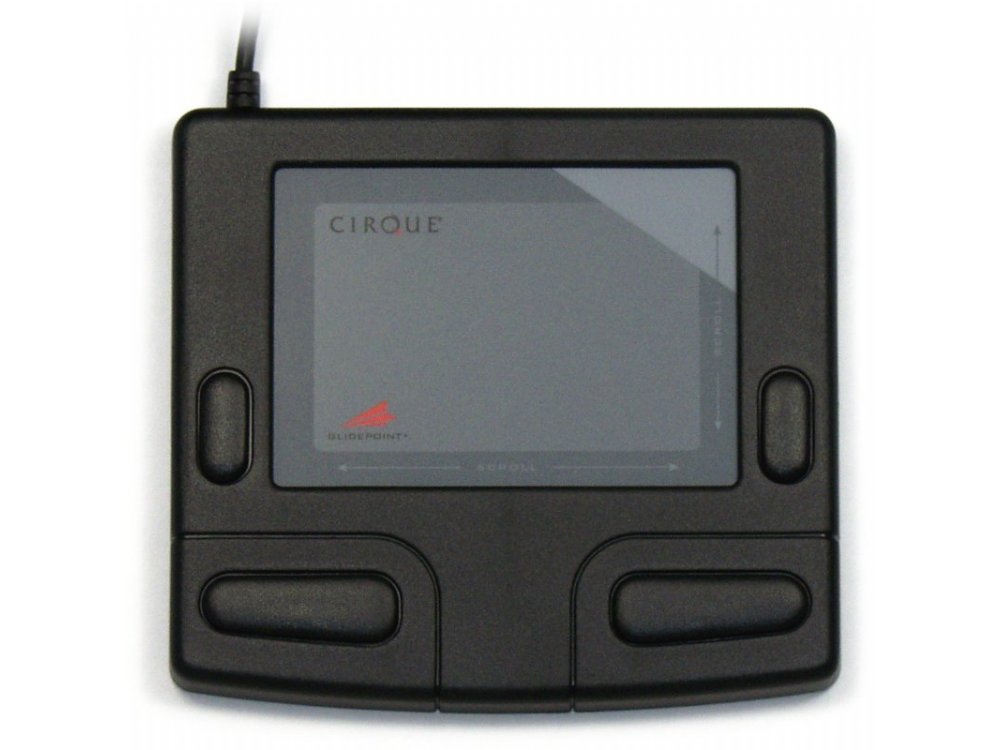
Cirque Smart Cat Glidepoint Touchpad, Black, USB
Only logged in customers who have purchased this product may leave a review.
The black, USB, Cirque Smart Cat® sets the standard of comfort plus performance in computer control. With intelligent software, one-touch scroll and zoom, and distinctive sounds for each operation, the Cirque Smart Cat® combines all the power of a top-of-the-line mouse with the unrivaled comfort and durability of a touchpad. Basic mouse functions are a snap with the Cirque Smart Cat®. Access right-clicks by tapping a finger in the touchpad’s upper right corner. Keep moving the cursor after you’ve run into the touchpad’s edge thank to the convenience of GlideExtend®. Programmable software allows you to go from fast on-screen movements to pixel-point control. Quickly activate vertical/horizontal scrolling as well as magnification tools by gliding a finger along the touchpad edges. Cirque’s capacitive touch technology provides complete navigation control of any graphical interface, packed in a space-saving, low-friction, durable touchpad.
GP410U-5021
£210.00 inc. VAT
£145.00 inc. VAT
From £49.98 inc. VAT
£99.98 inc. VAT
£54.98 inc. VAT
Philip Goddard –
My last Smart Cat purchase was in 2018, so I thought it was time for me to order another so I had a backup spare. Back then I’d researched widely online, and found to my disgust what I’d regard as ‘proper’ ergonomics and configurability for the basic touchpad functions were all seriously lacking, at least in relation to this picky old codger’s requirements (always with piles of website development maintenance to do).
This time I did an even more thorough online research, and indeed ordered what I considered was the most promising of the ‘precision’ pads currently available, and sure enough, the ‘promise’ surrounding its sales blurb was worth **nothing** because of just the same old issues I found before, plus one other that blights just about all those slick ‘precision’ slabs now that they don’t use their own driver and so rely on the relevant Windows driver, which no longer supports pointer acceleration. Pointless (sic)! :Lack of pointer acceleration means death to smooth workflow, with pointer either too slow for big movements orand too fast for precise tiny movements, so even on that one point the Smart Cat is King of the Pads because it has its own driver, which gives you pointer acceleration and other settings that the ‘slick slabs’ don’t have.
The Smart Cat’s apparently unique vertical and horizontal scroll bars are a blessing, blowing ‘gesture’ scrolling right out of the water for efficient working, though horizontal scrolling doesn’t work in some apps I couldn’t get it to work in my browser (Firefox) for example.
My counsel to anyone considering the Smart Cat at all, is to use it with ALL multifinger gestures turned-off, and also tap-and-drag likewise disabled, because those all tend to cause unexpected and inconveniencing actions at times, no matter what make of touchpad one is using. Then, you can start finding out what it’s like using fully and properly configured basic touchpad features in a uniquely *properly* designed touchpad.
Actually I do have one little slap on the wrist for Smart Cat design the absurd top-right corner of the pad’s tappable surface designated a ‘right-click’ zone is just an annoying gimmick. It defies common sense because there’s a right-click button already, and that zone on the pad just brings up context menus when you forget to avoid touching it! Fortunately you can configure that zone to be Left-click Select like the rest of the pad, and I strongly recommend that that be one of your first actions when setting the pad up that is, if indeed you want the smoothest workflow! 🙂
Eric Hoekstra –
The touchpad can be used as an alternative for the mouse when moving around the mouse pointer is the main task. For precise tasks, like drawing, a mouse might work more accurate. Cirque did a good job. The touchpad is responsive to finger movements and tapping. The touchpad feels comfortable to me.
I like the feature that the tapping the upper right corner works as right click. It took a while before I got used to vertical scrolling. One has to start from the upper right corner and then drag down, or the other way around from lower right corner (not starting from the middle).
Functionality on macOS is limited to basic mouse actions: moving, vertical scrolling, left, right and middle click. Horizontal scrolling and the more advanced actions like endless scrolling are only available on Windows with the driver installed.
The build quality seems fine. The trackpad is light, but the rubber foots keep it firmly sticked onto it place.