
Keychron
Keychron K2v2 Bluetooth RGB Backlit Aluminium Mac/PC Keyboards
From £84.00 inc. VAT
Keychron K2v2 Bluetooth RGB Backlit Aluminium Mac/PC Keyboards












Overview
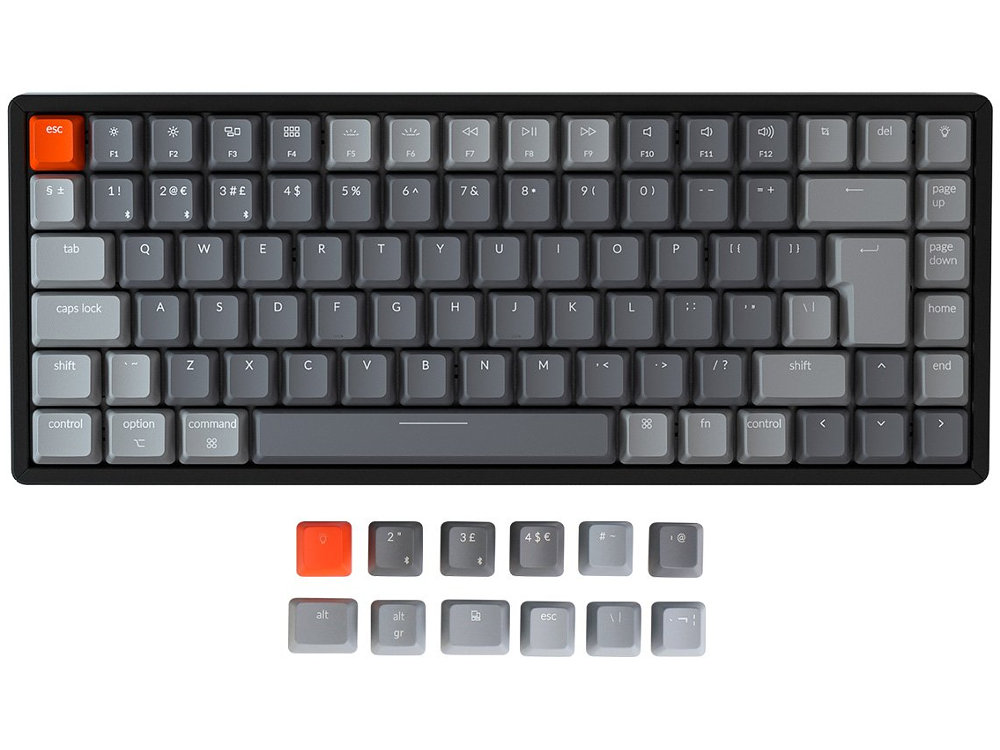
The Keychron K2 is a super Bluetooth or wired keyboard giving you all the keys and functions you need while keeping it compact and with one of the largest batteries seen in a mechanical keyboard.
Connect with your phone, laptop or iPad. Connect the keyboard wirelessly via Bluetooth with up to 3 devices, and switch between them with fn + 1, 2 or 3. You can also use the USB to type-C cable to connect the keyboard to your devices and/or charge the keyboard.
Tactile feel Gateron Brown switches with a lifespan of 50 million keystrokes and more.
Compatible with all operating systems from Mac to Android to Windows. K2 is one of the few mechanical keyboards featuring Mac layout media keys. It allows you to use all the same media keys as conventional macOS. Every K2 keyboard comes with specific keycaps for Mac and Windows, respectively.
K2’s 85 key design retains all the essential function keys like Page Up/Down, Home, End, and Screen capture (cmd+shift+4) which are important for your productivity. With N-key rollover (NKRO on wired mode only) you can register as many keys as you can press at once without missing out characters.
Designed to be a wireless mechanical keyboard that everyone would love to use in everyday work. The CNC processed streamline aluminum frame with curved profile keycaps creates an unbeatable feel and the 6 degree typing angle gives unrivaled comfort.
With 4000 mAh battery K2 has 25% more battery capacity than the Apple Magic keyboard, 2.7x more than the Logitech Craft Keyboard, 4x more than Hexgear’s X1 and two times more than the Keychron K1 Keyboard. This ensures that K2 lasts as long as it can with a single charge.
Engineered with more than 15 types of RGB light and comes with different styles (flashing, breathing, or static etc) which will match up to your mood. Simply press the light bulb key or fn + right arrow to achieve it.
- Switches: Gateron Brown tactile switches
- Backlit Types: 18
- Backlit: Adjustable 4-level RGB backlit
- System: Mac/iOS/Windows/Android
- Battery: 4000mAh Rechargeable li-polymer battery
- BT Working Time(RGB): Up to 10 hours (Lab test result may vary by actual use)
- Connection: Bluetooth and Type-C cable
- Bluetooth version: 3.0
- Top Case Material: Aircraft-grade aluminium
- Single-tone keycaps
- Single-tone keycaps
Customers also viewed these
Keychron Q2 Max QMK 2.4G BT RGB Aluminium Mac/PC Carbon Black Knob Keyboard…
£220.00 inc. VAT
in stock
Details
Select options
This product has multiple variants. The options may be chosen on the product page
Keychron Q8 65% Ergo QMK RGB Aluminium Mac/PC Carbon Black Custom Keyboards
From £98.40 inc. VAT
in stock
Details
Select options
This product has multiple variants. The options may be chosen on the product page
UK VA88M V2 Moonlight PBT Backlit Keyboards
From £130.00 inc. VAT
in stock
Details
Select options
This product has multiple variants. The options may be chosen on the product page
Matias Quiet Pro Mac Keyboards
£138.00 inc. VAT
in stock
Details
Select options
This product has multiple variants. The options may be chosen on the product page
Js –
Switch Type: Gateron Red Layout: USA
I bought the keychron k2. This ons is nice. But if you want to use two keyboard same pc. It is.going to be hardware issue sometimes.
The delivery and service is nice. I guess they are better than amazon uk.
Anonymous –
Switch Type: Gateron Red Layout: USA
Great keyboard, really solidly built with no deck flex at all.
Keyboardco shipped very quickly with great service
Matt –
Switch Type: Gateron Brown Layout: USA
Love this item it’s the perfect size and provides you that lovely mechanical fell you look in a mechanical keyboard.
The battery life is amazing on this product and the fact that I can link it to 3 different devices is just brilliant especially at the moment due to working from home I can easily switch from my personal computer and my work computer without messing with cables.
My only reservation with this is the height of the keyboard, please be aware that it is quite hight and would recommend a keyboard wrist rest, and you future self will also thank you for it.
Would recommend this product for newcomers and mech lovers alike.
Anonymous –
Switch Type: Gateron Blue Layout: USA
Absolutely fantastic service, support and delivery times. We live in crazy times right now and to have Keyboard company respond to requests via Facebook, confirm stock, and dispatching so promptly is greatly appreciated.
Thank you!
Tom L –
Switch Type: Gateron Blue Layout: United Kingdom
The Keyboard is fantastic and has lots of great functionality. It comes with the keys needed should you want to use it with a windows machine, which is great when I decide to drop the Mac. I primarily purchased this to stop the tips of my fingers hurting when using the Mac keyboard and it does the trick.
The service from the Keyboardco was great as well. I had an issue with my order which was rectified immediately when I called. Postage was also prompt.
All round a great experience. Thank you.
Anonymous –
Switch Type: Gateron Red Layout: USA
A great keyboard to start your journey into the world of Mechanical Keyboards!
Keyboardco.com were extremely good – quick delivery and great customer service. I had an issue with three defective keycaps and I received free replacements within a couple of days.
Highly recommended!
David C –
Switch Type: Gateron Blue Layout: United Kingdom
I love this keyboard! My Mac wired keyboard lost functionality in some letters, and I needed to replace it, so decided to go wireless and mechanical. The Keychron is by no means cheap, but it saved me money compared to a new Apple kb. The action is very good, it’s really nice to use something that both feels and sounds like an early IBM keyboard (I have one in the loft!), and which is likely to last a very long time. It’s taken a few days to adjust to typing on a mechanical rather than membrane keyboard, but I’m now back up to and even exceeding my previous typing speed. The height of the keyboard has been commented on in several reviews online, however in regular use this is not a problem – as long as you have a correct typing posture, not resting wrists on the desk, but sitting upright with hands above the keyboard, as if it is a typewriter. In fact, it has helped to improve my posture! Delivery from the Keyboard Co was fast and efficient. I would certainly recommend them if you’re looking for a new keyboard – they have a wide in-stock selection, and their prices are competitive too. Very happy customer!
Anonymous –
Switch Type: Gateron Red Layout: USA
A great keyboard and i am really pleased with this purchase – if you have any doubt just go ahead and buy – you wont regret it!
Anonymous –
Switch Type: Gateron Brown Layout: United Kingdom
Customer service was brilliant. The emails to keep me updated on the delivery were a nice touch, plus a follow up email to ensure everything was okay with my order.
Keyboard is very nice to use. Have used multiple mechanical keyboards before, this one is the most solid one so far. Very nice feel to it and satisfying to type on. I got the brown switches, which provide a tactile and quiet feel.
The height of the keyboard could be considered quiet high compared to other keyboards. Be sure you have either a wrist rest, or ample desk space to rest your elbows. Underside legs provide great stability and typing angle to make this easier on your wrists.
If you are someone in the UK who commonly uses the right shift, it’s slightly shorter, where the up arrow has taken it’s place. This is something I will get used to, but has been a learning experience for my first few days of using this keyboard.
The reason I have not given 5 stars is due to the keyboard having some connectivity issues every now and then when switching between my two computers and changing between the wiredbluetooth modes. This can be sorted simply by turning bluetooth off and on again on my PC, but it’s a pain to do this without a connected keyboard. My Logitech wireless mouse has never had an issue with switching PCs, I would expect the same from this keyboard. That said, this issue is trivial as once it’s connected, it works great.
Next time I need to buy a keyboard, this site will be top of my list.
Purplezorz –
Switch Type: Gateron Brown Layout: United Kingdom
Keyboard is solid! Real weight to it.
I’ve already began battering it with some games and it’s just ready to go all the time.
I chose brown switches with RGB and the aluminium frame.
The criticism that it’s very high is true, so get a wrist wrest; I find I don’t actually need it for gaming as it feels a little weird, but for typing once you get used to it, you definitely see…or rather feel the benefit.
The aluminium frame ringing criticism doesn’t seem to hold true in this official model and maybe was inherent to reviewer models.
The writing for the Bluetooth Cable mode is really tiny, but I think instead they needed to use a different colour and then it wouldn’t matter so much.
Right angle cable coming out the side isn’t as bad as people make out to be.
One thing to note is that it’s sometimes in sleep mode when you first connect it which can be confusing, so try pressing the CTRL key after changing it to wired mode once you’ve booted up your machine, then press the backlight changer key at the top to see if it’s online.
Changing keys to suit a UK layout windows machine was easy also and took a matter of minutes.
Haven’t tried wireless mode yet as well as using it with different machines, but haven’t needed to yet.
All in all, a solid mechanical keyboard finally with the layout I’ve always wanted (except for the delete key and have a function key instead of a mouse menu button) and the RGB backlighting is absolutely gorgeousbeautiful.
Can’t really fault it, so highly recommended.
KeyboardCo came through as well as they were the only UK distributor to have the brown switches + UK layout + RGB + aluminium frame. Packing was great and delivery wasn’t too long at all.
Alessandro –
Switch Type: Gateron Brown Layout: USA
Very quick shipping and great service. The keyboard itself has all the feature that I needed and quite comfortable switches. It’s the gem of my new home office in times of coronavirus.
Anonymous –
Switch Type: Gateron Brown Layout: United Kingdom
Excellent service with speedy dispatch.
Keyboard is great, everything came well packed without any defects. The Gateron Brown switches feel excellent with a nice tactile bump, and the keycaps look and feel wonderful.
Anonymous –
Switch Type: Gateron Red Layout: United Kingdom
Excellent keyboard – exactly what I was hoping for. Highly recommend it to anyone looking for a smaller mechanical keyboard. Build quality is great and it works right out of the box.
Great customer service from Keyboard Company. Received several emails after my purchase to advise me of my orders status. Highly recommend.
E.Lee –
Switch Type: Gateron Red Layout: United Kingdom
A very good Mac specific keyboard. Gateron Red are a great starter switch for this keyboard lark. Excellent prompt service with Keyboard Co… will be back for some new bits soon!
Anonymous –
Switch Type: Gateron Brown Layout: United Kingdom
Everyone from start to finish was polite and courteous. The stock updates were accurate and any questions raised were addressed within a day.
One of the feet is a bit loose but thats more than likely from manufacturing or transit from abroad. Then there is also one keycap missing from the optional pc keys but this has already been raised and keychron will correct this in the coming weeks.
Definitely going to get another board in the future.
Anonymous –
Switch Type: Gateron Brown Layout: United Kingdom
Delivery was very quick and the stock updates were accurate. They keyboard itself is satisfying to use and feels high quality in relation to price. The keys are slightly smaller than Im used to but my fingers are adapting.
Anonymous –
Switch Type: Gateron Brown Layout: United Kingdom
Service was solid, with multiple emails letting me know when they were expecting stock in.
Keyboards exactly what i was expecting. Keys feel good, some of the lighting affects are nice ( but there are some shockers and having to cycle through all them if you hit the button by mistake drags ).
Only warning for someone who hasn’t used Keychron’s keyboards before is the smaller keys. You’ll likely be fine hitting letter keys, but if you’re anything like me you’ll need to embrace a lot of mis clicks going for anything around enter or backspace.
Danny –
Switch Type: Gateron Brown Layout: USA
I ordered this product because of my love of mechanical keyboards and by the fact that it is the only acceptable mecha keyboard which has Apple specific inputs in its firmware preloaded. Typing feels natural and good, little bit high but nothing that a good palm rest could not solve. Packing was fantastic, everything arrived safe and sound to Slovakia without a problem. I definitely recommend this product and company!!!!
Josh –
Switch Type: Gateron Brown Layout: USA
Arrived in great condition and very quickly despite ordering over Christmas period. Customer service provided helpful updates on shipping given it was the holidays too
Chris –
Switch Type: Gateron Brown Layout: USA
Order arrived in perfect condition. Keyboard is amazing. Would definitely recommend.